
Adobe Premiere Pro 2027 Crack Download – Full Guide
Adobe Premiere Pro 2027 Crack Download – Full Guide
Adobe Premiere Pro 2027 is a professional video editing application designed for content creators, filmmakers, YouTubers, and video editors. It provides powerful tools for editing videos, improving audio, adding effects, and creating professional projects. Moreover, the latest version introduces new AI features that help users complete editing tasks more efficiently.
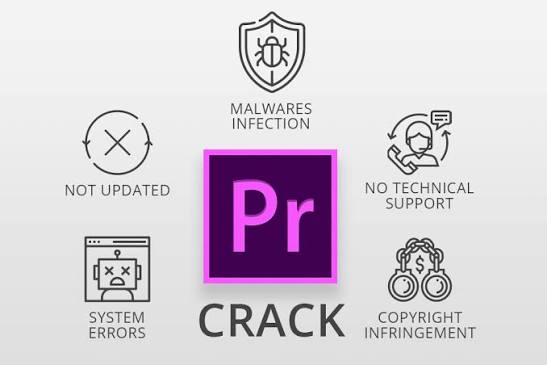
Many users search for Adobe Premiere Pro 2027 Crack because they want access to professional editing tools without paying for a subscription. However, unofficial installers may contain malware, harmful scripts, or unwanted programs. Therefore, this guide explains the software’s features, latest updates, system requirements, and safe installation options.
Whether you create YouTube videos, social media content, advertisements, or professional films, Premiere offers tools for different editing needs. Let’s explore its main features.
What Is Adobe Premiere Pro 2027?
Adobe Premiere Pro, now listed by Adobe as Adobe Premiere, is a professional video editing application developed by Adobe. It allows users to import footage, arrange clips, edit audio, add effects, create transitions, and export finished videos.
The software uses a timeline-based editing system. As a result, users can organize video and audio tracks, adjust clip timing, and build complex projects.
Premiere supports many popular video formats and works with other Adobe applications. In addition, it provides tools for color correction, captions, motion graphics workflows, and audio improvement.
The November 2026 release is version 27.0. It introduces a new Color Mode, AI Assistant, and several generative media features.
Main Features of Adobe Premiere Pro 2027
Adobe Premiere 2027 includes a wide range of tools for professional and everyday video editing.
1. AI Assistant
The new AI Assistant panel helps users with complex or repetitive editing tasks. It understands information about the Premiere project and can provide assistance within the editing workflow.
For example, it can help users work through project-related tasks more efficiently. Therefore, editors can spend less time handling repetitive work.
2. New Color Mode
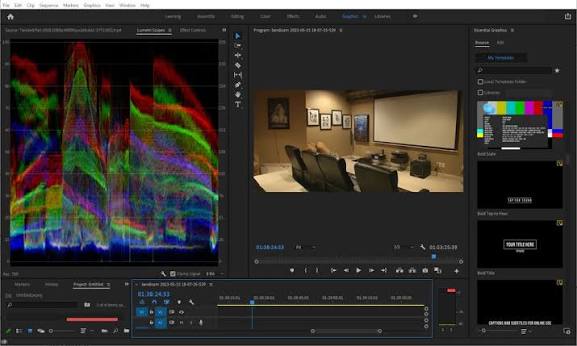
Color Mode is a dedicated workspace for color grading. It allows editors to move from the editing workspace to color adjustments without breaking their workflow.
Users can refine the appearance of their footage and create a consistent look across different clips. Moreover, the dedicated workspace makes color work easier to organize.
3. Generate Image
The Generative Media Tool allows users to generate images from text prompts directly on the Premiere timeline.
This feature can help editors create visual material for their projects. However, availability may depend on the account, region, and generative AI credits.
4. Generate Music
Premiere 27.0 introduces a tool for creating original music from text prompts.
Users can generate music directly within the editing workflow. In addition, this feature helps creators explore background music ideas without leaving the application.
5. Generate Sound Effects
The Generate Sound Effects panel can create sound effects using text prompts.
The Sync to Video option helps align generated sound effects with video content. As a result, editors can build a more complete audio experience.
6. Generate Soundscape
Generate Soundscape can analyze video footage and create matching ambient sound and effects.
This can be useful when a scene needs background atmosphere. Therefore, creators can add more depth to their videos.
7. Enhance Audio
Enhance Audio helps improve dialogue clarity and sound quality.
It can make recorded voices easier to hear, especially when the original recording needs improvement. However, the final result depends on the quality of the source audio.
8. Separate Crosstalk
Separate Crosstalk can detect two overlapping speakers recorded on a single mixed audio track and separate them into individual audio stems.
This feature is useful for recordings with multiple speakers. In addition, it gives editors more control over dialogue and audio mixing.
9. Auto Ducking
Auto Ducking helps balance background music and dialogue.
The updated workflow automatically adjusts keyframes as editors add, trim, or mute clips. Therefore, users do not need to generate keyframes again after every small edit.
10. New Effects and Masking Tools
Premiere 27.0 adds new effects and improvements to the Properties panel. It also includes HSL Masking for more precise color selection.
Furthermore, Object Masks receive improvements to tracking and file management. These tools help editors make detailed changes to selected parts of their footage.
What’s New in Adobe Premiere Pro 2027?
The latest release focuses on AI assistance, color grading, sound design, and editing improvements.
Important updates include:
- New AI Assistant panel.
- Dedicated Color Mode workspace.
- Generate Image from text prompts.
- Generate Music for original background tracks.
- Generate Sound Effects.
- Generate Soundscape for ambient audio.
- Separate Crosstalk for overlapping speakers.
- Improved Enhance Audio controls.
- Updated Auto Ducking workflow.
- New video and audio effects.
- HSL Masking for precise color adjustments.
- Improved Object Mask tracking.
- Generative Extend for missing transition frames.
Moreover, Adobe has improved performance for several AI and machine-learning features on supported NVIDIA RTX graphics cards.
Adobe Premiere Pro 2027 System Requirements
Before installing Premiere 27.0, check whether your computer meets the official requirements.
Minimum System Requirements for Windows
| Component | Minimum Specification |
|---|---|
| Operating System | Windows 11 version 24H2 |
| Processor | Intel 6th Generation or newer, or AMD Ryzen 1000 Series or newer |
| Processor Support | AVX2 required |
| RAM | 8 GB |
| NVIDIA GPU | Maxwell generation or newer |
| GPU Memory | 4 GB minimum |
| Intel / AMD GPU | 4 GB GPU memory |
| Display | 1920 × 1080 |
| Storage | 8 GB available space |
| Additional Storage | High-speed drive for media |
Recommended System Requirements
| Component | Recommended Specification |
|---|---|
| Operating System | Windows 11 version 25H2 or later |
| Processor | Intel 11th Generation or newer, or AMD Ryzen 3000 Series or newer |
| RAM | 16 GB for HD editing |
| RAM for 4K | 32 GB or more |
| Graphics Memory | 8 GB GPU memory |
| Display | 1920 × 1080 or higher |
| Storage | Fast internal SSD |
| Media Storage | Additional high-speed drive |
These specifications apply to Premiere version 27.0. In addition, the application needs an Adobe ID and an internet connection for activation and use.
How to Download Adobe Premiere Pro 2027 for PC
The safest way to install Premiere is through Adobe Creative Cloud. Follow these steps to get started.
Step 1: Visit the Adobe Website
Open the official Adobe Premiere website and review the available plans and trial options.
Step 2: Create an Adobe Account
Sign in with your existing Adobe ID. If you do not have an account, follow the registration instructions.
Step 3: Download Creative Cloud
Download the official Adobe Creative Cloud desktop application. It helps manage Adobe applications and updates.
Step 4: Find Adobe Premiere
Open Creative Cloud and search for Premiere. Check the available version and subscription details.
Step 5: Install the Software
Select Install and wait for the setup process to finish. Make sure your computer has enough free storage.
Step 6: Launch Premiere
Open the application and sign in with your Adobe account. Finally, create a new project and import your video files.
Official Adobe Premiere page: https://www.adobe.com/products/premiere.html
Is Adobe Premiere Pro 2027 Crack Download Available?
Many users search for Adobe Premiere Pro 2027 Crack Download, but unofficial websites may advertise modified installers that are not verified by Adobe.
A page claiming to offer a pre-activated version does not prove that the download is genuine. Such files may contain malware, password stealers, or unwanted software.
In addition, modified installations may fail to receive official updates or work correctly with Adobe services. They can also cause project errors and unexpected crashes.
For this reason, avoid unknown installers, key generators, and activation tools. Never disable Windows Defender just to run an unverified setup file.
Adobe’s official trial and subscription options are safer ways to access Premiere.
Adobe Premiere Pro 2027 vs Adobe Premiere Pro 2026
Version 27.0 introduces several features that were not available in the same form in the earlier 26.x releases.
| Feature | Premiere 27.0 | Premiere 26.x |
|---|---|---|
| AI Assistant | New project-aware assistant | Earlier feature set |
| Color Mode | New dedicated workspace | Earlier color workflow |
| Generate Image | Available in Generative Media Tool | Not available in the same 27.0 workflow |
| Generate Music | New text-prompt feature | Not available in the same 27.0 workflow |
| Generate Soundscape | New feature | Not available in the same 27.0 workflow |
| Separate Crosstalk | New feature | Not available in the same 27.0 workflow |
| Auto Ducking | Updated automatic keyframes | Earlier workflow |
| Object Masks | Improved tracking and management | Earlier mask workflow |
Both versions provide professional editing tools. However, version 27.0 adds more AI-powered features and a dedicated color grading workspace.
Advantages and Disadvantages of Adobe Premiere Pro 2027
Advantages
- Professional video editing tools.
- New AI Assistant panel.
- Dedicated Color Mode workspace.
- AI-generated images, music, and sound effects.
- Improved dialogue enhancement.
- Advanced audio editing features.
- Better Object Mask tracking.
- Support for professional video workflows.
- Integration with other Adobe applications.
Disadvantages
- Requires a paid subscription for continued full access.
- Needs a compatible Windows 11 system.
- Recommended hardware can be expensive.
- 4K editing needs more RAM and GPU memory.
- Some generative features may use AI credits.
- New users may need time to learn the interface.
Who Should Use Adobe Premiere Pro 2027?
Premiere is designed for people who create and edit video content.
YouTube Content Creators
YouTubers can edit videos, add captions, improve sound, and prepare content for upload. Moreover, the timeline workflow makes it easier to organize long projects.
Professional Video Editors
Professional editors can use advanced timeline tools, effects, masking, and color grading features to complete complex projects.
Social Media Creators
Creators can prepare videos for platforms such as Instagram, TikTok, and YouTube Shorts. In addition, captions and audio tools can improve short-form content.
Filmmakers
Filmmakers can use Premiere for organizing footage, editing scenes, improving sound, and preparing final exports.
Students and Beginners
Students can learn professional video editing through Premiere. However, beginners should first explore basic editing tools and Adobe’s available learning resources.
Useful Tips for Adobe Premiere Pro Users
A few simple habits can improve your editing workflow.
- Save projects regularly.
- Organize footage into folders.
- Use clear names for video and audio tracks.
- Keep backup copies of important projects.
- Use proxies when editing demanding footage.
- Update your graphics drivers.
- Use an SSD for media and cache files.
- Check export settings before rendering.
- Keep your audio levels balanced.
Furthermore, if you also record tutorials or screen demonstrations, explore our OBS Studio guide for information about recording software.
For advanced sound editing, you can also read our Adobe Audition guide.
Frequently Asked Questions
1. Is Adobe Premiere Pro 2027 available?
Yes. Adobe released Premiere version 27.0 in November 2026 with new AI, color grading, and audio features.
2. Is Adobe Premiere Pro 2027 free?
Premiere is commercial software. Adobe may provide a free trial, while continued access requires an eligible subscription.
3. What is the latest version of Adobe Premiere?
The November 2026 desktop release is version 27.0. Check Adobe’s release notes for the latest updates.
4. How much RAM does Premiere 2027 need?
The minimum Windows requirement is 8 GB RAM. Adobe recommends 16 GB for HD editing and 32 GB or more for 4K workflows.
5. Can I use Premiere 2027 on Windows 10?
No. The published requirements for version 27.0 specify Windows 11 version 24H2 or later.
6. Does Premiere 2027 have AI features?
Yes. It includes AI Assistant, Generate Image, Generate Music, Generate Sound Effects, Generate Soundscape, and other AI-powered tools.
7. Can Premiere edit 4K videos?
Yes. Premiere supports professional video editing, including 4K workflows. However, Adobe recommends more memory and GPU resources for higher-resolution projects.
8. Is Adobe Premiere Pro 2027 Crack safe?
Unofficial cracked installers are not verified by Adobe. They may contain malware or cause software problems, so the official installation is the safer option.
9. Does Premiere support automatic captions?
Premiere includes speech-to-text and caption workflows. Available language support and features can vary by version.
10. Where can I download Adobe Premiere Pro 2027?
Visit Adobe’s official website or use the Creative Cloud desktop application to check the available installation options.
Final Thoughts
Adobe Premiere Pro 2027 is a powerful video editing application for creators, filmmakers, and professional editors. Its new AI Assistant, Color Mode, and generative media tools provide more options for creating and improving videos.
Moreover, the updated audio tools and masking features can make everyday editing tasks easier. Although many users search for Adobe Premiere Pro 2027 Crack, unofficial installers can put their computers and personal data at risk.
Therefore, use Adobe’s official installation options and check your PC specifications before starting a project. With suitable hardware and practice, Premiere can help you create high-quality video content.



Recent Comments