
Symantec Endpoint Protection Review: Features, Security & Installation Guide
Symantec Endpoint Protection Review: Features, Security & Installation Guide
Symantec Endpoint Protection (SEP) is an enterprise security solution designed to protect business computers, workstations, and servers against malware, network attacks, and other cybersecurity threats. The software is part of Broadcom’s Symantec security portfolio and provides centralized endpoint protection for organizations that need to manage multiple devices.
Unlike basic antivirus applications, Symantec Endpoint Protection combines several security technologies, including antimalware protection, behavior-based detection, firewall controls, intrusion prevention, and device management. These capabilities help IT administrators apply consistent security policies across an organization’s endpoints.
This guide covers its main features, supported platforms, system requirements, management options, and official installation process.
What Is Symantec Endpoint Protection?
Symantec Endpoint Protection is a business-focused endpoint security platform. It helps organizations detect and prevent threats that may affect employee computers, company servers, and connected devices.
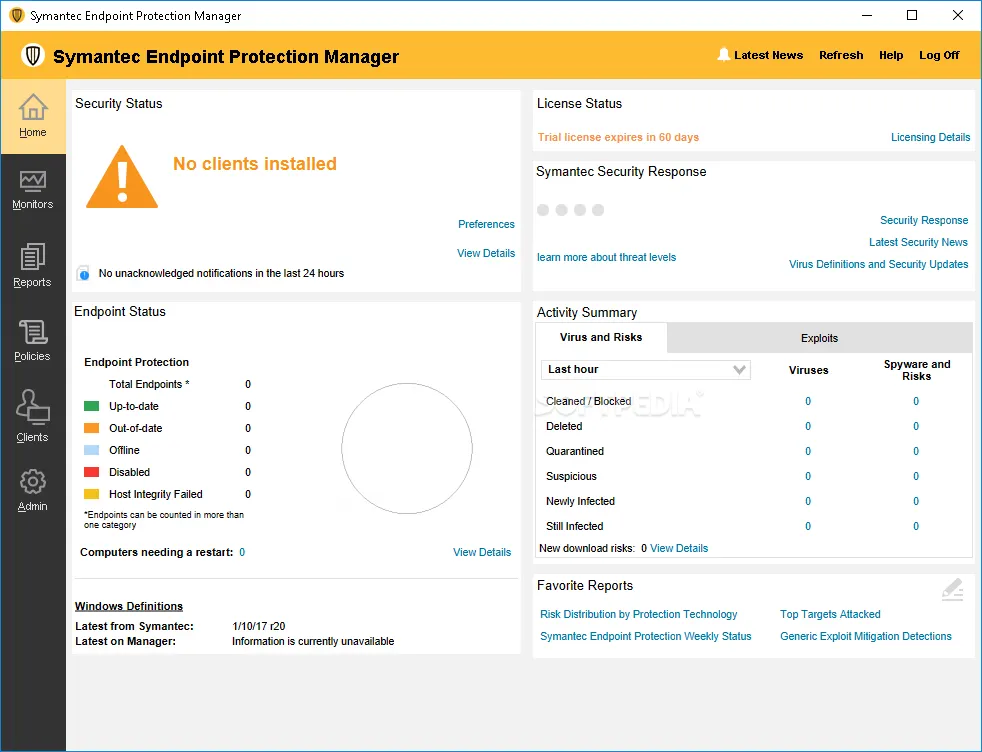
The solution uses multiple protection layers rather than depending only on traditional virus signatures. Its security technologies include advanced machine learning, behavior-based prevention, memory exploit mitigation, and network protection.
Organizations can use centralized management tools to monitor protected devices and manage security policies. The available management options depend on the product edition and deployment configuration.
Key Features of Symantec Endpoint Protection
1. Advanced Malware Protection
The software helps detect and block malicious files, viruses, ransomware, and other threats. Advanced machine learning and behavior-based prevention provide additional protection against suspicious activity.
2. Behavior-Based Threat Detection
Behavior monitoring helps identify potentially harmful actions rather than relying entirely on known malware signatures. This approach can help detect suspicious activity from previously unknown threats.
3. Firewall Protection
Built-in firewall capabilities allow administrators to manage network access through default and customized policies. These controls help protect endpoints against unauthorized network communication.
4. Intrusion Prevention
Intrusion prevention technologies help detect and block certain inbound network attacks, web-based threats, and malicious outgoing traffic.
5. Device Control
Administrators can manage removable storage devices, including USB drives, according to company security policies. This can help reduce the risk of unauthorized data transfers and malicious code entering company systems.
6. Application Control
Depending on the product edition, application control capabilities can help organizations restrict which applications are permitted to run on managed devices.
7. Centralized Security Management
IT teams can monitor endpoint security and apply policies through the supported management console. Centralized administration is especially useful for businesses managing many computers.
8. Host Integrity Checks
Host integrity features help administrators define and enforce security requirements for managed devices. These checks can support an organization’s endpoint compliance policies.
Symantec Endpoint Protection 14.5: Version Information
It is important to distinguish verified product releases from unofficial download titles.
Broadcom’s release history lists Symantec Endpoint Protection 14.5, build 14.5.172.0000, with a release date of November 3, 2026. The official release information should be checked before installing or upgrading an existing deployment.
The version number mentioned in an unofficial download title should not be treated as proof of an authentic release. Always obtain installation packages and updates through Broadcom’s official support channels or your organization’s authorized administrator.
System Requirements
System requirements vary depending on the client version, operating system, and whether the software is installed on a workstation or server.
Before installation, check the official Broadcom documentation for the exact version you plan to deploy. Older SEP documentation lists requirements such as:
- A compatible Intel or equivalent processor.
- At least 1 GB of RAM for certain older Windows client configurations, with 2 GB recommended.
- Available disk space for the client installation and security updates.
- A supported Windows operating system.
- Additional requirements for macOS and Linux installations.
These are historical requirements, not a confirmed specification for every current release. Do not use the older Pentium III and 1 GB RAM figures as universal requirements for modern installations.
How to Install Symantec Endpoint Protection
For a legitimate installation, use an authentic package supplied through Broadcom’s official support portal or your organization’s IT administrator.
- Confirm that your computer or server meets the requirements for the selected release.
- Obtain the installer from an authorized source.
- Verify that the package is intended for your operating system and deployment type.
- Close unnecessary applications before starting the installation.
- Run the official installer with the permissions required by your administrator.
- Follow the installation wizard and complete the required configuration.
- Connect the client to the appropriate management environment if your organization uses centralized management.
- Check that protection services are running and that security definitions and product updates are current.
For business-managed computers, contact your IT administrator before installing, removing, or changing endpoint security software.
Licensing and Official Downloads
Symantec Endpoint Protection is a commercial business security product. Access to installation packages, updates, and management features depends on the applicable license and support entitlement.
Avoid unofficial pre-activated installers, cracks, key generators, and modified packages. These files may contain malware, compromise company devices, or prevent the software from receiving legitimate security updates.
For product documentation, version information, and authorized downloads, use the official Broadcom resources:
- Broadcom Symantec Endpoint Protection documentation: https://techdocs.broadcom.com/
- Broadcom version and release history: https://knowledge.broadcom.com/external/article/154575/versions-system-requirements-release-dat.html
- Broadcom official website: https://www.broadcom.com/
You can also explore our guide to Bitdefender Total Security for information about another security solution.
Frequently Asked Questions
Is Symantec Endpoint Protection an antivirus?
Yes. It includes antimalware protection along with additional enterprise security technologies such as firewall controls, intrusion prevention, and device control.
Is Symantec Endpoint Protection designed for businesses?
Yes. It is primarily designed for organizations that need to protect and manage multiple computers, workstations, and servers.
Does Symantec Endpoint Protection support Windows?
Yes. Windows is one of its supported endpoint platforms. However, compatibility depends on the specific product release and Windows version.
Does Symantec Endpoint Protection support Mac and Linux?
Symantec’s endpoint security portfolio includes macOS and Linux support. The supported operating systems and available features vary by client version and product edition.
Is Symantec Endpoint Protection 15 the latest version?
Broadcom’s official release history lists Symantec Endpoint Protection 14.5, build 14.5.172.0000, released on November 3, 2026. The title or version number used by an unofficial download page should not be considered an official release confirmation.
Where can I get Symantec Endpoint Protection?
Use Broadcom’s official support and documentation resources or contact your organization’s authorized IT administrator for the correct installer and license information.
Final Thoughts
Symantec Endpoint Protection is an enterprise-focused security solution that combines malware prevention, behavior-based detection, firewall protection, intrusion prevention, and centralized administration. Its range of security controls makes it useful for organizations that need to protect multiple endpoints under consistent security policies.
Before choosing or installing a release, verify its compatibility, licensing, and support status through Broadcom’s official documentation. Using an authentic installer and keeping the product updated are essential parts of maintaining endpoint security.


THANKS, ADMIN FOR THIS GREAT POST. I LOVE YOUR CONTENT