
WinRAR 7.23 Crack + License Key Download (2026)
WinRAR 7.23 Crack + License Key Download (2026)
WinRAR 7.23 Crack is a popular search term among Windows users who want a reliable file compression tool. WinRAR helps users create archives, extract downloaded files, and reduce file sizes. It also supports several archive formats, including RAR and ZIP.
The software is useful for everyday tasks. For example, you can compress large folders before sharing them. You can also extract files from downloaded software packages.
The latest stable release is WinRAR 7.23. It was released on June 30, 2026. In addition, the developer has published newer beta builds for users who want to test upcoming changes.
This guide explains the main features, latest updates, system requirements, and installation process. You will also learn about the Free trial and paid license options.
What Is WinRAR 7.23?
WinRAR is a file compression and archive management program for Windows. It allows users to store multiple files inside one archive. As a result, managing large collections of files becomes easier.
The program can create RAR and ZIP archives. It can also extract many other formats, such as 7Z, TAR, GZ, and ISO.
Furthermore, WinRAR offers password protection and archive repair tools. These features make it useful for both personal and professional work.
What’s New in WinRAR 7.23?
WinRAR 7.23 includes important security and reliability improvements. The update focuses on safer archive extraction and better handling of recovery files.
1. Security Improvements
The 7.23 update fixes a heap overflow vulnerability related to RAR5 recovery volumes. It also addresses an issue involving specially crafted archives.
These fixes improve the safety of archive processing. Therefore, users should install the latest stable version instead of keeping an outdated release.
2. Safer Archive Extraction
The update adds extra checks during extraction. These checks help prevent specially crafted archives from placing files outside the selected destination folder.
This is important when opening archives from unfamiliar sources. However, you should still scan unknown downloads before extracting them.
3. Improved Reliability
WinRAR 7.23 also updates important extraction components. These changes help improve the program’s reliability when handling archive files.
For this reason, updating WinRAR is recommended even if you do not need new features.
4. Beta Version Information
WinRAR 7.30 Beta 2 is available through the official download page. However, it is a beta release rather than the stable final version.
Beta builds may include new features and unfinished changes. Therefore, most users should choose the stable 7.23 release for everyday work.
Main Features of WinRAR 7.23
WinRAR includes several tools for compressing, extracting, and protecting files. Here are some of its most useful features.
1. File Compression
WinRAR can combine multiple files into a single archive. This makes it easier to store and share folders.
You can also choose different compression settings. Higher compression may reduce the archive size, although it can take more time.
2. RAR and ZIP Archive Creation
The program supports two popular archive formats: RAR and ZIP.
RAR is WinRAR’s own archive format. Meanwhile, ZIP is widely supported by operating systems and other applications.
You can select the format that best suits your needs.
3. Multiple Archive Extraction
WinRAR can extract files from many popular archive formats. These include RAR, ZIP, 7Z, TAR, GZ, and ISO.
Consequently, you do not need a separate tool for every archive type.
4. Password Protection
WinRAR allows users to protect supported archives with a password. It also offers encryption options for sensitive files.
This feature is helpful when sharing private documents. However, always use a strong password and keep it somewhere safe.
5. Split Large Archives
Sometimes, a file is too large to upload or share in one piece. WinRAR can split an archive into smaller volumes.
For example, you can divide a large archive into several parts. The recipient can then extract the files after receiving all required volumes.
6. Archive Repair
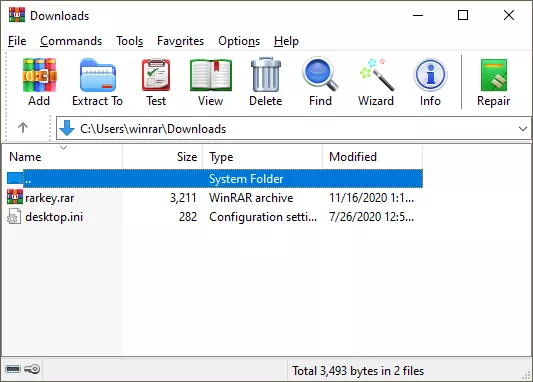
A damaged archive may fail to open correctly. WinRAR includes a repair feature that can attempt to recover supported damaged archives.
Keep in mind that recovery is not guaranteed. The result depends on the archive structure and the amount of damage.
7. Self-Extracting Archives
WinRAR can create self-extracting archives in supported formats. These files allow recipients to start extraction without opening the WinRAR interface.
This option can be useful when sharing files with people who do not regularly use archive software.
WinRAR 7.23 System Requirements
Before installing WinRAR, check your Windows version and system architecture.
| Requirement | Details |
|---|---|
| Operating System | Windows 11, 10, 8.1, 8, 7 |
| Architecture | 32-bit and 64-bit versions available |
| Processor | Compatible Windows processor |
| Storage | Space required for installation |
| Internet | Required to download the installer |
The official website provides separate download options for supported Windows architectures. Therefore, select the correct installer for your computer.
How to Download and Install WinRAR 7.23
Follow these simple steps to install WinRAR on your PC.
- Open the official WinRAR download website.
- Find the Windows version you need.
- Download the appropriate installer.
- Open the downloaded setup file.
- Follow the installation instructions.
- Choose the archive formats you want WinRAR to manage.
- Finish the setup and open the program.
You can now create and extract archive files.
Official download page: https://www.rarlab.com/download.htm
WinRAR Free vs Paid License
WinRAR provides a trial period for users who want to test the software. After the trial, users can purchase a valid license.
The main archive management features remain available during the evaluation period. However, a paid license is required for continued licensed use.
| Feature | Trial Edition | Licensed Edition |
|---|---|---|
| Create RAR archives | Available | Available |
| Extract archive files | Available | Available |
| Create ZIP archives | Available | Available |
| Password protection | Available | Available |
| Commercial licensed use | License required | Supported |
| License reminder | Displayed | Not displayed |
The official license is the recommended option for regular and commercial use.
Is WinRAR 7.23 Crack Safe?
Many people search for WinRAR 7.23 Crack or a free license key. However, unofficial activation files can create security risks.
Some modified installers may contain malware or unwanted programs. They can also change application files and cause unexpected errors.
Therefore, avoid unknown keygens and modified installers. Instead, download WinRAR from its official website and use a valid license.
Also, keep your archive software updated. This is especially important because archive files from unknown sources can contain harmful content.
WinRAR Advantages and Disadvantages
Advantages
- Supports many popular archive formats.
- Creates RAR and ZIP archives.
- Offers password protection.
- Can split large archives into smaller volumes.
- Includes an archive repair option.
- Provides a simple file management interface.
Disadvantages
- A paid license is required after the trial period.
- Some advanced settings may confuse new users.
- Repairing a badly damaged archive may fail.
- Unofficial activation files can create security problems.
Frequently Asked Questions
What is the latest stable version of WinRAR?
WinRAR 7.23 is the stable final version listed in the official release announcement. Newer beta builds may also be available for testing.
Is WinRAR 7.23 free?
WinRAR offers a trial period. Users who continue using the software should purchase a valid license according to the developer’s terms.
Can WinRAR open ZIP and 7Z files?
Yes. WinRAR can extract ZIP and 7Z archives, along with several other popular formats.
Does WinRAR support Windows 11?
Yes. WinRAR is available for Windows 11 and other supported Windows versions.
Can WinRAR protect files with a password?
Yes. It can create password-protected archives. You should use a strong password to protect private information.
What is the difference between WinRAR 7.23 and 7.30 Beta?
Version 7.23 is a stable final release. In contrast, 7.30 Beta is a testing build that may include newer changes but can also contain unfinished features.
Is WinRAR better than ZIP in Windows?
Windows can handle basic ZIP files without extra software. However, WinRAR provides additional archive formats, compression settings, password protection, and archive management tools.
Final Words
WinRAR 7.23 remains a useful choice for compressing and extracting files on Windows computers. It supports several archive formats and includes practical tools for password protection, file splitting, and archive repair.
The latest stable release also includes important security improvements. For everyday use, download the official installer and keep the program updated. If you use WinRAR regularly, consider purchasing a valid license.


Recent Comments