
SketchUp Pro 2027 Crack Download – Full Version for PC
SketchUp Pro 2027 Crack Download – Full Version for PC
SketchUp Pro 2027 is a powerful 3D modeling program for architects, interior designers, engineers, and creative professionals. It helps users turn simple ideas into detailed 3D models. Moreover, its easy tools make the design process faster for both beginners and experienced users.
Many people search for SketchUp Pro 2027 Crack to access its professional features without paying for a subscription. However, unofficial installers and activation files can create security and stability problems. Therefore, it is important to understand the software, its features, and the available download options before installing it.
In this guide, you will learn about SketchUp Pro 2027, its latest tools, system requirements, and common uses.
What Is SketchUp Pro 2027?
SketchUp Pro 2027 is a professional 3D design application developed by Trimble. It allows users to create buildings, rooms, furniture, landscapes, and other 3D objects.
Unlike many complex design programs, SketchUp uses a simple modeling approach. You can draw basic shapes and turn them into detailed objects. In addition, its tools help you adjust dimensions, materials, colors, and surface details.
The software also includes LayOut, which helps users prepare professional 2D drawings and presentations from their 3D models.
What’s New in SketchUp Pro 2027?
SketchUp 2027 introduces several workflow improvements for modeling and technical drawing. These updates help users manage complex projects with greater control.
1. New Unified Interface
SketchUp and LayOut now offer a more consistent interface on Windows and macOS. As a result, users can work with familiar workspace options across both applications.
You can also customize toolbars and arrange your workspace according to your needs.
2. Multiple Document Management
The updated software makes it easier to work with several projects at once. You can open multiple models in tabs or floating windows within the same application.
This feature is useful when comparing designs or moving objects between different projects.
3. Procedural Modeling Tools
SketchUp 2027 introduces procedural workflows for tools such as Follow Me and Solid Tools. It also adds the Copy Along tool.
These tools allow users to adjust certain modeling inputs without rebuilding the entire object. Therefore, they can save time when making design changes.
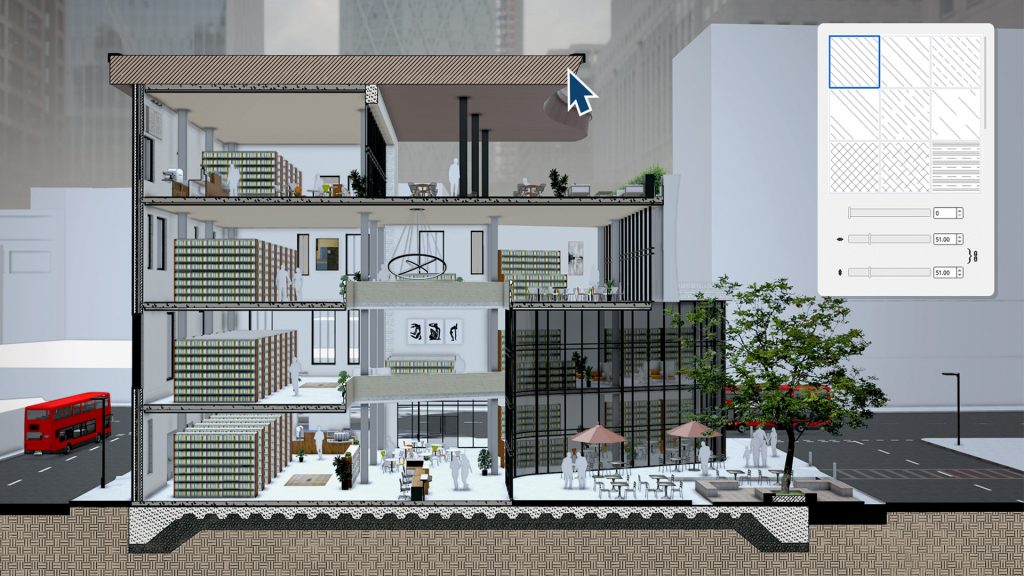
4. Section Fill Hatch Patterns
Technical drawings often need clear details to show different materials and sections. SketchUp 2027 adds hatch patterns to section fills.
You can manage these patterns through the Hatch Patterns panel, Entity Info, and Styles panel. Consequently, your section drawings can look more organized and professional.
5. AutoFit Live Components
Live Components can now adjust automatically when placed on suitable model surfaces.
For example, this feature can help when positioning configurable objects inside a room or building model. It reduces some manual adjustment work and makes placement easier.
6. Improved Outliner Sorting
The Outliner helps users organize model elements and component structures.
SketchUp 2027 adds sorting options that make it easier to organize component instances by tag. This is especially useful when working on large projects with many objects.
7. Better LayOut Tools
LayOut also receives useful improvements. Image Adjustments let users fine-tune images inside SketchUp viewports.
Furthermore, the new Draw Mode for Scaled Drawings provides a more flexible drawing workspace. These changes can improve the preparation of technical documents and presentations.
Main Features of SketchUp Pro 2027
Apart from its latest updates, SketchUp includes several useful tools for everyday design work.
Easy 3D Modeling
You can create walls, doors, windows, furniture, and other objects using simple drawing tools. The Push/Pull tool is particularly useful because it turns flat shapes into 3D objects.
3D Warehouse
3D Warehouse provides access to a large collection of ready-made models. Users can find furniture, vehicles, building parts, and other design elements.
As a result, you do not always need to create every object from the beginning.
Materials and Textures
SketchUp allows you to apply materials and textures to different surfaces. You can use these options to create more realistic models and improve the appearance of your designs.
Extension Warehouse
The Extension Warehouse provides additional tools for different design tasks. These extensions can expand the software’s abilities and help users build a workflow that matches their projects.
Professional 2D Documentation
LayOut helps turn 3D models into 2D drawings, presentations, and construction documents. Moreover, users can add dimensions, labels, and other details to make their designs easier to understand.
Import and Export Support
Professional design work often involves different file formats. SketchUp Pro provides import and export options that help users exchange project data with other applications.
What Can You Create With SketchUp Pro 2027?
SketchUp is suitable for many types of creative and professional work.
- Architecture: Create building models, floor plans, walls, and exterior designs.
- Interior Design: Plan bedrooms, kitchens, offices, and living spaces.
- Furniture Design: Build 3D models of chairs, tables, cabinets, and shelves.
- Landscape Design: Plan gardens, outdoor spaces, and landscape layouts.
- Construction: Prepare models and technical drawings for project discussions.
- Product Design: Develop simple product concepts and 3D prototypes.
For example, an interior designer can create a complete room model before selecting furniture or materials.
SketchUp Pro 2027 System Requirements
Your computer should meet the required specifications for a smooth modeling experience. Large projects and detailed textures may need more powerful hardware.
Windows Requirements
| Component | Requirement |
|---|---|
| Operating System | Windows 11 |
| Processor | 2+ GHz processor |
| RAM | At least 8 GB |
| Storage | At least 6 GB free space |
| Graphics | Separate graphics card recommended |
| Graphics Support | OpenGL 3.1 for Classic Graphics Engine |
| Input Device | Three-button mouse with scroll wheel |
| Internet | Required for installation and subscription authorization |
For models using advanced materials and lighting, a modern GPU with at least 8 GB of VRAM is recommended.
macOS Requirements
- Apple Silicon is required for SketchUp 2027 desktop.
- A supported macOS version is necessary.
- At least 8 GB RAM is recommended.
- Keep at least 6 GB of free storage space.
- An internet connection is required for installation and authorization.
Important: SketchUp 2027 no longer supports Intel-based Mac computers. Also, Windows 11 is required for the 2027 desktop release.
How to Download and Install SketchUp Pro 2027
The safest way to install SketchUp is through its official website. Follow these basic steps:
- Visit the official SketchUp website.
- Select the available download or subscription option.
- Choose the version for your operating system.
- Download the official installer.
- Open the installer and follow the setup instructions.
- Sign in with your Trimble account when requested.
- Complete the authorization process.
- Open SketchUp and start a new project.
Make sure your graphics drivers are updated before starting a large design project.
SketchUp Pro 2027 Crack – What Should You Know?
Searches for SketchUp Pro 2027 Crack often come from users who want access to professional modeling tools without a paid subscription.
However, unofficial activation files are not a safe replacement for a genuine license. Such downloads may contain harmful programs, unwanted browser changes, or modified application files.
They can also cause update problems and prevent the software from working correctly. Therefore, avoid unknown installers, key generators, and activation patches.
If you want to use SketchUp for professional work, an official subscription is a more reliable option. It also provides access to supported updates and included services.
SketchUp Free vs SketchUp Pro
SketchUp offers different ways to use its modeling tools. The right option depends on your project and the features you need.
| Feature | SketchUp Free | SketchUp Pro |
|---|---|---|
| Basic 3D Modeling | Yes | Yes |
| Web-Based Modeling | Yes | Yes |
| Desktop Application | No | Yes |
| LayOut | No | Yes |
| Professional Import/Export | Limited | Yes |
| Extension Warehouse | Limited access | Full access |
| Professional Workflows | Limited | Yes |
SketchUp Free is suitable for learning and basic projects. On the other hand, SketchUp Pro is designed for users who need desktop modeling, LayOut, and professional file support.
Advantages and Disadvantages
Advantages
- Easy-to-understand 3D modeling tools.
- Useful for architecture and interior design.
- Large collection of ready-made 3D models.
- Helpful extensions for different workflows.
- Professional 2D documentation through LayOut.
- Improved modeling and document management in 2027.
Disadvantages
- Professional features require a paid plan.
- Large models may need powerful hardware.
- Beginners need time to learn advanced tools.
- Some features require an internet connection.
- Unofficial downloads can create security risks.
Frequently Asked Questions
1. Is SketchUp Pro 2027 available for Windows?
Yes. SketchUp Pro 2027 is available for Windows 11 desktop computers. However, Windows 10 is not supported for the 2027 desktop release.
2. Is SketchUp Pro 2027 free?
SketchUp provides a free web-based option for basic modeling. However, SketchUp Pro is a paid subscription that includes additional professional tools.
3. Can I use SketchUp for interior design?
Yes. SketchUp is widely used for room layouts, furniture placement, kitchen designs, and other interior projects.
4. Does SketchUp Pro include LayOut?
Yes. The SketchUp Pro subscription includes LayOut, which helps users prepare 2D drawings and professional presentations from 3D models.
5. Can I install SketchUp Pro 2027 on Windows 10?
No. Windows 11 is required for SketchUp 2027 desktop. Older Windows versions are not supported by this release.
6. Is SketchUp suitable for beginners?
Yes. Its basic drawing and modeling tools are easy to understand. Beginners can start with simple objects and gradually learn more advanced features.
7. Is an internet connection required?
Yes. An internet connection is required to install and authorize a SketchUp subscription. Some features also need an active connection.
Final Words
SketchUp Pro 2027 is a useful 3D modeling solution for architects, designers, students, and construction professionals. Its updated interface, procedural tools, section hatch patterns, and improved LayOut features make everyday design work more flexible.
Although many users search for SketchUp Pro 2027 Crack, unofficial activation files can put their computers and project files at risk. Therefore, use the official download and choose a suitable plan for reliable access to the software.


Recent Comments