
Bandicam 2027 Crack + License Key Download (Latest Version)
Bandicam 2027 Crack + License Key Download (Latest Version)
Bandicam 2027 Crack is a common search term among people looking for screen recording software. Bandicam lets users record their computer screens, games, webcams, and audio. It is also useful for making tutorials, lessons, and video guides.
The latest release is Bandicam 2027 version 27.0.7.2687. It was released on October 15, 2026. In addition, this version brings new video editing and AI tools.
In this guide, you will learn about its features, latest updates, and system needs. You will also find out how to install the software and compare its Free and Full versions.
What Is Bandicam 2027?
Bandicam is a screen recording program for Windows. It helps users record what happens on their computer screens.
For example, you can record a game, an online class, or a software guide. You can also record your webcam while capturing your screen.
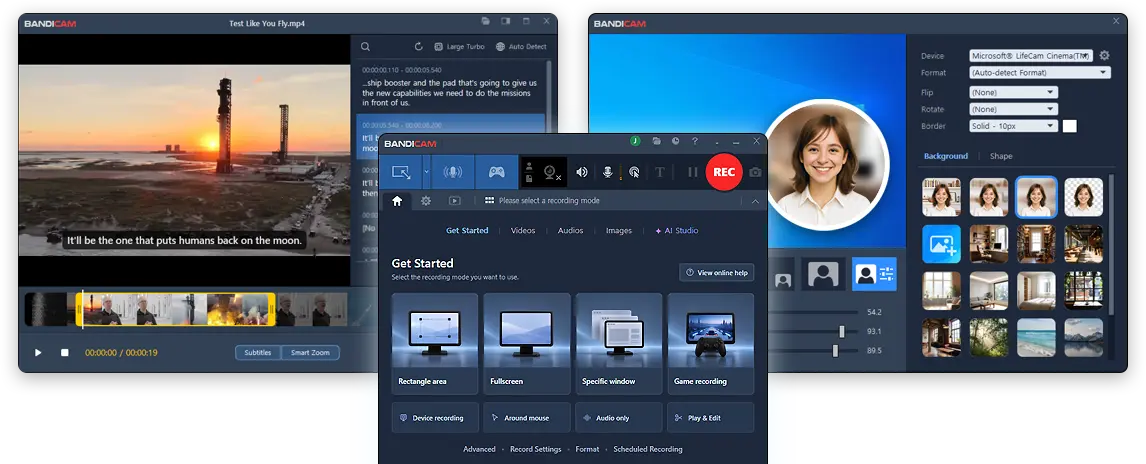
Moreover, Bandicam offers different recording modes. These modes let you record the full screen, a selected area, or a game.
What’s New in Bandicam 2027?
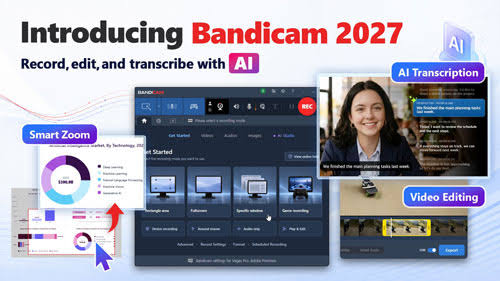
Bandicam 2027 brings several new tools for recording and editing. It also makes some common tasks easier.
1. Built-in Video and Audio Editor
The new version includes a built-in editor for video and audio files. As a result, users can make simple changes without opening another program.
You can also review your recordings inside Bandicam. This saves time when you want to record and edit in one place.
2. Smart Zoom
Smart Zoom follows the movement of your mouse cursor. Therefore, viewers can see the part of the screen that matters most.
This tool is helpful when you make software guides. It can also make small buttons and menus easier to see.
3. AI Transcription and Subtitles
Bandicam 2027 adds AI tools that turn speech into text. Users can also create and edit subtitles.
In addition, the software offers subtitle translation and export options. These tools can help people who make lessons for viewers in different languages.
4. AI Webcam Background Tools
The new AI tools can remove, blur, or change a webcam background. This is useful when recording lessons or work videos.
For example, you can hide a messy room behind you. However, the final result may depend on your camera and computer.
5. AI Video Highlights
Bandicam also offers tools to find useful parts of a recording. These tools can help users edit long videos more easily.
Furthermore, the software includes options for subtitle editing and removing silence. As a result, basic editing can take less time.
6. Improved Recording Controls
The latest version offers more recording options. Users can record the full screen or choose a smaller area.
It also includes blur effects for selected parts of the screen. Therefore, you can hide private details while making a tutorial.
Main Features of Bandicam 2027
Bandicam has several tools for screen and game recording. Here are some features that users may find useful.
1. Screen Recording
The screen recorder captures activity on your desktop. You can record the full display or select one area.
For example, this feature is useful for making software guides. It also works well for online lessons and presentations.
2. Game Recording
Bandicam can record many supported 2D and 3D games. You can capture gameplay while playing.
In addition, the software offers video settings for different computers. These settings help you balance video quality and file size.
3. Webcam Recording
The webcam mode records video from a connected camera. You can also place your webcam video over a screen recording.
This feature is useful for lessons and tutorials. If you need more webcam effects, you can also explore our WebcamMax guide.
4. Audio Recording
Bandicam can record sound from your computer and microphone. This is helpful when making voice tutorials or recording lessons.
You can also check your sound settings before recording. That way, you can avoid missing important audio.
5. Scheduled Recording
The scheduled recording tool can start and stop a recording at set times. Therefore, you do not need to sit in front of your computer for the whole session.
This feature is useful for planned recording tasks. However, your computer must stay on during the scheduled time.
6. Drawing and Mouse Effects
Bandicam includes drawing tools for screen recording. You can draw shapes, mark areas, and point to important items.
These tools make tutorials easier to follow. In addition, mouse effects help viewers see where you click.
7. Video Editing and Subtitles
The 2027 release adds video and audio editing tools. It also offers AI features for creating subtitles.
For more editing choices, you can read our Icecream Video Editor Pro guide. It covers another tool for working with recorded videos.
Bandicam 2027 Free vs Full Version
Bandicam offers a Free version and a Full version. Both include recording tools, but they have different limits.
| Feature | Free Version | Full Version |
|---|---|---|
| Screen recording | Yes | Yes |
| Game recording | Yes | Yes |
| Webcam recording | Yes | Yes |
| Audio recording | Yes | Yes |
| Recording time | Up to 5 minutes per recording | Unlimited |
| Raw recording watermark | No | No |
| Edited video export | Watermark may appear | No watermark |
| Scheduled recording | Limited | Available |
| Full paid features | No | Yes |
The Free version is useful for short recordings. However, the Full version removes the recording time limit and offers more tools.
Bandicam 2027 System Requirements
Before installing Bandicam, check your Windows version and computer setup.
| Requirement | Details |
|---|---|
| Operating System | Windows 11, 10, 8, 7 |
| Architecture | 64-bit |
| Processor | Supported Windows processor |
| Memory | Depends on recording settings |
| Storage | Enough free space for video files |
| Internet | Needed to download the installer |
The official website lists Windows 11, 10, 8, and 7 (64-bit). In addition, recording speed may depend on your processor and graphics card.
How to Download and Install Bandicam 2027
Follow these steps to install Bandicam on your PC.
- Visit the official Bandicam website.
- Open the download page.
- Choose the latest version.
- Download the Windows installer.
- Open the setup file.
- Follow the steps on your screen.
- Launch Bandicam after setup.
- Choose a recording mode and check your audio settings.
After that, you can start recording your screen, games, or webcam.
Official download page: https://www.bandicam.com/downloads/
Is Bandicam 2027 Crack Safe?
Many users search for Bandicam 2027 Crack or a free license key. However, unofficial activation files can put your computer at risk.
Some modified installers may contain harmful files or unwanted programs. They can also damage the software and cause update errors.
Therefore, avoid unknown keygens and modified installers. Instead, try the Free version or buy a valid license from the official website.
You can also explore OBS Studio if you need another screen recording tool. It offers screen capture and live streaming features.
Advantages and Disadvantages
Advantages
- Records desktop activity and games.
- Supports webcam and audio recording.
- Offers scheduled recording.
- Includes drawing and mouse effects.
- Adds AI subtitles and Smart Zoom.
- Provides video and audio editing tools.
Disadvantages
- The Free version has a five-minute recording limit.
- Some tools need a paid license.
- AI tools may use extra computer power.
- Recording quality depends on your hardware.
Frequently Asked Questions
What is the latest version of Bandicam?
The official website lists Bandicam 2027 version 27.0.7.2687. It was released on October 15, 2026.
Is Bandicam 2027 free?
Yes. Bandicam offers a Free version. However, each free recording has a five-minute time limit.
Does Bandicam add a watermark?
Raw recordings made with the Free version do not have a watermark. However, edited video exports may show one.
Can Bandicam record games?
Yes. Bandicam has a Game Recording mode for supported 2D and 3D games.
Does Bandicam support Windows 11?
Yes. The official website lists Windows 11 as a supported system.
Can Bandicam create subtitles?
Yes. The 2027 release includes AI tools for speech-to-text and subtitles. It also offers subtitle editing and translation.
Is Bandicam better than OBS Studio?
Both programs can record your screen. Bandicam focuses on simple recording and editing, while OBS Studio also offers tools for live streaming and advanced recording.
Final Words
Bandicam 2027 is a useful screen recorder for Windows users. It can record games, desktop activity, webcams, and audio.
The latest version also adds AI subtitles, Smart Zoom, and editing tools. As a result, users get more than a basic screen recorder.
The Free version is a good way to test the software. However, users who need unlimited recording can consider the official paid license.


Recent Comments