
Audacity 4.0.2 Crack + Latest Version Download for Windows 2026
Audacity 4.0.2 Crack + Latest Version Download for Windows 2026
Audacity 4.0.2 Crack is a search term used by people looking for a powerful audio recording and editing program. However, Audacity is already free and open-source software. You do not need a paid activation key to use its main features.
Audacity helps you record, edit, mix, and improve audio files. It is useful for podcast creators, students, musicians, teachers, and content creators. In addition, it supports many audio formats and offers a wide range of editing tools.
The latest version is Audacity 4.0.2, released on November 2, 2026. This update focuses on fixing crashes, project corruption, and other problems found in earlier releases. Therefore, users working with audio projects should consider installing the latest version.
What Is Audacity?
Audacity is a free digital audio editor and recorder. It allows you to record sound through a microphone or audio mixer. You can also import existing audio files and edit them on your computer.
The software provides tools for cutting, copying, trimming, and mixing audio. Moreover, it includes effects that can improve the sound of recordings.
For example, you can remove unwanted noise from a voice recording. You can also adjust volume, change pitch, and add effects such as echo and reverb.
Audacity is suitable for both simple and advanced audio work. As a result, it is a useful choice for people who want to edit sound without paying for an expensive program.
Audacity 4.0.2 Version Details
Here are the main details of the latest release:
| Information | Details |
|---|---|
| Software Name | Audacity |
| Latest Version | 4.0.2 |
| Release Date | November 2, 2026 |
| Developer | Audacity Team |
| Category | Audio Recording and Editing |
| License | Free and Open Source |
| Platform | Windows, macOS, Linux |
| Main Use | Audio Recording and Editing |
| Price | Free |
Audacity does not require a paid subscription for its standard editing features. Therefore, you can download and use the official version without purchasing an activation key.
Main Features of Audacity 4.0.2
Audacity includes many tools for recording and editing sound. Here are some of its most useful features.
1. Record Audio with a Microphone
Audacity lets you record live audio through a microphone or supported audio device. You can use this feature to create podcasts, voiceovers, lessons, and interviews.
The recording process is simple. First, select your input device. Next, adjust the recording level and press the record button.
You can also record multiple parts of a project. This makes it easier to fix mistakes without recording the entire session again.
2. Multitrack Audio Editing
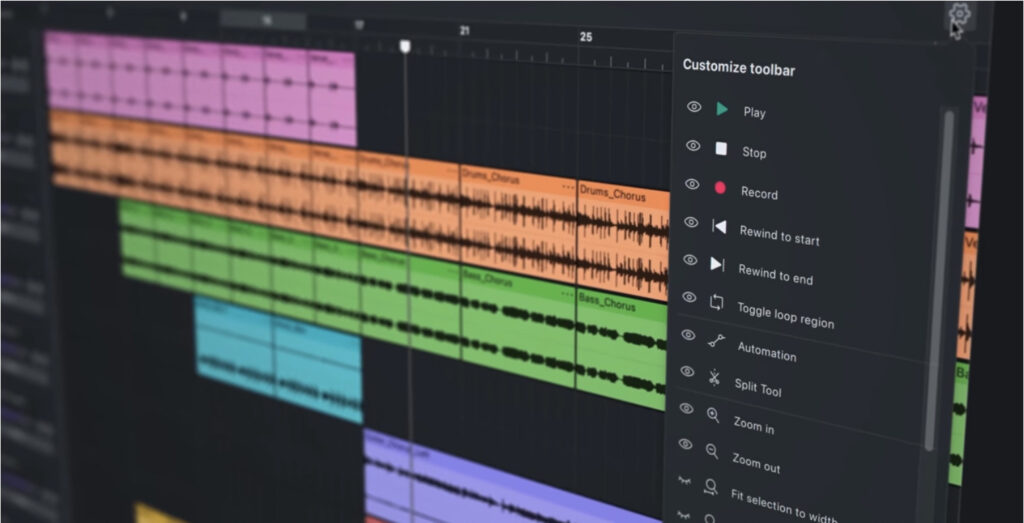
Multitrack editing allows you to work with several audio tracks in one project. For example, you can place a voice recording on one track and background music on another.
You can move, trim, and arrange clips to match your needs. In addition, you can adjust the volume of each track.
This is useful for podcast production and music projects. As a result, you can combine different recordings into one final audio file.
3. Noise Reduction
Background noise can make a recording difficult to understand. Audacity includes noise reduction tools that can help reduce steady sounds such as fan noise or light background hiss.
First, select a short part of the recording that contains only the unwanted noise. Then, use the noise reduction effect to create a noise profile.
After that, apply the effect to the required audio section. However, use moderate settings because too much noise reduction can affect the voice.
4. Audio Effects and Filters
Audacity provides several effects to change and improve sound. You can use these tools to adjust recordings and create different audio styles.
Some useful effects include:
- Equalization for adjusting sound frequencies.
- Reverb for adding room-like sound.
- Echo for creating repeated audio effects.
- Distortion for changing the sound character.
- Noise reduction for cleaning recordings.
- Volume adjustment for controlling loudness.
Moreover, Audacity supports compatible third-party audio plugins. Therefore, you can add more effects when your project needs them.
5. Cut, Copy, Trim, and Split Audio
Basic editing tools are important for every audio project. Audacity makes it easy to remove unwanted sections and arrange recordings.
You can cut mistakes, remove silence, and shorten long clips. In addition, you can split a recording into smaller parts.
These tools are helpful when editing interviews and podcasts. They also make it easier to prepare audio for online videos.
6. Change Pitch and Tempo
Sometimes, you may need to change the speed or pitch of an audio file. Audacity includes tools for these tasks.
You can change the tempo without changing the pitch. Similarly, you can adjust pitch without changing the overall speed.
For example, these options can help with music practice and voice editing. However, large changes may affect audio quality.
7. Support for Different Audio Formats
Audacity supports several common audio formats. You can import recordings, edit them, and export the finished project in a suitable format.
Common formats include:
- WAV
- MP3
- AIFF
- FLAC
- OGG
- M4A through supported FFmpeg workflows
Some formats may need the optional FFmpeg library. Therefore, check the official instructions if a file does not open or export as expected.
8. Spectrogram View
The spectrogram view displays audio as a visual frequency image. This helps users study sound in more detail.
You can use it to inspect different frequencies and identify certain audio problems. Moreover, it can help when working with sound effects and detailed recordings.
This feature is useful for users who need more control than a basic waveform display.
What’s New in Audacity 4.0.2?
Audacity 4.0.2 is a maintenance update. Its main purpose is to improve stability and fix problems found in previous versions.
Here are some important fixes:
- Fixed project corruption when loading projects with empty clips.
- Fixed problems with duplicate project file extensions.
- Improved project saving and replacement during Save As.
- Fixed clip loss and pitch problems when moving clips between tracks.
- Fixed crashes related to sample snapping.
- Fixed crashes when using certain effect commands.
- Restored automatic saving during recording.
- Improved playback latency in the input meter display.
These fixes are important because project problems can affect hours of editing work. Therefore, updating to the latest release can help users avoid known issues.
Audacity 4.0.2 System Requirements
Audacity is designed to work on common desktop and laptop computers. It does not require a dedicated graphics card for normal audio editing.
The official Windows download page lists support for Windows 10 and Windows 11. It also provides separate x86_64 and ARM64 builds.
| Requirement | Details |
|---|---|
| Operating System | Windows 10 or Windows 11 |
| Architecture | x86_64 or ARM64 |
| Processor | Compatible modern CPU |
| Graphics Card | No specific GPU required |
| RAM | Depends on project size |
| Storage | Fast local drive or SSD recommended |
| Internet | Required for downloading and updates |
Audacity needs fast and reliable access to your storage drive. Therefore, avoid working directly from slow USB drives or unreliable network storage when editing important projects.
Screenshot
How to Download and Install Audacity 4.0.2
You can download Audacity from its official website. Follow these steps to install it safely.
- Open the official Audacity download page.
- Select the Windows download option.
- Choose the x86_64 or ARM64 installer that matches your computer.
- Download the setup file.
- Open the downloaded installer.
- Follow the instructions on the screen.
- Complete the installation process.
- Launch Audacity from the Start menu.
After installation, connect your microphone or audio device. Then, select the correct input and output settings before starting a recording.
Official download: https://www.audacityteam.org/download/
How to Record Audio in Audacity
Recording audio in Audacity is easy. You only need a working microphone or supported audio input.
- Open Audacity.
- Select your microphone from the audio device menu.
- Choose the required recording channels.
- Check the input level.
- Press the Record button.
- Speak or play the sound you want to capture.
- Press Stop when the recording is complete.
- Play the recording and check its quality.
You can now edit the recording and remove unwanted parts. Finally, export the finished audio file in your preferred format.
Audacity vs Adobe Audition
Audacity and Adobe Audition are both audio editing programs. However, they have different pricing models and workflows.
| Feature | Audacity | Adobe Audition |
|---|---|---|
| Main Use | Audio recording and editing | Professional audio production |
| License | Free and Open Source | Paid subscription |
| Multitrack Editing | Yes | Yes |
| Noise Reduction | Yes | Yes |
| Audio Effects | Yes | Yes |
| Plugin Support | Yes | Yes |
| Best For | General users and creators | Professional audio workflows |
If you want a free audio editor, Audacity is a strong option. On the other hand, users who need Adobe’s wider audio production workflow can explore Adobe Audition.
You can also use OBS Studio when your main goal is to record desktop activity, capture microphone audio, or create live streams.
Is Audacity 4.0.2 Crack Safe?
Some websites offer files under names such as Audacity Crack, keygen, or pre-activated setup. However, these files are not required for the official software.
Modified installers may contain unwanted programs, harmful scripts, or malware. In addition, they may be outdated or changed from the original release.
Audacity is already free and open source. Therefore, there is no reason to use an unofficial activation file.
Always download the original application from the official Audacity website. This helps you avoid unknown files and receive the proper updates.
Pros and Cons of Audacity 4.0.2
Pros
- Free and open-source software.
- Supports live audio recording.
- Includes multitrack editing tools.
- Offers noise reduction effects.
- Supports many common audio formats.
- Provides useful sound filters and effects.
- Supports compatible third-party plugins.
- Available for Windows, macOS, and Linux.
Cons
- The interface may take time to learn.
- Advanced audio work needs practice.
- Some formats require extra components.
- Large projects can use more memory and storage.
- It does not replace every feature of a full professional audio workstation.
Frequently Asked Questions
Is Audacity 4.0.2 free?
Yes. Audacity is free and open-source software. You can use its main recording and editing tools without purchasing a license.
What is the latest version of Audacity?
The latest version covered in this guide is Audacity 4.0.2, released on November 2, 2026.
Can Audacity record my voice?
Yes. Audacity can record your voice through a supported microphone or audio input device.
Can I remove background noise in Audacity?
Yes. It includes noise reduction tools that can help reduce steady background sounds in recordings.
Does Audacity support MP3 files?
Yes. Audacity supports MP3 import and export in its standard supported workflows.
Can I use Audacity for podcast editing?
Yes. You can record voices, arrange multiple tracks, remove mistakes, adjust volume, and export your podcast.
Is Audacity available for Windows 11?
Yes. The official download page provides Windows builds for supported x86_64 and ARM64 systems.
Do I need an Audacity activation key?
No. Audacity is free and open source. You do not need a paid activation key or subscription for its standard features.
Final Words
Audacity 4.0.2 is a useful audio editor for people who record podcasts, voiceovers, lessons, and music. It combines recording, multitrack editing, sound effects, and audio export tools in one application.
The latest update also fixes several crashes and project problems. Therefore, users can benefit from installing the current release.
Although many people search for Audacity 4.0.2 Crack, the official software is already free. Download the original version and use its built-in tools without an unofficial activation file.


Recent Comments