
Topaz Video Crack + License Key – AI Video Enhancer Download Guide
Topaz Video Crack + License Key – AI Video Enhancer Download Guide
Topaz Video Crack is a common search term among people looking for professional video enhancement software. Topaz Video is a paid AI-powered application that helps improve video quality. It can upscale footage, reduce noise, sharpen details, and create smoother results.
The software is useful for video editors, content creators, and people who work with old recordings. Moreover, it offers several AI models for different video problems. In this guide, you will learn about its features, latest version, system requirements, and installation process.
What Is Topaz Video?
Topaz Video is an AI video enhancement program developed by Topaz Labs. It uses trained AI models to improve video details and reduce common quality problems.
For example, you can use it to improve low-resolution footage or reduce noise in dark scenes. You can also create smoother motion with supported frame interpolation tools.
Unlike a regular video editor, Topaz Video focuses mainly on improving video quality. Therefore, many users combine it with a separate editing program.
Topaz Video Main Features
Topaz Video includes several tools for improving video footage. Here are some of its main features.
1. AI Video Upscaling
Video upscaling increases the resolution of a video. For example, you can process lower-resolution footage to create a larger output.
Topaz Video uses AI models to rebuild details during this process. As a result, the output may look clearer than a simple resize.
However, the final quality depends on the original recording. A badly damaged video may still contain missing details after enhancement.
2. Video Noise Reduction
Noise can make footage look grainy, especially in dark scenes. Topaz Video includes AI models that help reduce this unwanted noise.
In addition, noise reduction can improve older recordings. You can select a suitable model and adjust the settings according to your footage.
3. Video Sharpening
Soft footage can lose important details. Topaz Video provides enhancement models that help improve sharpness and restore visible details.
For example, this feature can help with old recordings and low-quality clips. However, excessive sharpening may create unwanted edges or artificial details.
4. Frame Interpolation
Frame interpolation creates additional frames between existing frames. This process can make movement look smoother.
For instance, you can use it to improve footage with a low frame rate. The feature is useful for certain slow-motion and motion-enhancement projects.
However, fast movement and complex scenes may produce visual errors. Therefore, always review the output before using it.
5. Video Stabilization
Camera movement can make a video difficult to watch. Stabilization tools help reduce unwanted movement and create a steadier result.
This feature can be useful for handheld recordings. Nevertheless, very shaky footage may still need extra editing.
6. AI Enhancement Models
Topaz Video includes different AI models for specific video tasks. Some models focus on noise reduction, while others improve details, motion, or image quality.
Moreover, the Model Manager lets users download available models. This means you can install the models that match your editing needs.
7. Batch Video Processing
Batch processing helps users work with multiple video files. Instead of setting up every clip separately, you can add several files to a processing queue.
As a result, the software can save time when handling larger projects. However, processing speed depends on your hardware and selected AI model.
Topaz Video Latest Version
Topaz Labs lists Topaz Video 1.7.2 as the latest release in its official release section.
The release history also includes earlier versions such as 1.7.1 and 1.7.0. These updates include improvements and fixes for different models and processing features.
Topaz Video is the current product name. However, Topaz Video AI is now a discontinued legacy application, and version 7.1.5 is its final release.
Therefore, users should check the correct product before downloading an installer.
You can check the official updates here:
https://community.topazlabs.com/c/topaz-video/topaz-video-releases/122
Topaz Video System Requirements
AI video processing can use a lot of computer resources. Therefore, check your hardware before installing the software.
Windows Requirements
- Operating system: Windows 10 or later
- Processor: Intel or AMD processor with AVX support, released after 2016
- RAM: 16 GB minimum
- NVIDIA graphics: 6 GB VRAM minimum
- AMD graphics: 6 GB VRAM minimum
- Intel graphics: Supported integrated graphics options
- Storage: 45 GB available internal storage
macOS Requirements
- Operating system: macOS 13 or later
- Processor: Apple M-series chip
- RAM: 16 GB minimum
- Storage: 45 GB available internal storage
Intel-based Macs are not supported by the current Topaz Video application.
Recommended Hardware
For better performance, Topaz Labs recommends stronger hardware.
- RAM: 32 GB or more
- Windows GPU: NVIDIA RTX 30 series or newer
- Graphics memory: 8 GB or more
- Processor: A recent Intel or AMD CPU
- Storage: 60 GB or more
Furthermore, some advanced AI models require more powerful hardware. Check the requirements for each model before starting a large project.
How to Download and Install Topaz Video
Follow these steps to install the official application.
- Visit the official Topaz Labs website.
- Open the Downloads section.
- Select Topaz Video for your operating system.
- Download the installer.
- Open the downloaded setup file.
- Follow the installation instructions.
- Launch Topaz Video after installation.
- Sign in to your Topaz Labs account.
- Download the AI models you need through Model Manager.
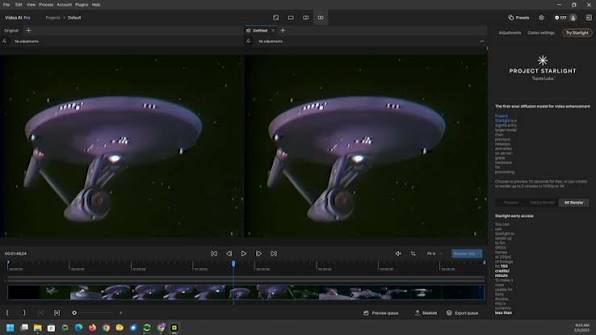
After installation, import a video and select an enhancement model. Then, review the preview before processing the complete file.
Topaz Video Crack and License Key
Many users search for Topaz Video Crack, Topaz Video License Key, and Topaz Video Activation Code to access paid features without purchasing a subscription.
However, unofficial cracks and key generators can create security problems. Modified installers may contain malware, unwanted programs, or damaged files.
In addition, unauthorized activation tools may stop working after software updates. They can also prevent users from receiving proper support.
Topaz Video uses a subscription-based license. Therefore, check the official pricing and trial options before choosing a plan.
The official installer is the safer way to test the software. It also helps ensure that you receive genuine updates and compatible AI models.
Topaz Video Pros and Cons
Pros
- AI-powered video enhancement
- Video upscaling tools
- Noise reduction and sharpening
- Frame interpolation support
- Different models for different tasks
- Batch processing options
- Useful for old and low-quality footage
Cons
- Requires powerful hardware
- AI processing can take time
- Uses a large amount of storage
- Some models need high graphics memory
- Current version requires a paid subscription
- Results can vary depending on the source video
Topaz Video Alternatives
If you need other tools for your video projects, consider these options.
- FoneLab Video Converter Ultimate can help with video conversion and related media tasks.
- Icecream Video Editor Pro is another option for basic video editing and arranging clips.
However, these programs do not provide exactly the same AI enhancement workflow as Topaz Video. Choose according to the task you want to complete.
Frequently Asked Questions
Is Topaz Video free?
Topaz Video is a paid application. Check the official website for current trial and subscription options.
What is the latest Topaz Video version?
The official release section lists Topaz Video 1.7.2 as the latest release at the time of writing.
Is Topaz Video AI the same as Topaz Video?
No. Topaz Video is the current product, while Topaz Video AI is a discontinued legacy application. Its final version is 7.1.5.
Can Topaz Video upscale videos to 4K?
Yes. Its AI upscaling tools can increase video resolution. However, the final output depends on the original footage and selected model.
Does Topaz Video work on Windows 11?
Yes. Topaz Labs lists Windows 10 or later as supported. Your processor and graphics hardware must also meet the requirements.
Does Topaz Video support Intel Macs?
No. The current application does not support Intel-based Macs. It requires an Apple M-series processor on macOS.
Is Topaz Video Crack safe?
Cracked installers and activation tools can contain harmful files or cause software problems. The official installer is the safer option.
Final Words
Topaz Video is a useful AI application for people who want to improve video quality. Its upscaling, sharpening, noise reduction, and frame interpolation tools can help with many editing projects.
Moreover, its different AI models provide options for different types of footage. However, the software needs suitable hardware to process videos smoothly.
Although many people search for Topaz Video Crack and License Key, unofficial activation files can put their computers and projects at risk. Therefore, use the official download and review the available license options before purchasing.


Recent Comments