
Easy Duplicate Finder 7.33.0.70 Review: Features & Guide
Easy Duplicate Finder 7.33.0.70 Review: Features & Guide
Easy Duplicate Finder is a file management utility designed to locate duplicate files and help users organize their storage. It scans selected folders and drives to identify repeated documents, photos, music, videos, and other supported files. As a result, users can review unnecessary copies and decide which files they want to keep or remove.
The software is available for Windows and macOS. It includes different scanning methods, file comparison options, and tools for reviewing duplicate groups. These features make it useful for people who regularly manage large collections of files.
This guide covers Easy Duplicate Finder 7.33.0.70, its main features, version history, system compatibility, and safe usage recommendations.
What Is Easy Duplicate Finder?
Easy Duplicate Finder is a duplicate file detection program developed by WebMinds. It helps users identify repeated files across selected storage locations. Instead of relying only on file names, the application offers comparison methods that can examine file content.
For example, two copies of a photograph may have different names or exist in separate folders. A suitable comparison method can help identify them as duplicates even when their filenames do not match.
The program also provides tools to review scan results before managing files. Therefore, users can check duplicate groups and choose which copies they want to retain.
Easy Duplicate Finder 7.33.0.70 for Windows and Mac
Version 7.33.0.70 was released on 24 February 2025. According to the developer’s official version history, this update introduced macOS Sequoia 15.3.1 support, an option to enable or disable coloring for groups with unsafe selections, updated user manuals, and a fix for the Select/Unselect All checkbox.
These changes focused mainly on compatibility, usability, and selection behavior. They did not represent a completely new scanning engine.
It is important to remember that version 7.33.0.70 is an older release. The developer has since published later Version 7 updates and introduced Version 8. Check the official version history if you need the latest release.

Key Features of Easy Duplicate Finder
Easy Duplicate Finder includes several tools for finding and reviewing repeated files. Available features can vary by version, operating system, and scan mode.
1. Duplicate File Detection
The application searches selected folders and storage locations for duplicate files. It can compare file content instead of depending entirely on names or extensions.
This approach helps identify repeated files that have been renamed or moved into different folders.
2. Multiple Scanning Methods
Different scan modes help users search for particular types of duplicates. Depending on the selected mode, users can compare files, scan music collections, review folders, or search supported cloud storage accounts.
Choosing the appropriate scan method can make the results more useful and reduce unnecessary scanning.
3. Photo and Image Scanning
The software includes options for finding duplicate photos and images. Users can review matching image files before deciding which copies they want to keep.
Newer releases also provide additional support for similar image detection. However, available image comparison options depend on the installed version.
4. Music and Audio Scanning
Music scanning helps users organize collections containing repeated audio tracks. The application offers audio comparison methods and supports different music formats depending on the version and scan mode.
This can be helpful when managing large music libraries across multiple folders.
5. Cloud Storage Scanning
Easy Duplicate Finder provides dedicated scan modes for supported cloud services, including Google Drive, Dropbox, and OneDrive.
These tools help users review duplicate files stored in their cloud accounts. Before deleting anything, carefully check the selected files and understand whether the action can be reversed.
6. Folder Comparison Mode
Folder Comparison allows users to compare files in source and target folders. This is particularly useful when merging folders or checking whether one folder contains copies of files stored in another.
The mode identifies source files as master files and helps protect them from accidental deletion.
7. File Preview and Duplicate Review
Before managing duplicates, users can inspect the scan results. Preview options make it easier to recognize the files and select the correct copy.
Always review the file name, location, size, and content before deleting anything important.
8. Undo and File Management Options
The application provides file management options for handling selected duplicates. Some local scan operations may support undo, depending on the action and version.
However, cloud scan operations may have permanent deletion behavior. Do not assume that every deletion can be reversed.
What’s New in Easy Duplicate Finder 7.33.0.70?
The official release notes list these changes:
- Added support for macOS Sequoia 15.3.1.
- Added an application setting to enable or disable coloring of groups with unsafe selections.
- Updated the Windows and Mac user manuals.
- Fixed an issue affecting the Select/Unselect All checkbox.
These improvements made the release more convenient and addressed a selection-related issue. Users should consult the official release history for changes introduced in later versions.
System Requirements and Compatibility
Easy Duplicate Finder supports Windows and macOS, but exact compatibility depends on the installed release.
The developer’s support information lists compatibility with Windows 11, Windows 10, Windows 8.1, Windows 8, Windows 7, and some older Windows versions. Modern macOS releases are also supported, with version-specific compatibility information available through the official version history.
Before installing version 7.33.0.70, check its compatibility with your operating system. Do not assume that the requirements for the latest Version 8 apply identically to this older release.
For the best experience, keep sufficient free storage available for scans and avoid running unnecessary heavy applications during large scanning tasks.
How to Use Easy Duplicate Finder Safely
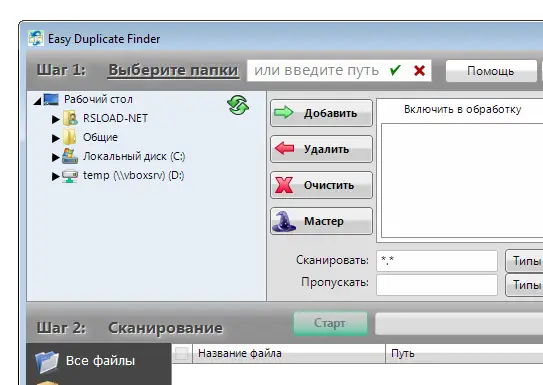
Follow these steps to review duplicate files:
- Download the installer from the developer’s official website.
- Open the downloaded installer and follow the setup instructions.
- Launch Easy Duplicate Finder after installation.
- Select the folders or storage locations you want to scan.
- Choose a suitable scan mode for your files.
- Start the scan and wait for the results.
- Review the duplicate groups carefully.
- Preview important files and confirm which copy you want to keep.
- Back up valuable files before deleting duplicates.
- Remove only the files you have verified are unnecessary.
Important: Never select and delete every result without checking it. Similar-looking files may contain different information. Also, cloud storage deletion may be permanent or synchronize across connected devices.
Easy Duplicate Finder vs. Other File Management Tools
Several utilities offer duplicate file detection or related storage management features. Your choice should depend on the task.
- Easy Duplicate Finder: Designed specifically for finding and managing duplicate files across supported locations.
- Duplicate Files Fixer: Another utility focused on detecting and removing duplicate files. You can read our Duplicate Files Fixer guide for a comparison of its general purpose.
- Disk Drill: Primarily a data recovery utility rather than a dedicated duplicate finder. Read our Disk Drill overview to learn about its recovery-related features.
These programs serve different purposes, so compare their supported features before choosing one.
Frequently Asked Questions
Is Easy Duplicate Finder free?
The developer offers a free download or trial experience. Some features and usage limits may depend on the edition and license. Check the official website for current plan details.
Is Easy Duplicate Finder 7.33.0.70 the latest version?
No. Version 7.33.0.70 was released in February 2025. The developer has published later Version 7 releases and introduced Version 8.
Can Easy Duplicate Finder find files with different names?
Yes. Suitable content-based comparison methods can identify identical files even when their filenames or folder locations differ.
Does Easy Duplicate Finder support Google Drive and Dropbox?
Yes. The software provides dedicated scan modes for supported cloud storage services, including Google Drive and Dropbox. OneDrive support is also listed by the developer.
Can I recover files after deleting duplicates?
Some local file management actions may support undo, depending on the scan mode and operation. Cloud deletion may be permanent, so review results and back up important files first.
Is Easy Duplicate Finder available for Mac?
Yes. The developer provides a macOS edition. Check the version history to confirm compatibility with your particular macOS release.
Should I upgrade from version 7.33.0.70?
If you need newer compatibility improvements, bug fixes, or features, compare the current release with your installed version. Always review the official release notes before upgrading.
Final Verdict
Easy Duplicate Finder is a practical utility for people who want to organize large file collections and identify unnecessary copies. Its scanning methods, folder comparison tools, previews, and cloud storage support can make duplicate management easier.
Version 7.33.0.70 introduced useful compatibility and interface improvements in February 2025. However, it is no longer the latest release. Users should check the developer’s official version history before installing an older build or deciding whether to upgrade.
For safe results, always review duplicate groups, keep backups of important data, and delete only files you have confirmed are unnecessary.
Official Website: https://www.easyduplicatefinder.com/
Official Version History: https://www.easyduplicatefinder.com/history.html
Recent Comments