
ESET Internet Security Review: Features, Protection & Setup Guide
ESET Internet Security Review: Features, Protection & Setup Guide
ESET Internet Security is a Windows security application developed by ESET. It is designed to protect computers against malware, ransomware, spyware, phishing websites, and other online threats. Its security tools combine real-time antivirus protection with features for safer browsing, online banking, network monitoring, and privacy.
ESET Internet Security is also part of ESET’s newer HOME Security subscription plans. Users can choose a suitable plan based on the devices and features they need.
This guide explains ESET Internet Security’s main features, protection tools, system requirements, subscription options, and installation process.
What Is ESET Internet Security?
ESET Internet Security is a security solution for Windows PCs. It uses multiple protection technologies to detect and block malicious files, suspicious activity, and online threats.
The software is designed to provide protection without unnecessarily interrupting everyday computer use. It can help protect users while browsing websites, downloading files, shopping online, using email, and connecting to home networks.
ESET Internet Security is a Windows application. ESET provides separate products for macOS, Android, and iOS, so users should select the correct application for their operating system.
Key Features of ESET Internet Security
1. Real-Time Antivirus Protection
ESET provides real-time protection that monitors files and activity for potentially harmful content. It is designed to detect malware such as viruses, spyware, trojans, worms, and other malicious programs.
The protection engine uses multiple detection technologies to identify known and emerging threats. Keeping the application and its detection modules updated is important for effective protection.
2. Ransomware Protection
Ransomware can encrypt personal files and demand payment to restore access. ESET includes technologies designed to detect and block ransomware-related activity.
Users should also maintain regular backups because antivirus protection cannot guarantee that every ransomware attack will be prevented.
3. Anti-Phishing Protection
Phishing websites imitate legitimate services to trick users into entering passwords, payment information, or other personal details.
ESET’s anti-phishing technology helps identify and block access to known fraudulent websites. Users should still check website addresses carefully and avoid opening suspicious links.
4. Firewall Protection
The firewall helps monitor network communication between the computer and other devices or internet services.
It can help block unauthorized network connections and provide additional protection when a computer connects to unfamiliar networks. Firewall settings should be configured carefully because blocking legitimate applications can interrupt normal connectivity.
5. Safe Banking and Browsing
ESET provides a protected browsing environment for supported banking and payment activities.
This feature is designed to add protection when users access financial websites. It can help reduce exposure to certain online threats, but users should continue to use secure websites and multi-factor authentication.
6. Webcam Protection
Webcam protection helps monitor attempts by applications to access a connected camera.
If an unexpected application tries to use the webcam, the security software can notify the user and provide options to manage access. This feature is useful for people who want additional control over camera privacy.
7. Network Inspector
Network Inspector helps users review devices connected to their home network and identify certain network security weaknesses.
It can help highlight issues such as potentially vulnerable devices or weak router configurations. Users should also update router firmware and use a strong Wi-Fi password.
8. Anti-Spyware Protection
Spyware can collect information about a user’s activity without proper consent. ESET includes protection technologies designed to detect and block spyware and other unwanted software.
This helps protect personal information and reduces the risk of malicious applications monitoring computer activity.
9. Email and Web Protection
Email and web protection features help inspect potentially dangerous content delivered through supported communication and browsing channels.
These protections can help identify malicious attachments, suspicious downloads, and harmful websites before they cause damage.
10. Lightweight Security Design
ESET emphasizes efficient security protection and low system impact. Actual performance depends on computer hardware, the number of running applications, scan settings, and the type of files being checked.
A full system scan may use more system resources than ordinary background protection.
What’s New in ESET Internet Security?
ESET regularly updates its applications with security improvements, compatibility changes, and bug fixes.
As of November 12, 2026, ESET’s official version list shows 20.0.7.0, released on October 27, 2026, as the latest listed ESET Internet Security build.
The 18.0.17.0 version mentioned in older download listings should not be presented as the latest 2026 release. ESET’s official release information should be checked before installing or updating an existing application.
The current release information includes improvements such as:
- New ESET Security Gaming Edition availability.
- Expanded Safe Banking and Browsing support for additional browsers.
- Browser security improvements.
- Web Control improvements in supported products.
- General interface refinements and bug fixes.
Some improvements apply only to specific ESET products or subscription tiers.
ESET Internet Security and ESET HOME Security Essential
ESET has moved its home-user products into the ESET HOME Security subscription range. ESET Internet Security has been replaced in the product lineup by ESET HOME Security Essential, while existing ESET Internet Security users may still manage their eligible subscriptions.
ESET’s current subscription lineup includes:
| Plan | General purpose |
|---|---|
| ESET HOME Security Essential | Core device and internet protection |
| ESET HOME Security Premium | Additional privacy and security tools |
| ESET HOME Security Ultimate | Expanded protection and privacy features |
The applications and features included in each plan can differ by operating system and region. Check ESET’s official comparison before purchasing.
ESET Internet Security System Requirements
Current ESET home security applications support modern Windows versions. ESET’s official download information lists Windows 10 and Windows 11 for ESET Internet Security and related Windows security products.
| Requirement | Information |
|---|---|
| Operating system | Windows 10 or Windows 11 |
| Internet connection | Required |
| Installation | Official ESET installer |
| Activation | Valid ESET subscription |
| Updates | Internet connection recommended for updates |
The exact hardware requirements can depend on the application version and Windows environment. Check ESET’s official requirements before installation.
The old claims of Windows XP, Vista, and every 32-bit Windows version being supported should not be relied on for current releases.
How to Download and Install ESET Internet Security
Follow these steps to install the genuine ESET application:
- Visit ESET’s official home security download page.
- Select the product or subscription that matches your requirements.
- Download the official installer for Windows.
- Open the downloaded setup file.
- Follow the installation instructions displayed on the screen.
- Sign in to your ESET HOME account if prompted.
- Activate the application using a valid subscription.
- Allow the application to download the latest security modules.
- Open the main dashboard and check that protection is active.
- Run an initial computer scan.
If you already have an older ESET installation, follow ESET’s official upgrade or uninstall instructions. Avoid using third-party uninstallers unless ESET specifically recommends them for your situation.
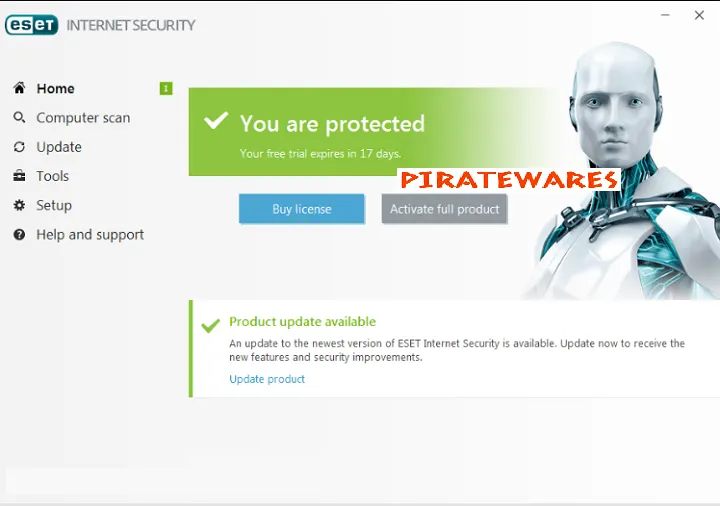
How to Activate ESET Internet Security
ESET products require a valid subscription or license to activate paid protection features.
To activate the software:
- Open the installed ESET application.
- Select the activation or subscription option.
- Sign in to the ESET HOME account associated with your subscription, or enter the valid activation details requested by the application.
- Follow the on-screen instructions.
- Confirm that the product displays an active subscription.
Do not use unofficial serial numbers, key generators, modified activation files, or shared license codes. They may be invalid, stolen, or bundled with malicious software.
Advantages of ESET Internet Security
- Real-time protection against malware and other threats.
- Ransomware and spyware protection technologies.
- Anti-phishing and safer browsing features.
- Firewall and network protection tools.
- Protected banking and payment browsing.
- Webcam access monitoring.
- Network Inspector for reviewing home network security.
- Regular product and security updates.
Limitations of ESET Internet Security
- The application requires a valid subscription for paid protection.
- Some features are available only on supported operating systems or subscription tiers.
- Current versions require modern Windows releases.
- Security software cannot guarantee protection against every threat.
- Initial scans and intensive security tasks can use system resources.
- Product names and subscription packages have changed, which may confuse users comparing older versions.
ESET Internet Security Alternatives
Users comparing antivirus and internet security applications may also want to explore other security products.
You can read our guide to Kaspersky Total Security to compare another well-known security suite.
Before choosing an antivirus product, compare its current protection features, independent test results, privacy policy, supported operating systems, subscription terms, and update policy.
Frequently Asked Questions
Is ESET Internet Security still available?
ESET Internet Security has been replaced in the newer home subscription lineup by ESET HOME Security Essential. Existing users may still have access through eligible subscriptions.
Is ESET Internet Security compatible with Windows 11?
Yes. ESET lists Windows 11 support for its current Windows security products. Check the requirements for the exact version before installing.
Is ESET Internet Security available for Mac?
ESET Internet Security is the Windows product. ESET offers a separate macOS application called ESET Cyber Security.
What is the latest ESET Internet Security version?
As of November 12, 2026, ESET’s official version list shows build 20.0.7.0, released October 27, 2026.
Does ESET Internet Security protect against ransomware?
ESET includes technologies designed to detect and block ransomware. However, no security application can guarantee that every ransomware attack will be prevented. Keep backups of important files.
Does ESET Internet Security include a firewall?
Yes. Firewall protection is one of the security features associated with ESET Internet Security.
Can I use ESET Internet Security without a subscription?
Paid protection features require a valid ESET subscription or license. Availability of a trial depends on the region and current offer.
Is ESET Internet Security the same as ESET NOD32 Antivirus?
No. They are different ESET products. ESET Internet Security includes additional internet and network protection features beyond the core antivirus capabilities of ESET NOD32 Antivirus.
How do I update ESET Internet Security?
Open the ESET application and use its update section to check for available product and detection-module updates. You can also follow ESET’s official upgrade instructions.
Final Verdict
ESET Internet Security provides a broad set of Windows security features, including real-time antivirus protection, anti-phishing tools, firewall protection, safer banking, webcam monitoring, and network inspection.
It remains useful to understand the product when comparing ESET’s older Internet Security application with the newer ESET HOME Security plans. For current protection, use an official installer, maintain an active subscription, and keep the application updated.



Recent Comments