
Internet Download Manager 6.42.52 Review: Features & Guide
Internet Download Manager 6.42.52 Review: Features & Guide
Internet Download Manager (IDM) is a Windows download manager developed by Tonec Inc. It helps users download files, organize download queues, resume interrupted transfers, and integrate downloads with supported web browsers.
IDM uses dynamic file segmentation technology to manage multiple download connections. It also includes scheduling, download categories, browser integration, and tools for managing different types of files.
Version 6.42 Build 52 is a historical release from October 2025. It should not be described as the latest version in 2026. Users who want the newest features and compatibility improvements should check the official IDM website for current releases.
This guide covers IDM’s main features, browser integration, version information, system compatibility, licensing, and installation.
What Is Internet Download Manager?
Internet Download Manager is a Windows application designed to manage and accelerate file downloads. It supports common download protocols and can integrate with compatible browsers to capture download links automatically.
Instead of managing every download separately through a browser, users can add files to IDM, organize them into categories, pause or resume supported transfers, and create download queues.
The software is commonly used for downloading documents, software installers, archives, videos where downloading is permitted, and other files hosted on compatible websites.
Key Features of Internet Download Manager
1. Dynamic File Segmentation
IDM uses dynamic file segmentation to divide supported downloads into multiple sections. These sections can be downloaded through available connections and assembled into the completed file.
The download engine can reuse connections as segments finish, helping manage available network resources efficiently.
Actual download speed depends on internet bandwidth, server limitations, connection quality, and the website’s download policies.
2. Resume Interrupted Downloads
One of IDM’s useful features is its ability to resume supported downloads after interruptions.
If a connection drops or a computer shuts down unexpectedly, IDM can often continue downloading from the saved position instead of starting again.
However, resume functionality depends on whether the remote server supports the required download behavior.
3. Browser Integration
IDM integrates with supported browsers through its browser extension, known as IDM Integration Module.
The integration allows IDM to capture supported download links and display download controls on compatible web pages.
Supported browser integration includes Google Chrome, Mozilla Firefox, Microsoft Edge, and other compatible browsers. The correct extension must be installed and enabled.
4. Download Scheduling
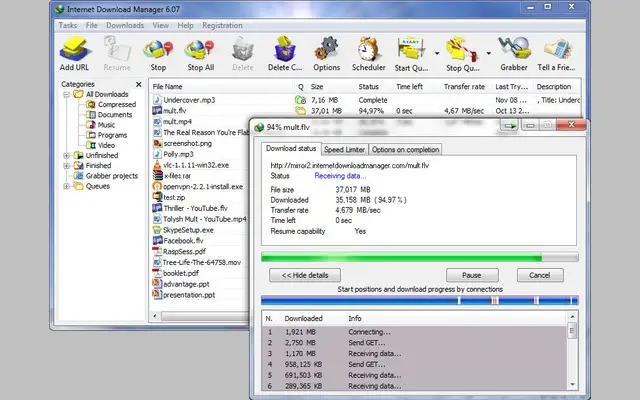
The built-in Scheduler allows users to arrange downloads for a selected time.
Users can create download queues, schedule transfers, and configure certain actions to occur when a queue finishes.
This is useful when downloading large files or managing internet usage during specific hours.
5. Batch Downloading
IDM can add multiple files to a download queue. Users can manage several downloads together rather than opening every file individually.
The Download All feature can also collect supported download links from a web page.
6. Download Categories
IDM automatically organizes downloads into categories according to file types and configured rules.
Users can manage documents, compressed files, programs, music, and videos through separate download categories.
Custom categories and download locations can also be configured.
7. Video Download Panel
IDM provides a browser video download panel on supported websites. When compatible media is detected, users may see an option to download the available stream.
This feature does not work on every website or every video. Website restrictions, DRM protection, technical changes, and browser compatibility can affect availability.
Only download media when you have the necessary permission and the website’s terms allow it.
8. Proxy and Protocol Support
IDM supports HTTP, HTTPS, and FTP downloads, along with proxy-related configuration options.
These settings can help users manage downloads in different network environments. Authentication, server configuration, and connection restrictions may affect individual downloads.
9. Customizable Interface
The application allows users to customize parts of its interface, including toolbar buttons, columns, and visual themes.
Users can organize the main download window according to their preferences and choose available toolbar styles.
10. Error Recovery and Download Management
IDM includes error recovery features for supported downloads. It can manage interrupted transfers, maintain download information, and help users organize ongoing tasks.
These features make it useful for people who regularly download large files or manage multiple transfers.
IDM 6.42.52 Version Information
Internet Download Manager 6.42 Build 52 was released on October 23, 2025.
According to the official changelog, this release addressed a problem that caused a 403 Forbidden error when downloading certain files and included additional bug fixes.
It belongs to the 6.42 release series and is not the newest IDM version in November 2026.
The official changelog lists later releases, including IDM 6.43 Build 18, released on November 4, 2026.
Users should check the official release history before installing an older build. Newer releases may contain browser-integration improvements, download fixes, and other compatibility changes.
Browser Compatibility and Integration
IDM can integrate with compatible web browsers through the IDM Integration Module extension.
For browser integration to work correctly:
- Install a supported version of IDM.
- Install the official IDM Integration Module extension.
- Enable the extension in your browser.
- Make sure browser integration is enabled in IDM’s General settings.
- Restart the browser after making integration changes.
If the download panel does not appear, check whether the extension is enabled and whether the website supports the type of media or file being downloaded.
System Requirements and Compatibility
IDM is a Windows application. Its official website lists support for Windows 7, Windows 8/8.1, Windows 10, and Windows 11.
However, compatibility with older operating systems may require additional updates. For example, IDM documents a SHA-256 signature support requirement for certain Windows 7 installations.
Before installing IDM, check the following:
- Operating system: Confirm that your Windows version is supported by the IDM release.
- Processor: Use a processor compatible with the selected Windows version.
- Memory: Ensure that your computer has enough RAM for Windows, IDM, and other running applications.
- Storage: Keep sufficient free space for the application and downloaded files.
- Browser: Use a compatible browser and the official IDM Integration Module.
- Network: A stable internet connection helps maintain reliable downloads.
The old Pentium IV and 1 GB RAM figures sometimes quoted in third-party articles should not be treated as a complete or verified specification for every current IDM release.
IDM Licensing and Free Trial
Internet Download Manager is commercial software. The official website provides a 30-day free trial so users can evaluate the application before purchasing it.
After the trial period, users need to purchase a license to continue using the registered version.
A legitimate serial number is provided through the official purchase process. Public serial-number lists, key generators, patches, and unauthorized activation tools do not provide a valid license.
For licensing information, use the official IDM website.
How to Install Internet Download Manager
Follow these steps to install IDM safely:
- Open the official Internet Download Manager website.
- Download the installer for Windows.
- Run the downloaded setup file.
- Follow the installation instructions.
- Allow the installer to complete.
- Launch Internet Download Manager.
- Install the official IDM Integration Module extension in your browser.
- Enable the extension in your browser settings.
- Open IDM’s General options and check browser integration.
- Test the application with a permitted file download.
If you decide to continue using IDM after the trial, purchase a legitimate license from the official website.
Avoid modified installers, unauthorized serial numbers, and activation patches.
Internet Download Manager Alternatives
Users who mainly need browser-based media downloads may also compare IDM with dedicated video download applications.
You can explore our 4K Video Downloader guide to learn about another application focused on online video downloads.
When comparing download managers, consider browser integration, supported protocols, download scheduling, resume functionality, file organization, and licensing costs.
Frequently Asked Questions
What is Internet Download Manager used for?
IDM is used to manage file downloads, organize download queues, resume interrupted transfers, schedule downloads, and integrate with compatible web browsers.
Is IDM 6.42.52 the latest version in 2026?
No. IDM 6.42 Build 52 was released in October 2025. The official changelog lists newer releases, including version 6.43 Build 18 from November 2026.
Does IDM increase download speed?
IDM uses dynamic file segmentation and multiple connections to improve download performance. Actual speeds depend on the internet connection, server, and website restrictions.
Does IDM support Chrome and Microsoft Edge?
Yes. IDM supports integration with compatible versions of Google Chrome and Microsoft Edge through its official browser extension.
Can IDM resume interrupted downloads?
Yes, IDM can resume supported downloads after interruptions such as network problems or computer shutdowns. Resume support also depends on the remote server.
Is Internet Download Manager free?
IDM offers a 30-day free trial. Continued use of the registered version requires purchasing a legitimate license.
Does IDM work on Windows 11?
Yes. The official IDM website lists Windows 11 among its supported operating systems. Users should install a current compatible IDM release.
Is IDM available for Mac?
IDM is a Windows application. It does not provide a native macOS version.
Why is the IDM video download panel not appearing?
The panel may not appear if the browser extension is disabled, IDM is outdated, the website has changed its media delivery system, or the video is not supported.
Final Thoughts
Internet Download Manager is a useful Windows download manager with dynamic file segmentation, download recovery, browser integration, scheduling, batch downloading, and file organization.
Version 6.42 Build 52 is an older release from October 2025. Users who want the latest improvements should check the official release history and install a supported current version.
For the safest experience, download IDM from its official website, use the legitimate trial or purchased license, and keep its browser extension updated.



Recent Comments