
IObit Malware Fighter Pro Review: Features, Protection & Setup Guide
IObit Malware Fighter Pro Review: Features, Protection & Setup Guide
IObit Malware Fighter Pro is a Windows security application developed by IObit. It is designed to detect malware, protect against ransomware, block suspicious online activity, and help safeguard personal information. The software combines IObit’s anti-malware technology with additional protection engines and security tools in its Pro edition.
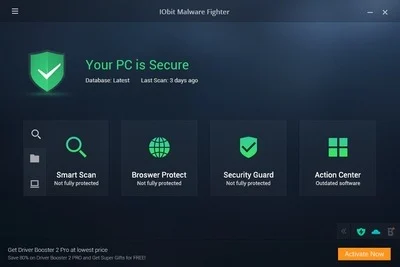
Its features include real-time protection, malware scanning, browser protection, ransomware defense, and Safe Box for protecting selected files and folders. This guide explains its main features, Free and Pro editions, system requirements, version history, and official installation process.
What Is IObit Malware Fighter Pro?
IObit Malware Fighter Pro is an anti-malware and PC protection utility for Windows. It helps identify and remove threats such as spyware, adware, Trojans, keyloggers, ransomware, and other potentially harmful programs.
The application provides several scanning options and background protection features. Users can scan their computers, review detected threats, and choose whether to remove or quarantine suspicious items.
The Pro edition adds additional security features, including Bitdefender protection, anti-ransomware tools, and Safe Box.
IObit Malware Fighter Version 12.2.0.1495
Version 12.2.0.1495 is the older version referenced in the original article title. It should not be presented as the latest 2026 release.
IObit’s official update history lists IObit Malware Fighter 14.0.0, released on November 2, 2026. The release includes an updated Bitdefender engine, improvements to IObit’s anti-malware engine, enhanced startup scanning, browser protection improvements, and an expanded threat database.
If you are installing the software on a modern Windows computer, check IObit’s official download page for the latest supported release instead of relying on an old version advertised as a 2026 download.

Key Features of IObit Malware Fighter Pro
1. Bitdefender Protection Engine
The Pro edition includes the Bitdefender engine alongside IObit’s own anti-malware technology. This provides an additional detection layer for identifying potentially harmful files and programs.
The availability and activation status of individual engines can depend on the installed edition and settings.
2. Real-Time Malware Protection
Real-time protection monitors selected system activity and files to help detect threats before they can cause damage.
It is designed to provide ongoing protection rather than relying only on occasional manual scans. Keep the protection features enabled and maintain an up-to-date threat database.
3. Anti-Ransomware Protection
Ransomware can encrypt personal files and demand payment to restore access. IObit Malware Fighter Pro includes an anti-ransomware engine designed to help detect and prevent suspicious file-encryption activity.
Its protection features can help safeguard important documents, but they should not replace regular offline or cloud backups.
4. Safe Box
Safe Box is a feature designed to protect selected files and folders from unauthorized access.
Users can add sensitive information to the protected area and configure password protection through the program’s settings. This can provide an additional layer of privacy for personal documents.
5. Browser Protection
Browser protection helps users avoid suspicious websites, harmful links, unwanted redirects, and certain online threats.
Depending on the installed version, supported browser tools can include protection for Chrome, Microsoft Edge, Firefox, and other listed browsers.
6. USB Disk Protection
USB drives can carry malicious files between computers. The USB protection feature helps detect threats associated with removable storage devices.
Scan unfamiliar USB drives before opening files or running programs from them.
7. Camera Protection
Camera protection helps prevent unauthorized applications from accessing a connected webcam.
This feature is useful for users who want additional control over applications that request camera access.
8. Startup and Process Protection
Security Guard includes tools that monitor selected startup items and suspicious processes.
These tools can help identify potentially harmful activity during Windows startup or while applications are running.
9. Automatic Updates
Keeping the program and its malware database updated is important for detecting newer threats.
IObit provides automatic program and database updates for Pro users. Users should check the update settings to ensure that the software is receiving current protection information.
10. Custom and Full System Scans
IObit Malware Fighter offers different scanning options:
- Smart Scan: Checks important areas of the computer.
- Full Scan: Examines computer storage more comprehensively.
- Custom Scan: Lets users choose specific drives, folders, or locations.
- Right-Click Scan: Allows users to scan a selected file or folder from the Windows context menu.
A full scan may take longer than a smart scan, depending on the amount of stored data and computer performance.
IObit Malware Fighter Free vs Pro
IObit offers both Free and paid Pro editions. The Pro edition adds additional protection tools and features.
| Feature | Free edition | Pro edition |
|---|---|---|
| Basic malware scanning | Available | Available |
| IObit anti-malware engine | Available | Available |
| Bitdefender real-time engine | Not included | Included |
| Anti-ransomware engine | Limited | Included |
| Safe Box | Not included | Included |
| Additional security guards | Limited | Expanded |
| Automatic updates | Limited options | Available |
| Premium technical support | Not included | Included |
Feature availability may vary by release. Review the official comparison page before purchasing a subscription.
System Requirements
According to IObit’s official user manual, the listed requirements are:
| Component | Requirement |
|---|---|
| Operating system | Windows 11, 10, 8, and 7 |
| Processor | 1 GHz or faster |
| RAM | 2 GB |
| Free disk space | 1,000 MB |
| Screen resolution | 1024 × 768 or higher |
These are the requirements published in the user manual. Always check the current installer and official documentation for the requirements of a particular release.
How to Download IObit Malware Fighter
Follow these steps to obtain the software safely:
- Visit the official IObit website.
- Open the IObit Malware Fighter product page.
- Review the available Free and Pro editions.
- Select the edition that meets your requirements.
- Download the installer from IObit’s official download page.
- Save the setup file to your computer.
- Check that the downloaded file comes from the official source before opening it.
Avoid unofficial torrent packages, modified installers, and pre-activated versions. They may contain altered files or unwanted programs.
How to Install IObit Malware Fighter
- Download the official installer.
- Close unnecessary applications.
- Double-click the downloaded setup file.
- Review the installation options and license agreement.
- Follow the instructions displayed by the installer.
- Complete the installation.
- Launch IObit Malware Fighter.
- Allow the program to update its malware database.
- Review the protection settings and run an initial scan.
Important: Do not turn off Microsoft Defender or other security protections simply to install an unofficial copy. Use the official installer and follow the software’s normal installation instructions.
How to Activate IObit Malware Fighter Pro
The Pro edition requires a valid license code.
- Purchase a license through IObit or an authorized seller.
- Install the official version of IObit Malware Fighter.
- Open the program.
- Locate the Enter Code option on the main screen.
- Enter your valid license code.
- Select Register Now.
- Follow the on-screen instructions to complete activation.
Do not use shared serial numbers, key generators, patches, or unauthorized activation tools. These are not legitimate licensing methods and may expose your computer to security risks.
Advantages of IObit Malware Fighter Pro
- Combines IObit’s anti-malware engine with Bitdefender protection.
- Provides real-time malware protection.
- Includes ransomware defense in the Pro edition.
- Offers Safe Box for selected files and folders.
- Provides browser and download protection features.
- Includes USB and camera protection tools.
- Supports smart, full, and custom scans.
- Provides automatic program and database updates for Pro users.
Limitations of IObit Malware Fighter Pro
- Several advanced features require a paid Pro subscription.
- Full scans can take time on computers with large storage drives.
- Security software cannot guarantee protection against every threat.
- Some protection features require configuration before use.
- It is designed for Windows rather than macOS or Linux.
- No antivirus product should be treated as a replacement for regular backups and safe browsing practices.
Tips for Using IObit Malware Fighter Safely
- Keep the program and malware database updated.
- Leave real-time protection enabled.
- Schedule scans according to your computer usage.
- Scan USB drives before opening unfamiliar files.
- Review detected threats before removing important files.
- Keep Windows security updates installed.
- Back up important documents regularly.
- Download software only from official or trusted sources.
Frequently Asked Questions
Is IObit Malware Fighter Pro free?
IObit provides a Free edition. The Pro edition is paid and includes additional security features such as Bitdefender protection, anti-ransomware tools, and Safe Box.
Is IObit Malware Fighter 12.2.0.1495 the latest version?
No. Version 12.2.0.1495 is an older release. IObit’s official update history lists version 14.0.0, released on November 2, 2026.
Does IObit Malware Fighter support Windows 11?
Yes. Windows 11 is listed among the supported operating systems in IObit’s official user manual.
Does the Pro edition include Bitdefender?
Yes. IObit lists Bitdefender real-time protection as a Pro feature. The engine can be managed through the program’s protection settings.
Can IObit Malware Fighter protect files against ransomware?
The Pro edition includes an anti-ransomware engine and Safe Box features designed to help protect important files. However, regular backups remain essential.
Does IObit Malware Fighter scan USB drives?
Yes. Its USB Disk Guard helps protect computers against threats associated with removable USB storage.
How do I activate IObit Malware Fighter Pro?
Install the official program, open it, select Enter Code, and enter a valid license code purchased from IObit or an authorized seller.
Does IObit Malware Fighter replace Microsoft Defender?
It is a separate security product. Before running multiple real-time security products together, review their compatibility and configuration to avoid conflicts. Keep Windows security protections appropriately configured.
Final Verdict
IObit Malware Fighter Pro combines malware scanning, real-time protection, ransomware defense, browser security, and privacy tools in one Windows application. Its Pro edition adds useful features such as Bitdefender protection and Safe Box for users who want additional security options.
Version 12.2.0.1495 is an older release, so users looking for current protection should check IObit’s latest supported version. Download the installer from the official website, keep the threat database updated, and use a valid license for Pro features.



Recent Comments