
SyncBackPro Review: Backup, Sync & Restore Features
SyncBackPro Review: Backup, Sync & Restore Features
SyncBackPro is a professional backup and file synchronization application developed by 2BrightSparks. It helps individuals and organizations protect important files, manage backups, and synchronize data between different storage locations.
The software supports local drives, external storage, network locations, FTP servers, and several cloud storage services. It also provides advanced options for scheduling, file comparison, encryption, and automated backup tasks.
One of its main advantages is flexibility. Users can create separate profiles for different backup jobs and configure each profile according to their needs.
What Is SyncBackPro?
SyncBackPro is a Windows-based backup and synchronization program. It allows users to create backups, mirror folders, synchronize files, and restore data when needed.
You can configure profiles to transfer files between different locations. For example, you can back up documents from your computer to an external hard drive or synchronize project folders with cloud storage.
The application is suitable for personal use, small businesses, and organizations that need reliable file management.
SyncBackPro can also work with SyncBack Touch to access supported Windows, macOS, Linux, and Android devices remotely. However, SyncBackPro itself is installed on a Windows computer.
Is SyncBackPro Free?
SyncBack is available in three main editions:
- SyncBackFree: A free edition for basic backup, mirroring, synchronization, and restoration.
- SyncBackSE: A paid edition with additional backup and synchronization features.
- SyncBackPro: The advanced commercial edition with cloud backup, scripting, email backup, SFTP, and other professional tools.
2BrightSparks provides a fully functional 30-day trial of SyncBackPro. After the trial, users need a valid licence to continue using the commercial edition without the trial limitation.
Personal users can use one SyncBackSE or SyncBackPro licence on up to five devices for personal, non-commercial data. Business users need to follow the separate commercial licensing rules.

Main Features of SyncBackPro
1. Flexible Backup Scheduling
SyncBackPro includes scheduling options that help automate regular backup tasks.
You can configure profiles to run at selected times or intervals. This reduces the need to start every backup manually.
Scheduling is especially useful for users who work with important documents, business files, and frequently updated folders.
2. File Synchronization
The synchronization feature helps keep files and folders consistent across different storage locations.
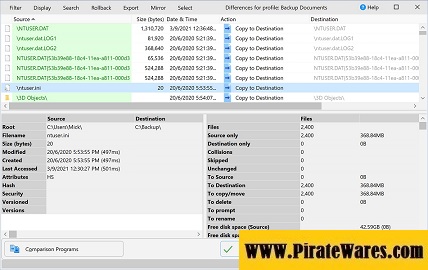
You can configure profiles to compare files and transfer changes according to your selected rules.
This is useful when working with multiple computers, external drives, or remote storage locations.
3. Multiple Backup Destinations
SyncBackPro supports several types of backup destinations.
Depending on your configuration, you can work with:
- Internal hard drives
- External USB drives
- Network locations and NAS devices
- FTP and FTPS servers
- SFTP servers
- Cloud storage services
- Remote devices through SyncBack Touch
This flexibility allows users to choose a destination that matches their storage and security requirements.
4. Cloud Backup and Synchronization
Cloud support is one of the major advantages of SyncBackPro.
The application supports services such as:
- Google Drive
- Microsoft OneDrive
- OneDrive for Business
- Dropbox
- Amazon S3
- Backblaze B2
- Microsoft Azure Blob Storage
- Box
- pCloud
- SharePoint
Available services can change between versions. Check the official documentation for the current supported providers.
5. Advanced Encryption
SyncBackPro offers encryption options for protecting backup data.
It supports AES encryption for compatible backup archives. It can also use secure connections when transferring data through supported cloud and SFTP services.
Remember that encryption during file transfer and encryption of stored backup files are different things. Configure both when your backup strategy requires protection at rest and during transmission.
6. File Compression
The software supports several compression methods to help reduce backup storage requirements.
Depending on the selected format and settings, you can use ZIP-compatible compression and other supported methods such as LZMA2.
Compression can save space, although the processing time depends on the file types and computer hardware.
7. Email Notifications and Logging
SyncBackPro can create logs that describe the results of backup and synchronization tasks.
It also provides notification options that help users monitor completed jobs and identify errors.
These features are useful when backups run automatically in the background.
8. Scripting and Customization
Advanced users can use scripting to customize profiles and control how certain backup tasks operate.
This provides additional flexibility for specialized workflows and business environments.
You can also configure actions to run before or after a profile, depending on the task requirements.
9. Automatic Drive Failure Detection
SyncBackPro supports S.M.A.R.T.-based drive failure monitoring.
When supported by the computer BIOS and storage device, the application can report indications of possible drive failure in its logs and profile status.
This feature can help users notice storage problems, but it does not replace regular backups or dedicated drive health checks.
10. File Integrity Checking
File integrity checking helps verify whether backup files remain complete and valid.
This is important because a backup is only useful when the stored data can be accessed and restored successfully.
Regular verification is a good practice for important personal and business files.
What’s New in SyncBackPro V12?
SyncBackPro V12 introduced several improvements over earlier major releases.
Official V12 information highlights features such as:
- Support for additional cloud and object storage services.
- Improved scripting capabilities.
- Additional secrets manager integrations.
- Advanced logging options.
- Improvements to remote profile monitoring.
- Parallel SFTP file transfers.
- File previews in selection and comparison windows.
- Improved handling of locked files through supported services.
These improvements make V12 a significant update for users who manage larger or more complex backup workflows.
The exact changes available depend on the installed release and configuration.
System Requirements
According to 2BrightSparks’ updated requirements, the following hardware specifications are recommended for SyncBack software.
| Component | Minimum requirement | Recommended |
|---|---|---|
| Operating system | Windows 7 SP1 or later | Windows 10 or 11 |
| Processor | Dual-core x86 CPU | Quad-core or better x86 CPU |
| RAM | 1 GB for 32-bit; 2 GB for 64-bit | 8 GB |
| Screen resolution | 1024 × 768 | 1280 × 1024 or better |
| Free disk space | 500 MB | 1 GB |
Both 32-bit and 64-bit versions of SyncBackPro are available.
SyncBack Touch has separate requirements for macOS, Linux, Android, and supported Windows devices.
How to Download and Install SyncBackPro
For the safest installation, download the setup file directly from the official 2BrightSparks website.
- Visit the official SyncBackPro download page.
- Select the appropriate 32-bit or 64-bit installer.
- Download the setup file.
- Open the installer and follow the instructions.
- Complete the installation process.
- Launch SyncBackPro from the Start menu.
- Create your first backup profile.
- Select the source and destination folders.
- Configure the backup options and schedule.
- Run a test backup and check the results.
You can use the official trial to evaluate the application before purchasing a licence.
How to Create a Backup Profile
Creating a backup profile is one of the main tasks in SyncBackPro.
- Open SyncBackPro.
- Select the option to create a new profile.
- Choose the backup or synchronization profile type.
- Enter a suitable profile name.
- Select the source folder containing your important files.
- Choose the destination folder or storage service.
- Review the comparison and transfer settings.
- Save the profile.
- Run a simulated test if available.
- Start the backup and review its log.
For important data, keep at least one additional backup on a separate storage device or location. Also test your restore process regularly.
Advantages and Limitations
Advantages
- Supports multiple backup and synchronization methods.
- Provides flexible scheduling options.
- Supports many cloud storage providers.
- Includes SFTP and secure transfer options.
- Offers encryption and compression.
- Supports scripting and advanced customization.
- Provides logging and file integrity checking.
- Works with SyncBack Touch for supported remote devices.
Limitations
- SyncBackPro is a commercial application after its trial period.
- Advanced settings may take time for beginners to understand.
- Large backup jobs can require considerable storage and processing resources.
- Cloud services may require separate accounts or subscriptions.
- SyncBackPro is a Windows application; other operating systems use SyncBack Touch for supported remote-device access.
Frequently Asked Questions
What is SyncBackPro used for?
SyncBackPro is used to back up, synchronize, mirror, and restore files and folders. It supports local storage, network locations, FTP, SFTP, and cloud services.
Is SyncBackPro free?
SyncBackPro is a paid application with a 30-day fully functional trial. Users who need a free solution can consider SyncBackFree, which offers basic backup and synchronization features.
Does SyncBackPro support Windows 11?
Yes. The official download information lists Windows 11 as a supported operating system.
Can SyncBackPro back up files to Google Drive?
Yes. SyncBackPro supports Google Drive backup and synchronization, along with several other cloud storage services.
Does SyncBackPro support macOS and Linux?
SyncBackPro itself is designed for Windows. However, SyncBack Touch can run on supported macOS and Linux devices and work with SyncBackPro for remote file access and transfers.
Can SyncBackPro detect hard drive problems?
Yes. It supports S.M.A.R.T.-based drive failure detection when the computer and storage hardware support the required functionality.
What is the latest version of SyncBackPro?
The official download page currently lists SyncBackPro V12.1.34.0. Older V11 releases are available through the legacy downloads page.
Final Verdict
SyncBackPro is a feature-rich backup and synchronization solution for users who need more control over their data management tasks.
Its support for cloud storage, scheduling, encryption, scripting, and file integrity checking makes it suitable for advanced personal and business workflows.
Beginners can start with basic backup profiles, while experienced users can configure more complex automated tasks. If you need a professional Windows backup application, SyncBackPro is worth evaluating through its official trial.


Recent Comments