
Advanced JPEG Compressor 2012 Review: Features & Image Optimization
Advanced JPEG Compressor 2012 Review: Features & Image Optimization
Advanced JPEG Compressor is a Windows application developed by WinSoftMagic Inc. It helps users reduce JPEG image sizes while maintaining a suitable level of visual quality. In addition, it provides tools for resizing, cropping, rotating, watermarking, and adjusting photographs.
The software can help photographers, website owners, and everyday users prepare images for sharing, storage, and printing. For example, users can compare original and compressed photographs before saving the final result. This makes it easier to choose a suitable balance between image quality and file size.
This guide focuses on Advanced JPEG Compressor 2012.9.3.100, an older release from the product’s 2012 version series. It explains the main features, compression controls, batch-processing workflow, system compatibility, and modern alternatives.
What Is Advanced JPEG Compressor?
Advanced JPEG Compressor is a photo optimization and editing application for Windows. It focuses on JPEG compression, although it also provides several basic image-editing and conversion tools.
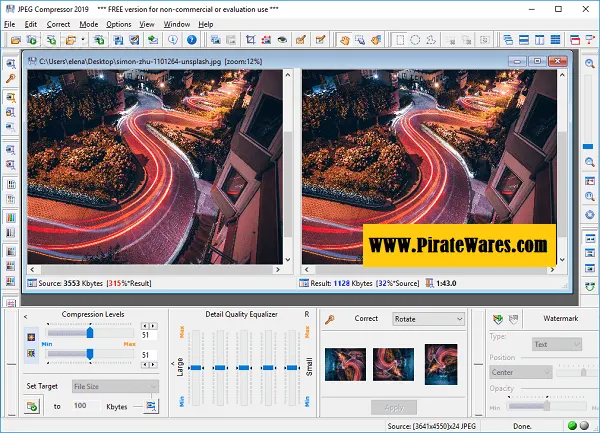
The application lets users adjust compression settings and preview the results before saving a photograph. Therefore, users can compare the original image with the compressed version and decide whether the quality remains acceptable.
Moreover, the software includes batch-processing options. These tools help users work with multiple images instead of editing every photograph separately.
Advanced JPEG Compressor was developed by WinSoftMagic Inc. It is proprietary software, not an open-source application. Also, users should not confuse JPEG compression with lossless compression because JPEG normally trades some image information for a smaller file size
-
Key Features of Advanced JPEG Compressor
1. JPEG Image Compression
The main purpose of Advanced JPEG Compressor is to reduce the size of JPEG photographs.
Users can adjust compression settings to control the relationship between file size and visual quality. For example, stronger compression generally creates smaller files, but it can also introduce visible image artefacts.
Therefore, preview the result before saving important photographs. This helps you avoid unnecessary quality loss.
2. Before-and-After Image Preview
Advanced JPEG Compressor provides separate preview areas for the original and processed images.
As a result, users can compare the two versions while changing compression settings. This feature makes it easier to notice differences in sharpness, colors, and fine details.
Additionally, the preview helps users select suitable settings for photographs that contain faces, text, or detailed backgrounds.
3. Batch Image Processing
The batch-processing feature allows users to process multiple images in one operation.
Instead of opening and saving every photograph individually, users can add several files and apply selected settings. Furthermore, the application supports batch profiles that help maintain consistent results across similar images.
This feature is particularly useful when preparing image collections for websites, email attachments, or photo archives.
4. Compression Profiles
Compression profiles store frequently used settings. Users can create, save, edit, and apply these profiles to other photographs.
For example, you can create one profile for website images and another for email attachments. Later, you can reuse the appropriate profile without adjusting every setting again.
Consequently, profiles make repeated image-processing tasks faster and more consistent.
5. Image Resizing
Advanced JPEG Compressor includes image resizing and resampling tools. These options help users change image dimensions before saving the final file.
For example, you can reduce a large photograph to create a smaller web image or thumbnail. The application also provides different interpolation methods to control how it resamples images.
However, choose dimensions carefully because excessive resizing can reduce image detail.
6. Cropping and Rotation
The built-in editing tools allow users to crop unnecessary image areas and rotate photographs.
Cropping helps remove unwanted edges or focus attention on the main subject. Similarly, rotation can correct the orientation of an image before compression.
As a result, users can perform several basic editing tasks without opening a separate photo editor.
7. Color and Image Adjustments
The application includes controls for adjusting image appearance. Depending on the selected tool, users can work with brightness, contrast, saturation, hue, color levels, and temperature.
These adjustments help improve photographs before compression. Nevertheless, apply them carefully and compare the final result with the original image.
8. Watermarking
Advanced JPEG Compressor includes image-watermarking functionality.
Users can add text or graphic marks to photographs to identify ownership or add branding. In addition, they can adjust the watermark’s position to suit the image.
This feature can help photographers and website owners prepare branded images for online sharing.
9. Selective JPEG Compression
One notable feature is selective image compression. It allows users to apply different compression levels to different image areas.
For example, a user may want to preserve more detail around a person’s face while applying stronger compression to less important background areas.
Therefore, selective compression can help maintain important visual details while reducing the overall file size.
10. Progressive JPEG Support
Advanced JPEG Compressor supports progressive JPEG images.
Unlike a standard baseline JPEG, a progressive JPEG can display an initial rough version of an image and gradually improve its appearance as more data loads.
This format can be useful for certain web-image workflows. However, the actual loading experience also depends on the browser, network connection, and image size.
11. Image Format Conversion
The application can convert several image formats into JPEG. Its documented input formats include GIF, TIFF, PNG, and BMP.
This feature helps users prepare different image types for JPEG-based workflows. However, remember that converting an image to JPEG can introduce lossy compression.
If you need to preserve transparency or edit an image repeatedly, keep the original PNG or other source file.
12. Metadata and TWAIN Support
Advanced JPEG Compressor includes options for viewing or editing information embedded in JPEG files, such as comments, signatures, and copyright notices.
Additionally, it supports image acquisition from compatible TWAIN devices, including certain scanners and digital cameras.
These options make the application useful for more than basic file-size reduction.
What Can You Use Advanced JPEG Compressor For?
The application supports several everyday image-processing tasks.
For example, you can use it to:
- Reduce the size of large JPEG photographs.
- Prepare images for website uploads.
- Resize photographs for email attachments.
- Create smaller thumbnails.
- Convert PNG, GIF, TIFF, and BMP images into JPEG.
- Apply watermarks to photographs.
- Crop and rotate image files.
- Process multiple photographs with batch settings.
- Create reusable compression profiles.
- Adjust image colors before saving.
In addition, photographers can use its preview controls to compare different compression settings before choosing the final output.
For time-lapse photography and image-sequence editing, you can also explore our LRTimelapse Pro guide. It covers a different workflow involving RAW, DNG, and JPEG photographs.
Advanced JPEG Compressor 2012.9.3.100: Version Information
Version 2012.9.3.100 belongs to the older 2012 release series. It should not be advertised as the latest version available in 2026.
Some software catalogues list later builds in the 2012.9.3 series. However, the availability of an archived version does not confirm that WinSoftMagic still provides current development or support for that specific release.
Therefore, users should check the publisher’s website for current product information before installing an older copy.
Also, do not assume that a 2012 installer supports every modern Windows feature or security standard.
Advanced JPEG Compressor System Requirements
Advanced JPEG Compressor is a Windows application. Historical software listings associate the 2012 edition with older Windows versions, including Windows XP, Vista, and Windows 7.
However, the available product information does not establish a reliable official minimum RAM or disk-space requirement for version 2012.9.3.100. Therefore, the figures in older download descriptions should not be treated as confirmed specifications.
Component Information Software Advanced JPEG Compressor Version covered 2012.9.3.100 Developer WinSoftMagic Inc. Platform Windows Architecture Check the exact installer Main function JPEG compression and image editing Internet connection Needed for online downloads; not necessarily for local image processing License Proprietary software For modern Windows computers, compatibility may vary because this is an older application. Check the installer source and test it with non-essential image files before using it in an important workflow.
How to Install Advanced JPEG Compressor
For a safer installation, use a legitimate installer from the publisher or a trustworthy software archive.
- First, locate the original Advanced JPEG Compressor installer.
- Check the publisher and file information before opening it.
- Scan the downloaded file with your security software.
- If the installer passes your checks, open it.
- Follow the installation instructions on screen.
- Launch Advanced JPEG Compressor after installation.
- Open a sample JPEG photograph.
- Adjust the compression settings and compare the preview.
- Save the output under a new filename so you preserve the original photograph.
Avoid unofficial activation patches, key generators, and modified installers. In addition, do not assume that a file is safe simply because a download page claims that antivirus software scanned it.
Is Advanced JPEG Compressor Portable?
The original article describes a portable edition, but I could not verify an official portable release for version 2012.9.3.100.
A compressed ZIP or RAR archive does not automatically make an application portable. A genuine portable edition should run without a conventional installation and should not depend on unverified modifications.
Therefore, check the publisher’s documentation before describing this particular version as portable.
Advantages and Limitations
Advantages
- Provides dedicated JPEG compression controls.
- Offers before-and-after image previews.
- Supports batch image processing.
- Includes reusable compression profiles.
- Provides resizing, cropping, and rotation tools.
- Supports watermarking and basic color adjustments.
- Includes selective compression options.
- Supports progressive JPEG images.
- Can convert several image formats into JPEG.
Limitations
- Version 2012.9.3.100 is an older release.
- It targets Windows rather than macOS or Linux.
- Modern Windows compatibility is not guaranteed.
- JPEG compression can reduce image quality.
- The software is proprietary, not open source.
- Current support and update availability require confirmation.
- An official portable package for this exact build could not be verified.
-
Advanced JPEG Compressor Alternatives
If you need a modern image-compression workflow, consider these alternatives.
1. JPEG Compressor by WinSoftMagic
WinSoftMagic also provides a JPEG Compressor product with compression controls, image previews, profiles, resizing, and other image-processing features.
Users who prefer the same developer’s compression workflow can compare its current product information with the older Advanced JPEG Compressor edition.
2. Caesium Image Compressor
Caesium Image Compressor is an image optimization option for reducing file sizes. It can help users prepare photographs for websites and other digital uses.
Check its current release and supported formats before selecting it for a particular workflow.
3. RIOT (Radical Image Optimization Tool)
RIOT focuses on image optimization and provides controls for comparing image quality and file size. It can be useful when preparing images for web publishing.
4. ImageMagick
ImageMagick is a command-line image-processing suite. It supports image conversion, resizing, and other processing operations.
It can suit advanced users who want to automate image tasks through scripts.
5. 4dots Simple Video Compressor
If your project involves video rather than still photographs, you can read our guide to 4dots Simple Video Compressor.
It handles video compression, so it is not a direct replacement for an image compressor. However, it may be useful when you also need to reduce the size of video files.
Frequently Asked Questions
What is Advanced JPEG Compressor used for?
Advanced JPEG Compressor helps users reduce JPEG file sizes and perform basic image-editing tasks. It also provides resizing, cropping, rotation, watermarking, and batch-processing features.
Who developed Advanced JPEG Compressor?
WinSoftMagic Inc. developed Advanced JPEG Compressor. It is not a Bill Atkinson application.
Is Advanced JPEG Compressor open source?
No. Advanced JPEG Compressor is proprietary software. Users should check the publisher’s licensing terms before using it.
Does Advanced JPEG Compressor support Mac?
The documented application targets Windows. I could not verify a native macOS or Linux edition.
Can Advanced JPEG Compressor process multiple images?
Yes. Its batch-processing feature lets users work with multiple images and apply saved compression profiles.
Does JPEG compression reduce image quality?
Usually, yes. JPEG uses lossy compression, which removes some image information to reduce file size. However, users can adjust the compression level to balance file size and visual quality.
Can Advanced JPEG Compressor resize images?
Yes. It includes image-resizing and resampling tools. Users can change image dimensions and create smaller versions for websites or other purposes.
Can I convert PNG images into JPEG?
Yes. The documented conversion workflow supports formats such as PNG, GIF, TIFF, and BMP as input for JPEG output. However, JPEG does not preserve transparency, so keep the original PNG if you need a transparent background.
Is version 2012.9.3.100 the latest release?
No reliable evidence confirms that this 2012 build is the latest version in 2026. Treat it as an older release and check the publisher’s current product information.
Is Advanced JPEG Compressor portable?
I could not verify an official portable edition for version 2012.9.3.100. Check the publisher’s documentation before relying on a portable package.
Final Verdict
Advanced JPEG Compressor 2012 provides a focused set of tools for JPEG optimization and basic photo editing. Its compression previews, batch processing, reusable profiles, resizing, watermarking, and selective compression features can help users prepare photographs for sharing and storage.
However, version 2012.9.3.100 is an older Windows release. It also lacks a verified modern compatibility guarantee. Therefore, users should check the installer source and compare newer image-compression tools before choosing it for a new workflow.
For people who maintain older Windows applications, Advanced JPEG Compressor may still be worth examining. Nevertheless, always preserve original photographs and review the final image quality before replacing any source files.
Official and Product Resources
- WinSoftMagic JPEG Compressor features: https://jpeg.compressor.software/features/
- Advanced JPEG Compressor product information: https://advanced-jpeg-compressor.software.informer.com/
- WinSoftMagic product information: https://www.winsoftmagic.com/


Recent Comments