
LRTimelapse Pro Review: Features, Workflow & Installation Guide
LRTimelapse Pro Review: Features, Workflow & Installation Guide
LRTimelapse Pro is a specialized application for creating professional time-lapse videos from image sequences. It helps photographers and filmmakers edit, animate, grade, deflicker, and render sequences captured with DSLR, mirrorless, and other compatible cameras.
The software supports RAW, DNG, and JPEG workflows and can work independently or alongside Adobe Lightroom Classic. Its tools are particularly useful for day-to-night transitions, long-term time-lapse projects, and sequences that require consistent exposure and color adjustments.
This guide covers LRTimelapse’s main features, supported workflows, version information, system requirements, and official installation process.
What Is LRTimelapse Pro?
LRTimelapse is a time-lapse editing and rendering application developed by Gunther Wegner. It is designed to make large collections of photographs look like smooth, consistent video sequences.
Instead of manually adjusting every photograph, users can create keyframes and apply editing changes across an image sequence. When used with Lightroom Classic, LRTimelapse can coordinate adjustments through its dedicated workflow and Lightroom integration.
The application supports both Windows and macOS, including modern Intel and Apple Silicon systems.
Key Features of LRTimelapse Pro
1. Keyframe Animation
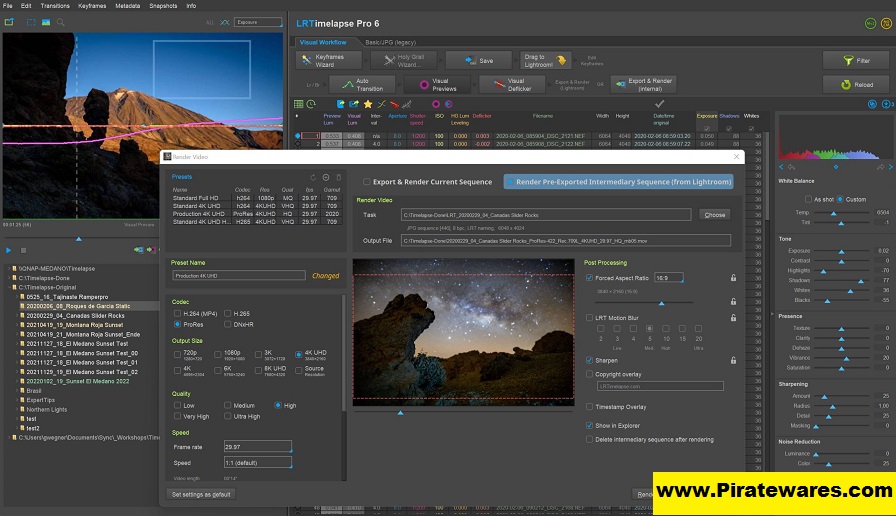
Keyframes allow users to define editing adjustments at selected points in a sequence. LRTimelapse helps interpolate changes between those points, creating smoother transitions throughout the time-lapse.
2. RAW, DNG, and JPEG Support
The application supports common image formats used in time-lapse photography, including RAW, DNG, and JPEG. This gives photographers flexibility when working with different cameras and image-processing workflows.
3. Holy Grail Wizard
The Holy Grail Wizard helps create day-to-night and night-to-day transitions. It is designed for sequences where lighting conditions change significantly during the capture process.
4. Visual Deflicker
Exposure and brightness variations can make a time-lapse appear uneven or flicker. LRTimelapse provides visual deflicker tools to help reduce these unwanted changes and produce more consistent footage.
5. Lightroom Classic Integration
LRTimelapse can work with Adobe Lightroom Classic to coordinate image adjustments. Users can edit keyframes in Lightroom and synchronize the changes with their time-lapse sequence.
The workflow uses metadata and dedicated Lightroom integration tools to transfer adjustments between applications.
6. Motion Blur Effects
LRTimelapse includes motion-blur blending tools that can help create smoother-looking movement in suitable sequences. The final appearance depends on the source images and selected settings.
7. Video Rendering
The software supports several output formats, including H.264, H.265/HEVC, ProRes, and DNxHR. It also supports high-resolution rendering, including 4K and 8K workflows, depending on the selected format and available hardware.
8. Batch Processing
Batch capabilities help users process multiple time-lapse sequences more efficiently. This is particularly useful for photographers managing several projects or large image collections.
9. Color-Managed Workflow
Color management helps maintain consistent color reproduction throughout editing and rendering. This is important when preparing footage for professional post-production.
What’s New in LRTimelapse 7.3?
LRTimelapse 7.3 was officially released on February 9, 2025. It introduced several improvements and fixes.
Some notable changes included:
- A configuration reset option during startup.
- Additional rendering speed options, including one-third and three-times speed.
- Preservation of original creation dates when saving XMP metadata to JPG files.
- An image-count indicator in the importer.
- Improvements to timestamp subtitle handling.
- Better handling of file deletion and network-drive issues.
- Fixes for batch transitions, metadata operations, and export-related problems.
Version information: Version 7.3 is a historical release, not the latest version. The developer’s update archive lists LRTimelapse 7.5.5 as available in September 2026. Check the official website for the current installer and release notes.
LRTimelapse Pro System Requirements
The developer’s End User License Agreement specifies a 64-bit environment and at least 8 GB of free RAM. A fast SSD is recommended, along with a monitor resolution of at least 1920 × 1080.
| Component | Requirement |
|---|---|
| Operating system | Supported 64-bit Windows or macOS |
| RAM | At least 8 GB free RAM |
| Storage | SSD recommended |
| Display | Minimum 1920 × 1080 |
| Architecture | Intel or Apple Silicon on supported Mac systems |
| Additional software | Adobe DNG Converter |
| Lightroom integration | Adobe Lightroom Classic, when using that workflow |
LRTimelapse officially supports Windows 7 or later and macOS 11 or later according to its EULA. However, compatibility with older operating systems is not guaranteed. Check the current installation notes before installing.
How to Download and Install LRTimelapse
For security and compatibility, download the application from the developer’s official website rather than unofficial modified installers.
- Visit the official LRTimelapse website: https://lrtimelapse.com/
- Open its Download page.
- Select the installer for your operating system.
- Download and install Adobe DNG Converter as required.
- Close Lightroom Classic and any older LRTimelapse installation before starting the installer.
- Run the downloaded installer and follow the on-screen instructions.
- Open LRTimelapse and follow the developer’s workflow guide.
- If you use Lightroom Classic, check the integration settings described in the official installation instructions.
The official installation guide explains the required Lightroom settings and additional components.
Is LRTimelapse Pro Free?
LRTimelapse offers a limited free evaluation option so users can explore the application before purchasing a license. Some advanced features and usage limits depend on the license edition.
The Pro edition is intended for users who need professional rendering options, advanced processing features, and commercial-use capabilities. Check the official licensing page for current restrictions, pricing, and upgrade terms.
A legitimate license is required for continued use beyond the permitted evaluation limits. Avoid unofficial license keys, key generators, and modified installers.
LRTimelapse Pro: Frequently Asked Questions
1. What is LRTimelapse used for?
LRTimelapse is used to edit, animate, deflicker, grade, and render time-lapse sequences created from photographs.
2. Does LRTimelapse work with Lightroom Classic?
Yes. LRTimelapse integrates with Adobe Lightroom Classic and provides a workflow for editing keyframes and synchronizing image adjustments.
3. Does LRTimelapse support RAW images?
Yes. It supports RAW, DNG, and JPEG workflows, making it suitable for many DSLR and mirrorless camera systems.
4. Is LRTimelapse available for Windows and macOS?
Yes. The developer provides installers for supported Windows and macOS systems, including supported Intel and Apple Silicon environments.
5. What is the Holy Grail Wizard?
The Holy Grail Wizard helps photographers manage changing exposure conditions when creating day-to-night or night-to-day time-lapse sequences.
6. Can LRTimelapse reduce flickering?
Yes. Its visual deflicker tools help reduce brightness and exposure inconsistencies that can make time-lapse footage appear uneven.
7. What is the latest LRTimelapse version?
The developer’s update archive lists version 7.5.5 as available in September 2026. Check the official download page for the latest release.
8. Does LRTimelapse require Adobe DNG Converter?
Yes. According to the developer’s installation instructions, Adobe DNG Converter is required even if you do not directly work with DNG files.
Final Thoughts
LRTimelapse Pro is a specialized solution for photographers and filmmakers who want more control over time-lapse editing. Its keyframe animation, visual deflicker, Lightroom Classic integration, and rendering tools make it useful for both simple sequences and demanding professional projects.
Before installing, check the official system requirements, choose the correct version for your operating system, and review the licensing options to make sure the application meets your needs.
For additional video-conversion workflows, you can also explore our Any Video Converter guide.
Official Resources:
- Official website: https://lrtimelapse.com/
- Official downloads: https://lrtimelapse.com/download/
- Installation guide: https://lrtimelapse.com/install/
- Version 7.3 release notes: https://lrtimelapse.com/updates/lrtimelapse-7-3/
- Licensing information: https://lrtimelapse.com/faq/



Recent Comments