
Animiz Animation Maker 2.5.8 Review: Features & Installation Guide
Animiz Animation Maker 2.5.8 Review: Features & Installation Guide
Animiz Animation Maker is a Windows-based application for creating animated video presentations, explainer videos, and GIFs. It is designed for beginners, educators, marketers, and content creators who want to produce engaging visual content without needing advanced animation or programming skills.
The software provides pre-designed templates, characters, images, shapes, animation effects, and a multi-track timeline. Users can combine these elements with text, music, and voiceovers to create presentations for business, education, training, and social media.
This guide explores Animiz Animation Maker 2.5.8, its main features, editing workflow, export options, system compatibility, and installation process.
What Is Animiz Animation Maker?
Animiz Animation Maker is an animated video presentation tool that simplifies the process of creating visual content. Instead of building every scene from scratch, users can start with ready-made templates and customize them with their own text, images, characters, and animations.
The application uses a drag-and-drop interface, making it accessible to people with limited video editing experience. Its timeline allows users to control the appearance, movement, and timing of different elements within a scene.
Animiz can be used for:
- Educational presentations and training videos
- Business and product presentations
- Marketing and promotional videos
- Animated explainers and storytelling
- Social media content
- Animated GIF creation
Key Features of Animiz Animation Maker 2.5.8
1. Ready-Made Animation Templates
Animiz includes pre-designed scenes and templates that help users start projects quickly. Templates can be customized with different backgrounds, characters, text, and visual elements.
2. Drag-and-Drop Editing
The drag-and-drop interface makes it easier to add and arrange objects on the animation canvas. Users can position characters, images, shapes, and other elements without complicated editing procedures.
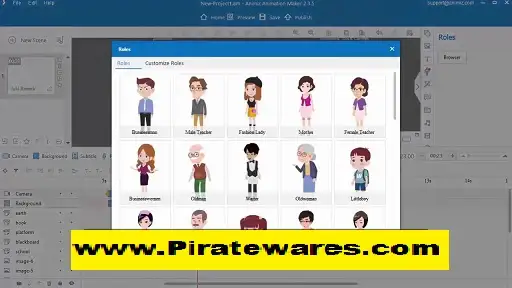
3. Characters and Visual Assets
The software provides a collection of visual resources, including characters, icons, shapes, images, and other design elements. These assets can help make presentations more attractive and easier to understand.
4. Multi-Track Timeline
Animiz includes a multi-track timeline for controlling different elements in a project. Users can adjust the timing of captions, background elements, animations, and other objects to create a coordinated presentation.
5. Animation Effects
Built-in entrance, emphasis, and exit effects allow users to animate individual objects. These effects can be adjusted to control how elements appear, move, and disappear during a scene.
6. Text and Captions
Users can add titles, captions, labels, and other text elements to their presentations. Text animation and timing controls help make important information more noticeable.
7. Voiceover and Audio Support
Animiz supports audio-related editing features, including voiceovers and background music. Narration can help explain complex subjects, while background audio can make presentations more engaging.
8. Preview and Scene Management
The preview function allows users to review their work before publishing. Users can add scenes, rearrange their order, and adjust individual elements to improve the overall flow of a presentation.
9. Multiple Export Formats
Animiz supports different publishing options for sharing completed projects. Its official website lists online video, offline video, and GIF publishing. Supported offline video formats include MP4, MOV, WMV, AVI, FLV, and MKV.
10. Online Publishing and Sharing
Users can publish presentations online through the Animiz service and share their work through supported social platforms. Available publishing features may depend on the account and subscription plan.
What’s New in Animiz Animation Maker 2.5.8?
Version 2.5.8 is listed in third-party software catalogs. However, a complete official changelog specifically confirming all changes for this version could not be independently verified.
Before upgrading, check the developer’s official download page and update information for the latest supported release.
How to Create an Animation with Animiz
Creating an animated presentation involves a few basic steps:
- Open Animiz Animation Maker and create a new project.
- Select a suitable template or start with a blank scene.
- Add characters, images, shapes, and other visual elements.
- Customize the background, text, and scene layout.
- Use the timeline to adjust the timing of different objects.
- Apply entrance, emphasis, and exit animation effects.
- Add background music or record a voiceover where needed.
- Preview the complete presentation and make adjustments.
- Save your project and publish it in your preferred supported format.
Following this workflow can help beginners create organized animated presentations without advanced editing knowledge.
Animiz Animation Maker System Requirements
Animiz is designed for Windows computers. Its official FAQ states that Windows users can use the software to create animated videos and GIFs.
Before installation, consider these compatibility points:
- Operating system: Windows; confirm compatibility with your specific Windows release.
- Architecture: Check whether the selected installer is 32-bit or 64-bit.
- Processor: A compatible processor capable of running the application.
- Memory: Sufficient RAM for editing scenes and handling multimedia assets.
- Storage: Enough free disk space for the application, project files, and exported videos.
- Internet connection: Required for online resources, account access, and cloud publishing features.
The older requirements sometimes listed on download websites should not be treated as confirmed specifications for every current Windows configuration.
How to Download and Install Animiz Animation Maker
For a safe installation, download the application from the developer’s official website.
- Visit the official Animiz download page.
- Check the available installer and confirm that it matches your Windows system.
- Download the installation package.
- Locate the downloaded setup file.
- Run the installer and follow the on-screen instructions.
- Complete the installation process.
- Open Animiz Animation Maker.
- Sign in or create an account if required.
- Start a new project and explore the available templates and editing tools.
Do not disable Windows security software or use modified activation files. Use the developer’s official licensing options to access paid features.
Licensing and Free Version
Animiz offers a free option as well as paid plans. The features and publishing limits can vary depending on the selected plan.
The free version may have restrictions involving templates, available assets, cloud storage, export quality, and watermarks. Paid plans provide additional resources and publishing capabilities according to their terms.
For current pricing, account limits, and licensing details, visit the official Animiz website before purchasing.
Related Animation Software
If you are interested in more advanced 3D motion graphics, you can also read our guide to Video Copilot Element 3D. It covers a different type of animation workflow, focused on 3D objects and visual effects.
Frequently Asked Questions
Is Animiz Animation Maker free?
Animiz offers a free plan with certain limitations. Paid plans provide additional features and resources.
Does Animiz Animation Maker work on Mac?
The official Animiz FAQ identifies Windows as the platform for creating animated videos and GIFs. Do not assume that the desktop application supports macOS.
Can I create GIFs with Animiz?
Yes. Animiz supports GIF publishing, allowing users to create animated content for sharing.
Does Animiz support voiceovers?
Yes. The application provides audio and voiceover-related features that can be used to add narration to animated presentations.
Which video formats does Animiz support?
The official product website lists MP4, MOV, WMV, AVI, FLV, and MKV among its offline publishing formats.
Is Animiz suitable for beginners?
Yes. Its templates, drag-and-drop editing, visual assets, and timeline controls make it accessible to beginners who want to create animated presentations.
Where can I download Animiz Animation Maker?
Download it through the official developer website at Animiz.com. Check the available version and system compatibility before installing.
Final Thoughts
Animiz Animation Maker is a useful option for creating animated presentations, educational videos, promotional content, and GIFs. Its templates, visual assets, multi-track timeline, animation effects, and audio tools provide a straightforward workflow for beginners and content creators.
Before installing Animiz 2.5.8, verify the available version and compatibility through the official developer website. Choose the appropriate licensing plan according to your editing and publishing requirements.

Recent Comments