
Bitdefender Total Security Review: Features & System Requirements
Bitdefender Total Security Review: Features & System Requirements
Bitdefender Total Security is a cybersecurity suite designed to protect computers and other devices against malware, ransomware, phishing, spyware, and online threats. It combines antivirus protection with web security, firewall controls, privacy features, and device optimization tools.
The application is designed for individuals and families who want to protect multiple devices through one security subscription. Depending on the supported platform and subscription, users can access protection for Windows, macOS, Android, and iOS.
This guide explores Bitdefender Total Security’s main features, supported platforms, system requirements, version information, and official installation process.
What Is Bitdefender Total Security?
Bitdefender Total Security is a security application developed by Bitdefender. Its primary purpose is to identify, block, and remove malicious software while helping users browse the internet more safely.
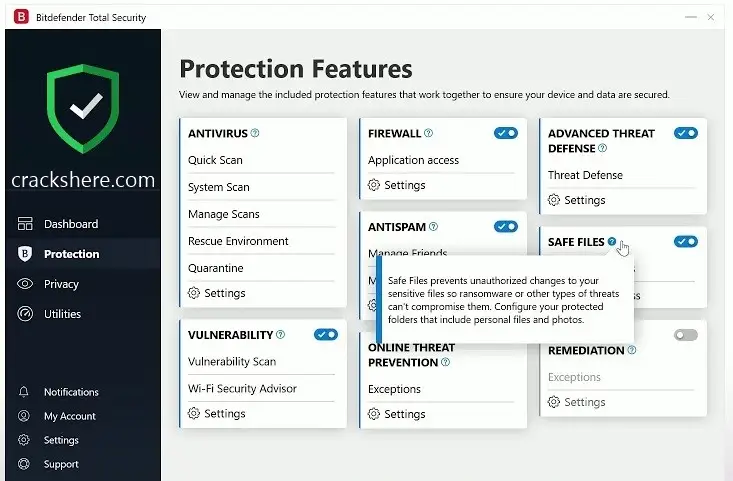
The Windows edition combines several security technologies, including real-time antivirus protection, behavioral threat detection, ransomware protection, firewall controls, and web protection.
It also includes tools for improving device performance and managing certain privacy settings. These features make it suitable for home users, students, professionals, and families who regularly use the internet.

Main Features of Bitdefender Total Security
1. Real-Time Antivirus Protection
Bitdefender continuously monitors supported system activities to detect suspicious files and potentially harmful applications.
Its antivirus engine uses multiple detection technologies to identify known malware and suspicious behavior. Users can also run manual scans when they want to check specific files, folders, or their entire computer.
2. Advanced Threat Defense
Advanced Threat Defense monitors application behavior to identify potentially dangerous activities.
Instead of relying only on known malware signatures, this technology analyzes suspicious processes and actions. It can help detect certain emerging threats that may not yet have a familiar signature.
3. Multi-Layer Ransomware Protection
Ransomware can encrypt personal files and demand payment before restoring access. Bitdefender includes ransomware protection technologies designed to prevent malicious applications from damaging important data.
Users should still maintain regular backups. No antivirus application can guarantee protection against every possible attack or data-loss incident.
4. Web Protection and Anti-Phishing
Unsafe websites and fraudulent links can expose personal information or lead to malware downloads.
Bitdefender’s web protection features help identify suspicious websites, phishing attempts, and potentially dangerous online content. These tools are particularly useful when shopping, browsing, or accessing online accounts.
5. Privacy Firewall
The Windows edition includes a firewall designed to monitor network activity and help prevent unauthorized connections.
Users can review application network access and manage supported firewall settings. This adds another layer of protection beyond basic antivirus scanning.
6. Parental Control
Families can use Bitdefender’s parental control tools to manage selected aspects of children’s online activities.
Depending on the subscription and supported device, available controls may include:
- Website and content filtering
- Screen-time management
- Online activity monitoring
- Device usage restrictions
- Location-related features on supported mobile devices
Parents should review the available controls and privacy settings before enabling monitoring features.
7. Device Optimization
Bitdefender Total Security includes device optimization tools intended to help manage system performance.
The available utilities can help users review selected performance issues, manage startup behavior, and identify opportunities to improve device efficiency.
Performance results vary according to the computer’s hardware, installed applications, and background processes.
8. Cross-Platform Protection
Bitdefender Total Security supports multiple operating systems through separate platform-specific applications.
The supported platforms include:
- Windows
- macOS
- Android
- iOS
However, the available features are not identical across all platforms. For example, some firewall and optimization features are specific to Windows.
What’s New in Bitdefender Total Security?
The original article lists build 27.0.41. However, I could not independently confirm that exact build number as the latest official release.
Bitdefender’s official version information lists 27.0.65.370, released on November 9, 2026, as the latest Windows security-suite version at the time of checking.
The documented changes include:
- Fixed an issue involving changing or removing the product password without entering the current password.
- Improved Safepay security.
- Improved protection against potential vulnerabilities.
- Fixed several product errors.
Bitdefender distributes updates gradually, so the build number available on an individual computer may differ temporarily.
For the latest release information, consult the official Bitdefender version history.
Bitdefender Total Security System Requirements
The following requirements apply to the Windows edition.
Minimum System Requirements
- Operating system: Windows 7 with Service Pack 1, Windows 8.1, Windows 10, or Windows 11
- RAM: 2 GB
- Available storage: 2.5 GB free disk space
- Browser/software requirement: Internet Explorer 11, as listed in the publisher’s requirements
- Internet connection: Required for installation, activation, and security updates
Older processors may affect system performance. Therefore, a more recent computer with sufficient memory and storage is recommended for a smoother experience.
Other Platform Requirements
Bitdefender provides separate applications for other operating systems.
- macOS: The official requirements list macOS Big Sur 11.3 or later for the Mac edition.
- Android: Android 7 or later.
- iOS: iOS 14 or later.
Available features and hardware requirements vary between platforms. Always check the current requirements for your specific device before installing.
How to Download and Install Bitdefender Total Security
For a secure installation, use the official Bitdefender website and follow these steps:
- Visit the official Bitdefender Total Security website.
- Review the available subscription and device coverage.
- Choose the appropriate plan or trial option, if available.
- Create or sign in to your Bitdefender Central account.
- Download the installer for your operating system.
- Open the downloaded installation file.
- Follow the instructions displayed by the setup wizard.
- Sign in to your account when requested.
- Complete the installation and allow the application to update.
- Run an initial security scan to check your device.
Use a valid subscription or license for the features included in your selected plan. Avoid unofficial activation tools, preactivated installers, and modified packages because they can compromise your computer’s security.
Tips for Getting the Most from Bitdefender Total Security
A security application works best when users maintain sensible computer habits. Consider these recommendations:
- Keep Bitdefender updated to receive the latest protection improvements.
- Enable real-time protection.
- Schedule regular scans when appropriate.
- Avoid opening suspicious email attachments.
- Download applications from trusted publisher websites.
- Use strong and unique passwords for important accounts.
- Keep a separate backup of important files.
- Review parental controls and firewall settings periodically.
- Do not ignore security notifications without checking their details.
These practices can help reduce common security risks.
Frequently Asked Questions
Is Bitdefender Total Security a good antivirus?
Bitdefender Total Security combines antivirus protection with additional security features, including ransomware defense, web protection, firewall controls, and privacy tools. It is worth considering for users who want several security functions in one subscription.
Is Bitdefender Total Security free?
Bitdefender offers different products, trial options, and paid subscriptions. Continued access to the full Total Security feature set generally requires an appropriate license. Check the official website for current availability and pricing.
Does Bitdefender Total Security work on Windows 11?
Yes. Windows 11 is included in the officially listed supported operating systems for the Windows edition.
Does Bitdefender Total Security support Mac and mobile devices?
Yes. Bitdefender offers separate applications for macOS, Android, and iOS. The available features depend on the operating system and subscription.
What is Bitdefender Advanced Threat Defense?
Advanced Threat Defense is a behavioral detection technology that analyzes suspicious application activities to identify potentially harmful processes.
Does Bitdefender protect against ransomware?
Yes. The Windows security suite includes multi-layer ransomware protection technologies designed to help prevent ransomware attacks. Users should still keep independent backups of important data.
What is the latest Bitdefender Total Security version?
At the time of checking, Bitdefender’s official Windows version page lists build 27.0.65.370, released on November 9, 2026. Updates may roll out gradually.
Can Bitdefender slow down a computer?
Any security application uses some system resources. The effect depends on the computer’s processor, RAM, storage, and background applications. Meeting the recommended hardware requirements can help improve performance.
Final Verdict
Bitdefender Total Security combines antivirus protection, ransomware defense, web security, firewall controls, parental features, and device optimization tools in one security suite.
Its multi-platform coverage makes it a practical option for individuals and families who want to manage protection across several devices. However, features differ between Windows, macOS, Android, and iOS.
For the safest experience, download the installer directly from Bitdefender, use a legitimate subscription, and keep automatic security updates enabled. Always check the official version history and system requirements before installing an older build.


Recent Comments