
Bootstrap Studio Review: Features, Website Design & Setup Guide
Bootstrap Studio Review: Features, Website Design & Setup Guide
Bootstrap Studio is a desktop web design application for building responsive websites using the Bootstrap framework. It combines a visual drag-and-drop editor with direct access to HTML, CSS, JavaScript, and other front-end development tools.
Instead of writing every page structure manually, users can assemble layouts using ready-made components, customize their appearance, preview designs, and export the finished project as a regular website.
The application is useful for web designers, front-end developers, freelancers, and students who want to create responsive website layouts through a visual workflow while retaining control over the underlying code.
This guide covers Bootstrap Studio’s features, version history, supported platforms, system requirements, installation, licensing, and practical limitations.
What Is Bootstrap Studio?
Bootstrap Studio is a visual website design tool built around the Bootstrap framework. It provides a workspace where users can create pages by dragging components onto a design canvas and adjusting their properties.
The application generates HTML, CSS, and JavaScript for the project. Developers can also open the code editors to make manual changes when they need more control over the design.
It can be used to create:
- Business and company websites
- Personal portfolios
- Landing pages
- Product and service pages
- Blogs and content-focused websites
- Responsive website prototypes
- Front-end layouts for larger web applications
Bootstrap Studio focuses on front-end design. It does not replace a complete back-end development environment or automatically provide every server-side feature a website may need.
Bootstrap Studio 7.0.3: Version Information
Bootstrap Studio 7.0.3 was released on January 16, 2025.
This release introduced an Object Fit option for images, making it easier to create consistent card and grid layouts when images have different dimensions. It also included macOS interface fixes and other minor improvements.
Version 7.0.3 is an older release, not the latest version in 2026. The official release history lists newer major releases, including version 9.0.1 from October 23, 2026.
If you are installing Bootstrap Studio today, check the official release page for the latest compatible version rather than relying on an old third-party installer.
Main Features of Bootstrap Studio
1. Visual Drag-and-Drop Editor
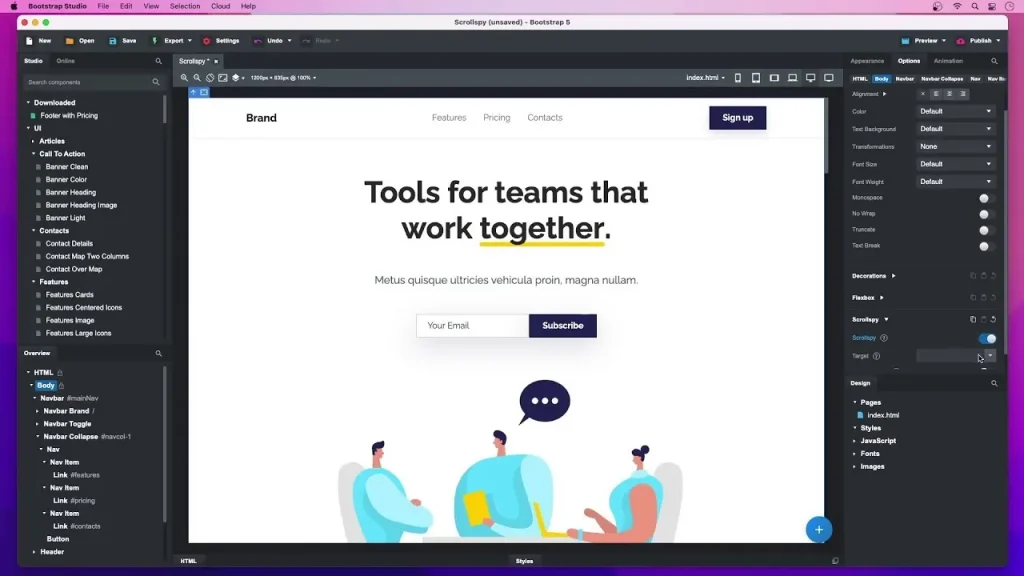
The visual editor is one of Bootstrap Studio’s main features. Users can add components to a page, reposition them, and customize their appearance through the application’s interface.
This approach makes it easier to build page structures without manually writing every HTML element.
2. Ready-Made Bootstrap Components
Bootstrap Studio includes a library of built-in components based on the Bootstrap framework. These components can be used to create common website elements such as:
- Navigation bars
- Headers and footers
- Buttons and forms
- Image galleries
- Cards and content sections
- Responsive layouts
- Interactive interface elements
The application also provides access to community-made components through its Online library.
3. Responsive Website Design
A responsive website adjusts its layout to different screen sizes. Bootstrap Studio helps designers create layouts that work across desktop computers, tablets, and mobile devices.
Users can adjust the design canvas to test different screen dimensions and refine the layout before exporting the website.
4. Live Preview
The Preview feature allows users to open their designs in web browsers and view changes as they work.
The application can also make previews available to other devices on the same local network. This is useful when checking how a design behaves on a phone or tablet.
5. HTML, CSS, and JavaScript Editing
Although Bootstrap Studio provides a visual interface, it is not limited to drag-and-drop editing.
Users can work directly with:
- HTML markup
- CSS styling
- SASS files
- JavaScript
- JSON and other supported project files
This combination makes the software useful for developers who prefer visual editing for layout work but still want access to the code.
6. Clean Website Export
When a design is complete, Bootstrap Studio can export it as a regular static website containing HTML, CSS, JavaScript, and image files.
The exported files can be uploaded to a web host or further edited using another development environment.
Export options include HTML and CSS minification, asset versioning, image handling, and CDN settings.
7. Linked Components
Linked Components allow users to synchronize repeated elements across multiple pages.
For example, if a website uses the same navigation bar on several pages, the designer can link those components. Updating the linked component can then update its copies throughout the design.
This helps maintain consistency and reduces repetitive editing.
8. Website Templates
Bootstrap Studio includes ready-made templates that can be customized for different projects.
Templates can provide a starting point for landing pages, portfolios, business websites, and other layouts. Users can modify the pages, replace content, adjust styles, and add components to match their requirements.
9. Built-In CMS
Newer versions include Bootstrap Studio CMS, which allows users to manage collections of content such as blog posts, products, events, and portfolio items inside the application.
During export or publishing, the content is rendered into static HTML. This can be useful for content-heavy websites that do not require a traditional server-side CMS.
This is a newer feature and should not be attributed to the older 7.0.3 release.
What’s New in Recent Bootstrap Studio Versions?
Bootstrap Studio has continued to receive updates after version 7.0.3.
The official release history includes improvements such as:
- New Swiper components for interactive slideshows.
- Additional blog-related components.
- An AI Assistant introduced in version 8.
- Improved video components and design controls.
- A built-in CMS introduced in version 9.
- New components for Markdown, scrolling effects, and page loading.
- Bug fixes and improvements to the code editors.
These features belong to later releases. Users working with version 7.0.3 should not expect every newer feature to be available in that version.
Bootstrap Studio System Requirements
Bootstrap Studio supports current desktop operating systems, but compatibility depends on the application release.
| Operating system | Officially listed support |
|---|---|
| Windows | Windows 10 and Windows 11 |
| macOS | macOS 11 and newer |
| Linux | Supported distributions, including Ubuntu, Debian, and Fedora |
| Chrome OS | Not supported |
The developer does not list Windows 7 as a supported operating system for current releases. Older versions may be available for legacy systems, but they do not provide the same compatibility or features as current releases.
A 64-bit operating system is recommended. Check the official download and support information for the exact requirements of your selected version.
How to Download and Install Bootstrap Studio
Use the official Bootstrap Studio website to obtain the installer.
- Open the official Bootstrap Studio website.
- Visit the download or purchase section.
- Check the available version and supported operating system.
- Download the installer for your computer.
- Open the downloaded installation file.
- Follow the setup instructions displayed on screen.
- Launch Bootstrap Studio after installation.
- If you have purchased a license, enter your valid license key when prompted.
The first activation requires an internet connection so the application can validate the license. After activation, the application can be used offline.
Avoid modified installers, unauthorized patches, and key generators. They are not official Bootstrap Studio releases.
Bootstrap Studio Licensing and Activation
Bootstrap Studio is commercial software with official Standard and Lifetime licensing options.
The Standard edition includes one year of free upgrades. After that period, users can continue using the version covered by their license, but they will not receive further updates unless they renew.
The Lifetime edition includes future version upgrades without a recurring renewal for upgrades.
The developer also offers educational licensing options for eligible students and institutions.
For legitimate activation:
- Purchase a license through the official website or use an eligible educational license.
- Check your purchase email for the license key.
- Open Bootstrap Studio.
- Enter the license key in the activation window.
- Allow the application to validate the key online.
- Manage activated devices through the application’s license management options.
A purchased license can be activated on up to three computers owned by the same customer, subject to the developer’s license terms.
Advantages of Bootstrap Studio
- Visual drag-and-drop website editing.
- Ready-made Bootstrap components and templates.
- Responsive layout design tools.
- Direct HTML, CSS, and JavaScript editing.
- Live browser preview.
- Export to standard website files.
- Linked components for consistent page elements.
- Support for multiple desktop operating systems.
- Useful tools for designers and front-end developers.
Limitations of Bootstrap Studio
- It is a commercial application rather than completely free software.
- It focuses on front-end website design.
- Server-side functionality such as PHP and database handling requires separate development.
- Users need basic web development knowledge for advanced customization.
- Current releases do not support Windows 7.
- Exporting a design does not automatically turn it into a complete WordPress theme or back-end application.
Frequently Asked Questions
Is Bootstrap Studio free?
Bootstrap Studio is commercial software. The developer offers Standard and Lifetime licenses, along with educational licensing for eligible students and institutions.
What is Bootstrap Studio 7.0.3?
Bootstrap Studio 7.0.3 is a release published on January 16, 2025. It introduced an Object Fit option for images and included several bug fixes.
What is the latest version of Bootstrap Studio?
The official release history lists version 9.0.1, released on October 23, 2026. Check the developer’s release page for any subsequent updates.
Can Bootstrap Studio create responsive websites?
Yes. It provides visual tools and Bootstrap components for creating layouts that adapt to different screen sizes.
Does Bootstrap Studio generate HTML code?
Yes. It generates HTML, CSS, JavaScript, and related assets that can be exported as a static website.
Can I use Bootstrap Studio for WordPress?
Bootstrap Studio can create front-end designs and export static website files. However, exporting a design does not automatically produce a complete WordPress theme. Additional development is needed to integrate the exported files into WordPress.
Does Bootstrap Studio support Windows 7?
Current releases support Windows 10 and Windows 11. The developer lists older versions for certain legacy operating systems, but Windows 7 is not supported by current releases.
Does Bootstrap Studio work offline?
The application can be used offline after installation and initial license validation. Some online services and features naturally require an internet connection.
Is Bootstrap Studio suitable for beginners?
Yes. Its visual editor and ready-made components make it approachable for beginners. Learning basic HTML, CSS, and responsive design concepts will still help users build more advanced websites.
Final Verdict
Bootstrap Studio is a useful visual website design application for people who want to create responsive Bootstrap-based websites without manually writing every part of the layout.
Its drag-and-drop editor, reusable components, live preview, code editing tools, and HTML export features make it suitable for web designers, freelancers, and front-end developers.
Version 7.0.3 is an older release from January 2025. Users looking for current features should review the latest official release and choose a version compatible with their operating system.
For legitimate use, download the application from the developer’s website and activate it with a valid license.



Recent Comments