
Gillmeister Rename Expert 5.32.1 Review: Features & File Renaming Guide
Gillmeister Rename Expert: Features, File Renaming & Windows Guide
Managing hundreds or thousands of files can become difficult when their names are inconsistent or poorly organized. Gillmeister Rename Expert is a Windows application designed to simplify this task by allowing users to rename multiple files and folders through customizable rules.
The software offers batch renaming, metadata support, regular expressions, sequential numbering, and file organization features. It can help photographers, music collectors, office users, and anyone who regularly manages large collections of files.
In this guide, we explore Gillmeister Rename Expert, its main features, supported file types, Windows compatibility, and installation process.
What Is Gillmeister Rename Expert?
Gillmeister Rename Expert is a batch file-renaming utility developed by Gillmeister Software. It allows users to change the names of multiple files and folders without editing each item individually.
Users can replace text, insert characters, remove unwanted sections, change capitalization, adjust extensions, and create numbering sequences. The application also supports metadata from supported image, audio, and document files.
One of its useful capabilities is the ability to preview proposed filename changes before applying them.
Key Features of Gillmeister Rename Expert
1. Batch File and Folder Renaming
Rename multiple files and folders in a single operation. This is useful when organizing photographs, documents, music collections, and downloaded files.
2. Custom Filename Rules
The application provides several actions for modifying filenames, including:
- Adding prefixes and suffixes
- Replacing existing text
- Removing unwanted characters
- Changing uppercase and lowercase letters
- Moving parts of a filename
- Editing file extensions
These options make it easier to create consistent naming conventions.
3. Metadata-Based Renaming
Rename Expert can use metadata to generate meaningful filenames. Supported information includes EXIF and IPTC data for images and ID3 tags for audio files.
For example, photographs can be organized using their shooting dates, while music files can use artist or title information.
4. Regular Expression Support
Advanced users can use regular expressions to create more complex renaming rules. This makes it possible to identify specific filename patterns and replace or rearrange selected sections.
Regular expressions are especially helpful when processing large collections with consistent naming structures.
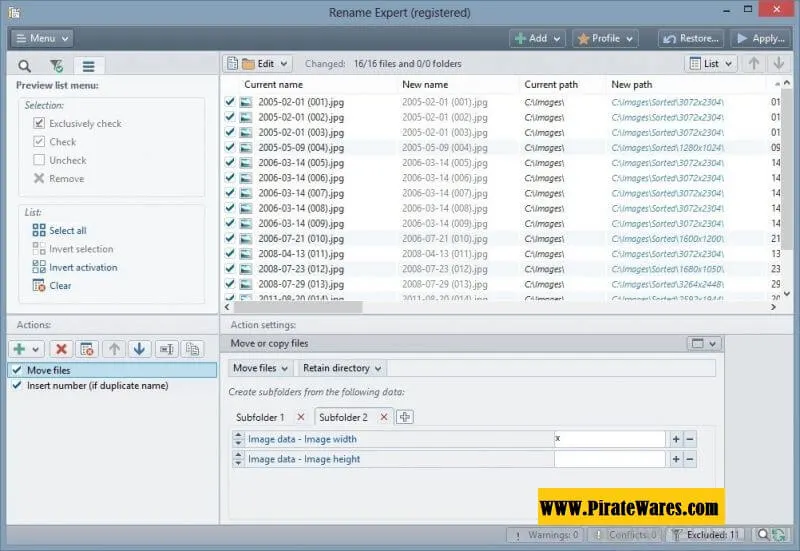
5. Preview New Filenames
Before applying changes, users can inspect the proposed filenames in a preview list. The software also identifies possible conflicts, such as duplicate names.
This feature helps reduce mistakes during large renaming operations.
6. Sequential Numbering
Rename Expert can add sequential or random numbering to files and folders. This is useful for organizing image collections, project documents, and other files that need a consistent order.
7. Move and Copy Files
The application provides options for moving or copying files based on defined rules. Users can organize files into folders using information contained in their names or metadata.
8. Save Custom Profiles
Frequently used renaming settings can be saved as profiles. Users can reuse these configurations instead of rebuilding the same actions every time.
9. Command-Line Support
Advanced users can use command-line functionality to automate certain renaming operations. The software also provides options for creating batch scripts.
How Does Gillmeister Rename Expert Work?
The basic workflow is straightforward:
- Add the files or folders you want to rename.
- Select the required renaming actions.
- Customize the rules according to your needs.
- Review the proposed filenames in the preview list.
- Check for duplicate names or other conflicts.
- Apply the changes after confirming the preview.
For safety, test your rules on a small group of sample files before processing an entire folder.
Gillmeister Rename Expert: Version Information
Gillmeister Rename Expert is regularly maintained by its developer. The original article mentions version 5.32.1, but this exact build could not be confirmed through the official release information.
The official download page lists version 5.31.8. Check the developer’s download page and changelog for the latest confirmed release before installing.
Gillmeister Rename Expert System Requirements
The official download information lists support for these Windows versions:
- Windows 11
- Windows 10
- Windows 8
- Windows 7
- Windows Vista
- Windows Server editions
Additional details:
- Software Name: Gillmeister Rename Expert
- Developer: Gillmeister Software
- Software Category: File Management and Batch Renaming
- Architecture: Check the installer for your Windows system
- License: Commercial software with a trial version
- Installation: Windows setup package
For the most accurate requirements, consult the official download page before installation.
How to Install Gillmeister Rename Expert
Follow these steps to install a legitimate copy:
- Visit the official Rename Expert website.
- Open the download section.
- Download the installer for your Windows computer.
- Locate the downloaded setup file.
- Double-click the installer to start the installation wizard.
- Accept the licence agreement after reviewing it.
- Choose the installation folder.
- Follow the remaining instructions displayed by the installer.
- Click Finish when the installation is complete.
- Open the application and test its features using a small sample folder.
The developer states that an internet connection is not required during installation. A valid licence key is needed to upgrade from the demo to the registered version.
Is Gillmeister Rename Expert Portable?
The developer’s official website documents a feature for creating a portable version through the application’s Tools menu. This allows users to prepare a portable copy for supported use cases.
For exact portable-version instructions, consult the official help documentation and licensing terms.
Related File Organization Software
If you also want to organize files automatically instead of only changing their names, explore our Easy File Organizer guide.
Easy File Organizer focuses on sorting and arranging files into folders, while Gillmeister Rename Expert specializes in creating consistent filenames and applying advanced renaming rules.
Frequently Asked Questions
What is Gillmeister Rename Expert used for?
It is used to rename multiple files and folders using customizable rules, metadata, numbering, and text replacement.
Can Gillmeister Rename Expert rename multiple files at once?
Yes. Batch renaming is one of its main functions and allows users to process large groups of files together.
Does Rename Expert support EXIF metadata?
Yes. It supports image metadata such as EXIF and IPTC, which can be used to create filenames based on photo information.
Does Gillmeister Rename Expert support regular expressions?
Yes. Regular expressions are available for advanced filename manipulation and customized renaming patterns.
Can I preview filenames before changing them?
Yes. The application provides a preview list so users can inspect proposed changes and identify possible conflicts.
Is Gillmeister Rename Expert available for Mac?
The official product is a Windows application. A native macOS edition is not listed on the developer’s download page.
Is Gillmeister Rename Expert free?
The developer provides a demo version that can be tested without payment. The demo limits the number of files or folders that can be renamed at once. A valid licence removes this limitation.
What is the latest version of Rename Expert?
The official download page lists version 5.31.8 in the available product information. Check the developer’s website for newer releases.
Final Thoughts
Gillmeister Rename Expert is a flexible Windows utility for people who regularly manage large collections of files and folders. Its batch-renaming tools, metadata support, regular expressions, preview system, and saved profiles provide useful options for both everyday users and advanced file managers.
Before applying large changes, always review the preview and keep backups of important files. Download the application from the official developer to ensure you receive a legitimate installer and current version information.


Recent Comments