
Guitar Pro 8 Review: Features, Tablature Editing & Guide
Guitar Pro 8 Review: Features, Tablature Editing & Guide
Guitar Pro 8 is a music notation and tablature editor developed by Arobas Music. It helps musicians write, edit, play, and share musical scores. The software is particularly useful for guitarists, bass players, and other musicians who work with tablature and standard music notation.
With Guitar Pro 8, you can create musical arrangements, edit individual notes, adjust tempos, and listen to your compositions using realistic instrument sounds. It also includes practice tools such as a metronome, tuner, chord diagrams, and scale libraries.
Whether you are learning an instrument or arranging music professionally, Guitar Pro provides a collection of tools for composing and practicing songs.
What Is Guitar Pro 8?
Guitar Pro 8 is a desktop application for creating and editing sheet music and tablature. It supports instruments such as guitar, bass, ukulele, banjo, piano, and percussion.
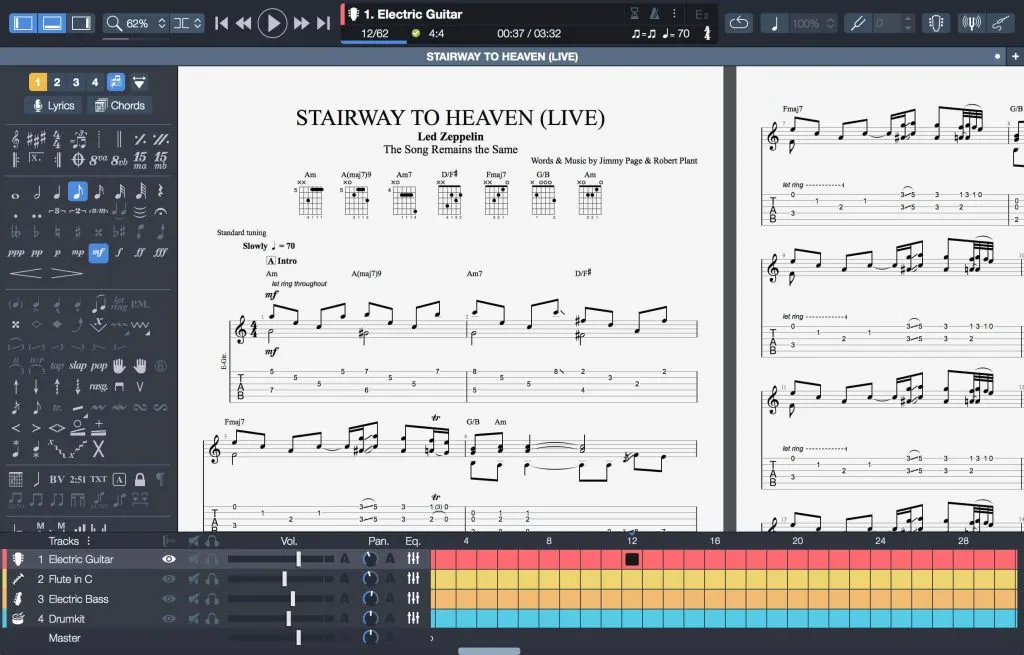
The software displays standard musical notation alongside tablature. This makes it easier for musicians to understand notes, finger positions, rhythms, and musical arrangements.
You can also play your scores through the built-in sound engine, adjust individual tracks, and export your work into supported formats.
Guitar Pro 8 is available for both Windows and macOS.
Main Features of Guitar Pro 8
1. Tablature and Sheet Music Editor
Guitar Pro provides an editor for creating and modifying musical scores. You can enter notes, chords, rhythms, and other musical symbols using the keyboard, mouse, or a MIDI instrument.
It displays standard notation and tablature together, helping musicians work with different musical formats.
2. Support for Multiple Instruments
The software supports several instruments, including:
- Electric and acoustic guitars
- Bass guitars
- Ukulele
- Banjo
- Piano and keyboards
- Drums and percussion
This flexibility makes it useful for creating arrangements that include multiple instruments.
3. Realistic Sound Engine
Guitar Pro includes its Realistic Sound Engine (RSE), which provides more natural instrument playback than basic MIDI sounds.
The soundbanks help musicians listen to their arrangements and understand how different tracks work together.
You can also adjust instrument sounds and effects to create a playback experience that better matches your composition.
4. Audio Track Integration
One of Guitar Pro 8’s major additions is the ability to add an audio track to a score.
This is useful when transcribing music or practicing alongside an existing recording. You can synchronize the audio with your notation and work on matching the musical sections.
5. Chord and Scale Libraries
The built-in chord and scale tools help musicians explore different musical structures.
You can view chord diagrams, examine scale patterns, and use these resources while composing or practicing.
6. Metronome and Practice Tools
Guitar Pro includes practice features that help musicians improve timing and accuracy.
You can adjust the tempo, use the metronome, loop selected sections, and gradually increase playback speed while learning difficult passages.
These options are useful for beginners as well as experienced players.
7. Pedalboard and Sound Effects
The software includes a pedalboard and effects options for customizing instrument sounds.
You can experiment with different effects and amplifier settings to create suitable tones for your arrangements.
8. Track Mixing and Editing
Guitar Pro allows users to work with individual tracks in a composition. You can adjust volume and panning, isolate tracks, and modify playback settings.
These controls make it easier to review individual instruments and balance a complete arrangement.
9. Music Score Layout and Design
The score layout tools help users organize musical notation for reading and printing.
You can adjust spacing, chord diagrams, text, and other score elements to create a cleaner presentation.
10. Import and Export Options
Guitar Pro supports several file formats used in music notation and audio workflows. Depending on the format, you can import existing compositions, edit them, and export your work for sharing or further production.
The software also supports MIDI-related workflows and audio export.
What’s New in Guitar Pro 8?
Guitar Pro 8 introduced several improvements over earlier releases. Its main additions include:
- Audio track integration for working with existing recordings.
- A visual metronome for improved practice sessions.
- A pedalboard for customizing instrument sounds.
- Improved drum mixing controls.
- Scale diagrams for different stringed instruments.
- A command palette for faster access to editing tools.
- More control over note spacing and score layout.
- Improved playback and track management options.
Guitar Pro 8.x updates are provided to fix bugs and improve stability. The developer provides updates through the application’s built-in update feature.
Guitar Pro 8.4.4 Version Information
The title of this article references version 8.4.4. However, I could not confirm that specific build through the official Arobas Music download and support pages.
The official download page lists Guitar Pro 8.1.5, published on 25 February 2026. Therefore, version 8.4.4 should not be described as an officially verified release without further confirmation from the developer.
For accurate version information, check the official download page or use the application’s built-in update checker.
Guitar Pro 8 System Requirements
According to the official requirements, Guitar Pro 8 supports the following configurations:
- Windows: Windows 8, Windows 10, and Windows 11 (64-bit)
- macOS: macOS 10.13 or later
- Processor: 64-bit, 1 GHz dual-core Intel, AMD, or Apple Silicon
- RAM: 4 GB
- Free Disk Space: 2 GB
- Display Resolution: 1024 × 768 pixels
- Audio: A sound card is required
- Installation: Administrator privileges are required
For low-latency guitar input, the developer recommends an external audio interface. Windows users can use an ASIO-compatible device, while macOS users can use a Core Audio-compatible device.
Is Guitar Pro 8 Free?
Guitar Pro 8 offers a full-featured 7-day trial. After the trial period, users need a valid license to continue using the application.
The developer sells a lifetime Guitar Pro 8 license with a one-time payment. The license includes free 8.x updates, and the same license can be installed on up to five computers or operating systems for the licensed user, subject to the publisher’s terms.
Users who already own an eligible previous Guitar Pro license may qualify for an upgrade price.
How to Download and Install Guitar Pro 8
Follow these steps to install the genuine application:
- Visit the official Guitar Pro website.
- Open the Guitar Pro 8 download page.
- Select the Windows or macOS installer.
- Wait for the download to complete.
- Open the downloaded installer.
- Accept the license agreement and follow the setup instructions.
- Select the soundbanks option if you want to use the Realistic Sound Engine.
- Complete the installation.
- Launch Guitar Pro 8 from your desktop or applications menu.
- Use the 7-day trial or enter your valid license information.
Keep your operating system’s security protection enabled. Download the installer directly from the developer rather than using modified setup files or unofficial activation packages.
Frequently Asked Questions
What is Guitar Pro 8 used for?
Guitar Pro 8 is used to create, edit, play, and share musical scores and tablatures. It is especially useful for guitarists, bass players, and musicians who work with multiple instruments.
Does Guitar Pro 8 support Windows 11?
Yes. The official system requirements list Windows 11, Windows 10, and Windows 8 in 64-bit editions.
Is Guitar Pro 8 available for Mac?
Yes. Guitar Pro 8 supports macOS 10.13 or later. It also supports Apple Silicon according to the developer’s requirements.
Can Guitar Pro 8 play music?
Yes. Its Realistic Sound Engine provides instrument playback, allowing users to listen to their scores and arrangements.
Does Guitar Pro 8 include a metronome?
Yes. It includes a metronome and other practice tools that help musicians improve timing and accuracy.
Is Guitar Pro 8 a lifetime purchase?
The developer offers a lifetime license with a one-time payment. The license includes free updates within the Guitar Pro 8.x series.
Can I install Guitar Pro 8 on multiple computers?
Yes. The official licensing information allows installation on up to five computers or operating systems for the same licensed user, subject to the license terms.
Is Guitar Pro 8.4.4 the latest version?
I could not verify version 8.4.4 through the official release information. The official download page currently lists version 8.1.5, published on 25 February 2026.
Final Verdict
Guitar Pro 8 is a useful music notation and tablature application for musicians who want to compose, arrange, edit, and practice songs. Its combination of standard notation, tablature, realistic playback, audio track integration, and practice tools makes it suitable for different skill levels.
The software is particularly valuable for guitarists and bass players, although its support for keyboards, drums, and other instruments also makes it useful for broader musical arrangements.
If you want a dedicated desktop tool for working with musical scores and tablatures, Guitar Pro 8 is worth considering. Visit the official developer website to check the latest release, trial, and license information.



Recent Comments