
Atomic Email Hunter Review: Features, Pricing & Guide
Atomic Email Hunter Review: Features, Pricing & Guide
Atomic Email Hunter is a Windows-based email discovery application developed by AtomPark Software. It helps businesses and marketing professionals find publicly available email addresses associated with relevant websites and search terms.
The application can search using keywords or website URLs, collect matching email addresses, and organize the results into lists. It also includes filtering and duplicate-removal options to make contact management easier.
Atomic Email Hunter is designed for lead research and contact discovery. However, finding a publicly displayed email address does not automatically give permission to send marketing messages. Users should respect privacy requirements, website terms, and applicable email marketing laws.
This guide covers its main features, version information, pricing, compatibility, and official installation process.
What Is Atomic Email Hunter?
Atomic Email Hunter is an email extraction utility created by AtomPark Software. It searches selected websites and collects email addresses that match the user’s search criteria.
The application supports different search methods, including keyword-based discovery and searches based on a specific website address. Users can then review the collected results and organize them for legitimate business research.
The software is intended for Windows computers and is available through the developer’s official website.
How Does Atomic Email Hunter Work?
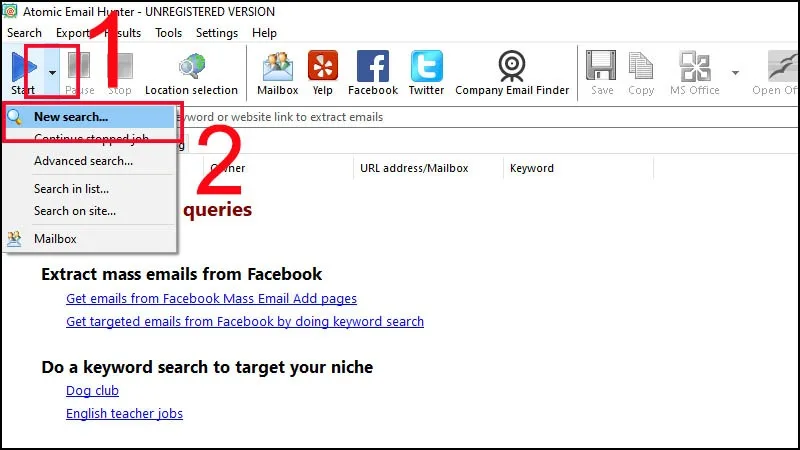
Atomic Email Hunter offers several ways to discover email addresses:
1. URL-Based Search
Users can enter a website address to search its pages for publicly available email addresses. The application can examine the supplied website and its linked pages, depending on the selected search settings.
2. Keyword-Based Search
Keyword search helps users find websites related to a particular business, industry, or subject. The software searches for relevant pages and identifies email addresses that appear in the available content.
3. Website Search With Keywords
This method combines a website address with selected keywords. It helps narrow the search to information relevant to a particular topic rather than collecting every available result.
Main Features of Atomic Email Hunter
1. Email Address Discovery
The main purpose of Atomic Email Hunter is to find email addresses from supported online sources. It can identify addresses displayed on relevant webpages and organize the results for review.
2. Keyword Search
Keyword-based discovery helps users locate websites related to their business or research topic. This can make the search more focused than manually visiting unrelated websites.
3. Search Filters
The application includes filtering options that help users refine search results. Users can configure search conditions and exclude unwanted results to make the collected information easier to review.
4. Duplicate Removal
Large search results may contain repeated email addresses. Atomic Email Hunter provides list-management options for identifying and removing duplicates.
This helps keep contact records organized and reduces unnecessary repetition.
5. Proxy Configuration
The application provides proxy configuration options for supported search operations. These settings may be useful in certain network environments.
However, proxy use should not be treated as permission to bypass website restrictions, access controls, or anti-abuse protections.
6. Search History and Results
The software includes search-related tools that help users review and manage collected information. Search settings and result management can make repeated research tasks easier to organize.
7. Exporting Contact Lists
Registered users can save targeted mailing lists to local files. This makes it easier to review and organize the results in compatible applications.
The unregistered edition has limitations, including restrictions on saving extracted mailing lists.
8. Integration With Other Atomic Products
Atomic Email Hunter belongs to AtomPark Software’s email marketing product family. Other applications from the same developer include tools for email verification, list management, and campaign delivery.
These are separate products, so their features and licenses should be checked individually.
What’s New in Atomic Email Hunter?
The developer’s official update history lists Atomic Email Hunter version 15.22, released on 29 November 2025.
The documented change for this release is:
- Fixed issues with keyword searching.
The developer’s update history also lists earlier releases, including version 15.21, which included general bug fixes.
Version 15.30.07 is mentioned in some third-party download titles, but I could not verify it in the official release history. For reliable version information, use the developer’s website.
Atomic Email Hunter System Requirements
The developer’s download page lists Windows 7–11 compatibility.
The following information is confirmed by the publisher:
- Operating System: Windows 7, Windows 8, Windows 10, and Windows 11
- Platform: Windows desktop application
- Installation: Official downloadable installer
- Trial: 7-day trial listed by the developer
The current official download page does not provide a complete, reliable minimum RAM, processor, or disk-space specification. Therefore, older hardware requirements should not be treated as confirmed.
Is Atomic Email Hunter Free?
Atomic Email Hunter offers a limited trial version. The developer’s website currently lists a 7-day trial.
A paid license is required for full registered functionality. According to the official documentation, the unregistered edition does not allow users to save extracted targeted mailing lists.
The developer also explains that a registration key activates the licensed application on one PC. Check the current licensing terms before purchasing.
How to Download and Install Atomic Email Hunter
Follow these steps to obtain the genuine application:
- Visit the official AtomPark Software website.
- Open the Atomic Email Hunter product page.
- Review the available trial and license options.
- Choose the official download or trial option.
- Wait for the installer to download.
- Open the downloaded setup file.
- Follow the installation instructions.
- Launch Atomic Email Hunter after installation.
- Review the available search and filtering settings.
- If you purchase a license, follow the developer’s official activation instructions.
Keep Windows Defender and other security protections enabled. Avoid modified installers, unofficial activation files, and unknown archives.
Responsible Use and Email Marketing Compliance
Atomic Email Hunter can identify email addresses displayed on websites, but that does not mean every address can legally be used for promotional messages.
Before contacting anyone:
- Check the applicable privacy and marketing laws.
- Respect website terms and restrictions.
- Use contact information only for a legitimate and appropriate purpose.
- Avoid collecting sensitive or private personal information.
- Do not send unsolicited bulk messages.
- Provide a clear and functional unsubscribe option where required.
- Maintain suppression lists and respect opt-out requests.
For business outreach, permission-based contact lists and transparent communication are safer long-term practices.
Frequently Asked Questions
What is Atomic Email Hunter used for?
It is used to discover and organize email addresses from supported websites and online sources using keywords or website URLs.
Is Atomic Email Hunter compatible with Windows 11?
Yes. The developer’s download page lists compatibility with Windows 11, Windows 10, Windows 8, and Windows 7.
Does Atomic Email Hunter have a free version?
The developer offers a limited 7-day trial. Full registered functionality requires a paid license.
Can Atomic Email Hunter remove duplicate email addresses?
Yes. Its list-management features include sorting and duplicate-removal options.
Can I save extracted email lists without registering?
The developer’s documentation states that the unregistered edition does not allow users to save extracted targeted mailing lists.
Is Atomic Email Hunter 15.30.07 the latest version?
I could not verify version 15.30.07 in the official release history. The developer’s website lists version 15.22, released on 29 November 2025.
Is Atomic Email Hunter safe to download?
For a more reliable installation, download the application directly from AtomPark Software. Avoid unofficial modified installers and activation packages.
Final Verdict
Atomic Email Hunter is a specialized email discovery tool for users who need to research publicly available business contact information. Its keyword search, URL-based discovery, filtering, and duplicate-removal options provide a structured approach to contact research.
However, the tool should be used responsibly. Publicly visible email addresses are not automatically permission-based marketing contacts. Always follow applicable privacy rules and email marketing requirements.
Users interested in the application should check the official AtomPark Software website for the latest release, trial availability, and licensing information.


Recent Comments