
Live2D Cubism Review: 2D Modeling, Animation & Features
Live2D Cubism Review: 2D Modeling, Animation & Features
Live2D Cubism is a professional 2D modeling and animation application designed to bring illustrated characters to life. Instead of converting artwork into a conventional 3D model, the software works with layered 2D illustrations and allows artists to create natural movements, facial expressions, and character animations while preserving the original drawing style.
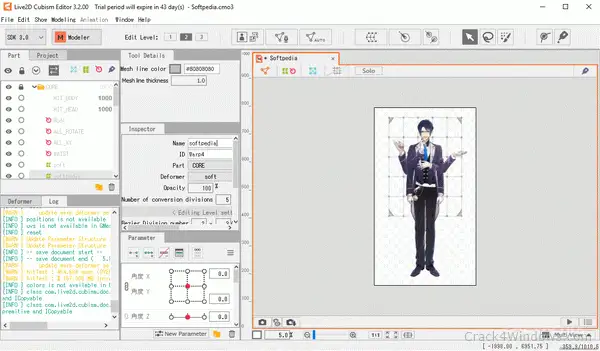
The application is widely used for VTuber avatars, animated characters, mobile applications, video games, and other digital content. Artists can import layered artwork, prepare character parts, create ArtMeshes, add deformers, and build animations using parameters and keyframes.
Live2D Cubism Editor is available in FREE and PRO editions. New users can also try the PRO features through the official trial before deciding which edition suits their projects.
What Is Live2D Cubism Used For?
Live2D Cubism is primarily used to animate characters created from 2D illustrations. Artists prepare a layered drawing and import it into the Editor, where individual elements such as eyes, eyebrows, hair, mouth, and body parts can be adjusted independently.
After preparing the artwork, users can create a model with different movements and expressions. These movements can be controlled through parameters, keyforms, and deformers. The finished model can then be used in compatible applications and development workflows.
Common uses include:
- Creating animated VTuber avatars.
- Developing expressive 2D characters for games.
- Producing character animations for mobile applications.
- Creating facial expressions and lip-sync movements.
- Building animated illustrations for digital content.
- Preparing character models for supported Live2D applications.
Key Features of Live2D Cubism
1. 2D Character Modeling
Live2D Cubism provides modeling tools for turning a layered illustration into an animated character. Users can separate the artwork into individual parts and adjust how those parts move.
This approach preserves the original visual style instead of requiring artists to rebuild the character as a traditional 3D model.
2. ArtMesh Editing
ArtMeshes are used to control the shape and deformation of individual illustration parts. Artists can edit mesh points and adjust how a character’s artwork changes during movement.
Proper mesh preparation is important for producing smooth expressions and natural character motion.
3. Deformers and Parameters
Deformers help users move or reshape multiple elements together. Warp Deformers and Rotation Deformers can be used to control different parts of a character.
Parameters allow artists to connect model changes with specific movements, such as head angles, eye expressions, and mouth positions.
4. Facial Expressions and Lip-Sync
Live2D Cubism supports expressive character animation, including facial movement and lip-sync workflows. Users can create different eye, mouth, and facial positions and connect them to model parameters.
These features are useful for VTuber avatars, interactive characters, and animated game characters.
5. Physics Simulation
Physics settings can add secondary movement to suitable model parts. For example, artists can configure hair, accessories, or other elements to respond naturally to character movement.
The result depends on the model setup and the physics parameters configured by the creator.
6. Animation Timeline
The animation workspace allows users to arrange movements over time using keyframes and parameters. Artists can create character actions, expressions, and animation sequences within a project.
The timeline-based workflow is useful when producing animated scenes and character performances.
7. PSD File Import
Cubism Editor supports layered PSD artwork as an input format. This makes it possible to prepare character illustrations in compatible drawing applications and then import them for modeling.
PNG images and WAV audio are also listed among the supported input formats. The final workflow depends on the project and the type of content being created.
8. Export Options
The official system requirements page lists PNG, JPEG, and GIF as supported image outputs, along with MP4, WebM, and MOV video formats.
The available export options make it possible to prepare different types of content for supported creative workflows.
What’s New in Live2D Cubism?
Live2D continues to update Cubism Editor with improvements to modeling and animation tools.
Cubism 5.3 introduced several notable features, including:
- Blend Modes: Expanded color blending options for more advanced visual effects.
- Offscreen Drawing: Allows parts to be drawn separately before being transferred to the canvas, providing additional control over opacity and clipping.
- Brush Improvements: Additional brush shapes and improved deformation tools.
- Warp Deformer Improvements: Better handling of child elements that extend beyond a parent deformer.
The official release history lists Cubism 5.3.04 as a stable release dated September 3, 2026. The 5.3.05 beta1 build is also listed for users interested in testing newer changes. For regular projects, the stable release is generally the safer choice.
Live2D Cubism FREE vs PRO
Live2D offers two editions: FREE and PRO. The FREE edition can be used for basic modeling and animation, but it has limits on several project features.
| Feature | FREE | PRO |
|---|---|---|
| Basic modeling | Available | Available |
| Basic animation | Available | Available |
| Texture files per model | Limited | No limit |
| ArtMesh count | Up to 100 | No limit |
| Motion parameters | Up to 30 | No limit |
| Deformers | Up to 50 | No limit |
| Parts | Up to 30 | No limit |
| Advanced modeling tools | Limited | More features |
The exact restrictions depend on the feature being used. If a project exceeds the FREE edition’s limits, saving may be restricted until the model is adjusted to meet those limits.
The official website also provides a 42-day PRO trial. After the trial expires, users can continue with the FREE edition or purchase a PRO subscription.
Live2D Cubism System Requirements
The following requirements are listed on the official Live2D Cubism Editor system requirements page for the current 5.3 series.
Windows Requirements
- Operating System: Windows 10 or Windows 11, 64-bit.
- Processor: Intel or AMD CPU.
- RAM: 4 GB minimum; 8 GB or more recommended.
- Storage: Approximately 1 GB of free disk space.
- Graphics: OpenGL 3.3 or higher; OpenGL 4.5 or higher recommended.
- Display: 1440 × 900 pixels minimum.
- Recommended Display: 1920 × 1080 pixels.
Live2D notes that performance requirements can increase with larger illustrations, more mesh vertices, and additional parameters. Some integrated graphics environments may also have compatibility limitations.
macOS Requirements
The official requirements page lists support for Apple Silicon and Intel-based Mac computers. Supported macOS versions and hardware details should be checked on the official requirements page before installation.
How to Download and Install Live2D Cubism
For a safer installation, use the official Live2D website rather than unofficial installers or modified packages.
- Visit the official Live2D Cubism Editor download page.
- Choose the appropriate Windows or macOS download.
- Select the first-time download option if you are installing it for the first time.
- Follow the official download and installation instructions.
- Launch Cubism Editor after installation.
- Start with the available FREE edition or use the 42-day PRO trial.
- Sign in or complete the official license authentication process when required.
Do not disable Windows Defender or other security software to install the application. Avoid modified installers and unauthorized license files.
Live2D Cubism Alternatives
The best alternative depends on the type of animation or visual project you want to create.
- Video Copilot Element 3D: A different workflow focused on 3D objects, models, and motion graphics inside Adobe After Effects. It is not a direct replacement for Live2D’s 2D character rigging tools.
- Traditional 3D Animation Software: Suitable for creators who want to build and animate characters in a three-dimensional environment.
- 2D Animation Applications: Useful for frame-by-frame animation and illustration-based workflows.
If your main goal is to animate a layered 2D character while preserving its original artwork, Live2D Cubism is designed specifically for that type of work.
Frequently Asked Questions
Is Live2D Cubism free?
Yes. Live2D Cubism provides a FREE edition for basic modeling and animation. It also offers a 42-day PRO trial, after which users can continue with the FREE edition or purchase PRO.
What is the latest stable version of Live2D Cubism?
The official download page lists version 5.3.04 as the stable release, dated September 3, 2026. A newer 5.3.05 beta1 build is also listed separately.
Can Live2D Cubism import PSD files?
Yes. Cubism Editor supports layered PSD artwork, allowing users to import prepared illustrations and use their separate layers when creating a model.
Is Live2D Cubism suitable for VTubers?
Yes. It is commonly used to create expressive 2D character models for VTuber streaming and compatible applications.
What is the difference between Live2D FREE and PRO?
The FREE edition includes basic modeling and animation features with limits on items such as ArtMeshes, parameters, deformers, and texture files. PRO provides expanded functionality for more complex projects.
Does Live2D Cubism support Windows 11?
Yes. The official requirements list Windows 10 and Windows 11 in 64-bit desktop mode for the current 5.3 series.
Final Thoughts
Live2D Cubism is a specialized application for artists, animators, game developers, and VTuber creators who want to animate 2D illustrations without rebuilding them as conventional 3D characters. Its modeling tools, ArtMeshes, deformers, parameters, physics, and animation timeline provide a flexible workflow for creating expressive characters.
The FREE edition is a practical starting point for learning the software, while PRO is designed for larger and more advanced projects. Before installing, check the official version history and system requirements to choose a compatible release.



Recent Comments