
MAGIX ACID Pro 11.0.2.21 Review: Features & Music Production Guide
MAGIX ACID Pro 11.0.2.21 Review: Features & Music Production Guide
MAGIX ACID Pro 11 is a digital audio workstation (DAW) designed for music producers, composers, DJs, and audio enthusiasts. It has a long history in loop-based music production and provides tools for arranging samples, recording audio, editing MIDI, and mixing complete projects.
Unlike a basic audio converter or music player, ACID Pro offers a complete production environment. Users can combine audio loops, virtual instruments, MIDI performances, and effects to build original compositions. In addition, its tempo-matching workflow makes it easier to experiment with different musical ideas.
This guide explores MAGIX ACID Pro 11.0.2.21, its main features, update information, compatibility considerations, and the newer ACID Pro 2026 release.
What Is MAGIX ACID Pro?
MAGIX ACID Pro is a Windows-based digital audio workstation that focuses on loop-based music creation. Its workflow allows users to arrange audio clips on a timeline and build compositions by combining different sounds.
For example, a producer can start with a drum loop, add a bassline, arrange melody samples, and record additional instruments. The software then provides mixing and effects tools to help shape the final composition.
ACID Pro also supports MIDI sequencing and VST plug-ins. Therefore, users can work with virtual instruments and external audio effects instead of relying only on the included sounds.
Key Features of MAGIX ACID Pro 11
1. Loop-Based Music Production
Loop-based production is one of ACID Pro’s most recognizable features. Users can arrange ACIDized loops on the timeline and combine them to create beats, backing tracks, and complete songs.
The software can work with loop tempo and pitch information, making it easier to fit compatible samples into a project. As a result, producers can experiment with different arrangements without manually rebuilding every audio section.
2. Multitrack Audio Recording
ACID Pro provides multitrack recording and editing tools for music production. Users can record vocals, instruments, and other audio sources on separate tracks.
After recording, they can arrange clips, adjust levels, and apply effects. This approach makes it easier to manage complex projects because each musical element remains on its own track.
ACID Pro 11 also supports high-resolution audio recording, with product specifications listing up to 24-bit and 192 kHz recording.
3. MIDI Sequencing and Editing
MIDI support allows musicians to create and edit performances using virtual instruments or external MIDI equipment.
Users can arrange MIDI notes, adjust timing, and edit musical parts within a project. Furthermore, MIDI instrument tracks can be frozen to audio when users want to reduce processing demands during playback.
This workflow is useful when a project contains multiple instruments and effects.
4. MIDI Playable Chopper
The MIDI Playable Chopper is one of ACID Pro 11’s notable creative tools. It allows users to divide audio samples into smaller sections and trigger those sections through MIDI control.
This feature can help producers create remixes, rhythmic patterns, and experimental beats. Instead of playing an entire sample from beginning to end, users can work with individual sections and rearrange them.
5. Time Stretching and Pitch Shifting
Time stretching and pitch shifting help users adapt audio material to a composition.
For instance, a producer can adjust a compatible loop to match a project’s tempo. Similarly, pitch adjustments can help align samples with a musical key.
These tools are particularly useful for remixing and loop-based arrangements because they provide more flexibility when combining audio from different sources.
6. VST2 and VST3 Plugin Support
ACID Pro 11 includes a VST plug-in engine for working with compatible virtual instruments and audio effects. It also provides a 32-bit bridge for supported older plug-ins.
Users can expand their production setup with third-party synthesizers, compressors, equalizers, reverbs, and other audio tools. However, compatibility depends on the plug-in architecture and the software version.
7. Audio Effects and Mixing Tools
ACID Pro includes audio processing tools for shaping individual tracks and complete mixes. Depending on the edition, its bundled effects and instruments can include tools from MAGIX and third-party developers.
Common production tasks include:
- Equalization and frequency adjustment
- Compression and dynamics processing
- Reverb and delay effects
- Saturation and tonal shaping
- Track-level and bus-level mixing
- MIDI instrument processing
These tools help users refine their recordings and create a more balanced final mix.
8. Beatmapper and Remixing Workflow
Beatmapper helps users work with audio material that has a different tempo from the current project. It can analyze compatible recordings and help align their rhythmic structure with the arrangement.
Consequently, DJs and remix producers can combine different musical sections more efficiently. They can also experiment with samples and loops without manually adjusting every beat.
9. Track Organization and Arrangement
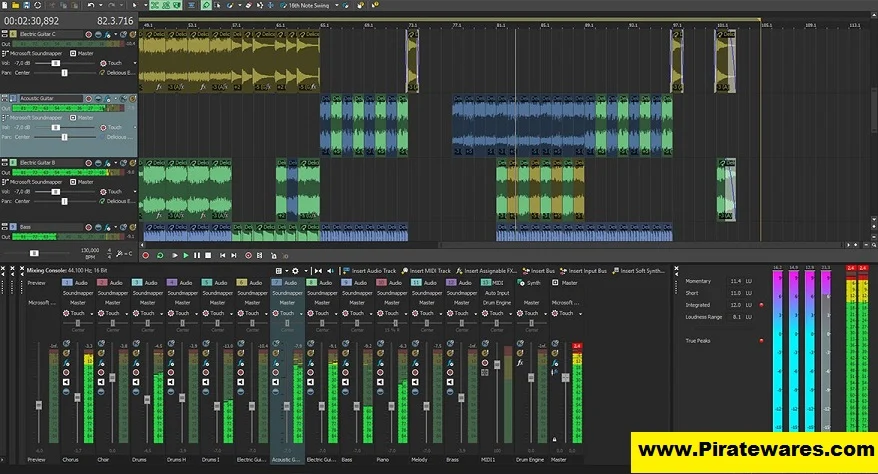
Large music projects can contain many audio and MIDI tracks. ACID Pro provides timeline and arrangement tools to keep these elements organized.
Track folders help group related material, while the mixing environment provides controls for managing levels, effects, and routing. Therefore, users can keep vocals, drums, instruments, and other elements organized throughout production.
What Is New in ACID Pro 11.0.2.21?
The ACID Pro 11.0.2.21 update includes several fixes and instrument-related changes compared with build 11.0.1.17.
The published change information highlights the following updates:
- Fixed VST effects chain state handling.
- Improved support for instantiating some newer Vita Solo Instruments.
- Added Angels Harp, E-Bass, and Clean E-Guitar instruments through the in-app store.
- Added access to Cherry Audio Sines and GX-80 instruments through the in-app store.
These changes focus on plug-in handling and access to additional instruments rather than a complete redesign of the application.
The listed changes come from the ACID Pro 11 update history. They should not be confused with the features of the newer ACID Pro 2026 release.
ACID Pro 11 vs. ACID Pro 2026
ACID Pro 11 is an earlier generation of the software. In 2026, Boris FX introduced a newer ACID Pro release with an updated product and licensing workflow.
The newer release continues the loop-based production approach while adding more loops, curated starter songs, and an expanded sound library.
Here is a simple comparison:
| Area | ACID Pro 11 | ACID Pro 2026 |
|---|---|---|
| Main workflow | Loop-based music production | Updated loop-based workflow |
| Audio recording | Multitrack recording | Current-generation product |
| MIDI | MIDI sequencing and editing | Current MIDI workflow |
| Plugins | VST2/VST3 support | Check current product documentation |
| Product status | Earlier release | Newer 2026 release |
| Licensing | MAGIX-era licensing | Boris FX licensing |
Users who already own ACID Pro 11 should check the official upgrade policy before purchasing another license. Eligibility can depend on the original purchase date and license type.
Who Should Use MAGIX ACID Pro?
ACID Pro can serve different types of music creators.
Music Producers
Producers can use its loop library, MIDI tools, virtual instruments, and mixing features to create original music. Its timeline workflow also helps them experiment with arrangements.
DJs and Remix Artists
Beatmapper, time stretching, and MIDI Playable Chopper can help remix artists manipulate samples and build new rhythmic patterns.
Composers
Composers can combine recorded instruments, MIDI performances, and audio loops to develop musical ideas and complete arrangements.
Sound Designers
Sound designers can use audio editing, effects, and sample manipulation tools to create custom sounds and textures.
System Requirements and Compatibility
The original post lists Windows 7, 8, 8.1, and 10, along with 512 MB RAM and 90 MB of storage. These figures should not be treated as verified requirements for ACID Pro 11.0.2.21.
The software’s exact requirements can depend on the installer, edition, audio interface, plug-ins, and bundled content. In particular, a project containing many virtual instruments and effects will need more resources than a simple loop arrangement.
Before installing an older release, check:
- Whether your Windows version is supported by that specific build.
- Whether the installer supports your 64-bit Windows environment.
- How much storage the program and bundled sound libraries require.
- Whether your audio interface has compatible drivers.
- Whether your third-party VST plug-ins work with the installed version.
MAGIX lists ACID Pro among its products that can be used with Windows 11, but it also warns that compatibility is not guaranteed for every older version. Therefore, verify the exact release before installing it on a newer computer.
Is MAGIX ACID Pro Available for Mac?
ACID Pro is a Windows-focused desktop application. The current Boris FX trial information lists Windows as its supported platform.
Mac users should not assume that the Windows installer will run natively on macOS. Instead, check the vendor’s current platform information or consider a DAW designed specifically for Mac.
How to Install ACID Pro Safely
For a legitimate installation, use the installer supplied through the official software provider.
- Visit the official ACID Pro product page.
- Check the available release and supported operating systems.
- Download the installer or Boris FX Hub as instructed.
- Create or sign in to the required vendor account.
- Follow the installation instructions.
- Launch the application after setup.
- Activate the product using your valid license or start the official trial if available.
Avoid unofficial key generators, modified installers, and unknown activation patches. Also, do not disable antivirus protection to run files from untrusted download sources.
Frequently Asked Questions
1. What is MAGIX ACID Pro used for?
MAGIX ACID Pro is a digital audio workstation used for loop-based music production, multitrack recording, MIDI sequencing, audio editing, remixing, and mixing.
2. What is ACID Pro 11.0.2.21?
It is an ACID Pro 11 software build. Its published update information includes VST effects chain fixes and additional Vita Solo and Cherry Audio instrument availability.
3. Does ACID Pro 11 support VST3 plugins?
Yes. ACID Pro 11 includes VST2 and VST3 support, along with a 32-bit bridge for compatible older plug-ins.
4. Can I record vocals in ACID Pro?
Yes. Its multitrack recording workflow allows users to record vocals and instruments on separate tracks and mix them within a project.
5. Is ACID Pro suitable for beginners?
Its loop-based workflow can make it approachable for beginners who want to experiment with samples and beats. However, learning MIDI editing, routing, plug-ins, and mixing will take practice.
6. Is ACID Pro 11 the latest version in 2026?
No. Boris FX introduced ACID Pro 2026 as a newer release. ACID Pro 11.0.2.21 is an earlier version.
7. Does ACID Pro work on Windows 11?
MAGIX lists ACID Pro among its products that can be used with Windows 11. However, it does not guarantee compatibility for every older release. Check the exact build before installing it.
8. Is there a free version of ACID Pro?
Boris FX offers an official 15-day full-featured trial of its current ACID Pro product. Trial availability and licensing conditions may change, so check the official trial page for current details.
Final Verdict
MAGIX ACID Pro 11 remains a notable loop-based digital audio workstation. Its combination of audio recording, MIDI sequencing, time stretching, VST support, and sample manipulation makes it useful for producers who prefer a loop-oriented creative workflow.
However, ACID Pro 11.0.2.21 is not the newest release in 2026. Users should compare it with ACID Pro 2026, verify system compatibility, and review the current licensing options before choosing an edition.



Recent Comments