
MAGIX Music Maker Review: Features, Music Production & Setup Guide
MAGIX Music Maker Review: Features, Music Production & Setup Guide
MAGIX Music Maker is a digital audio workstation (DAW) designed to help users create music, beats, and audio projects on Windows computers. It offers a beginner-friendly workflow with loops, virtual instruments, audio recording, MIDI editing, and sound effects.
The software is suitable for beginners who want to experiment with music production as well as users who need accessible tools for arranging tracks and creating demos. This guide covers its features, version information, system requirements, and official installation process.
What Is MAGIX Music Maker?
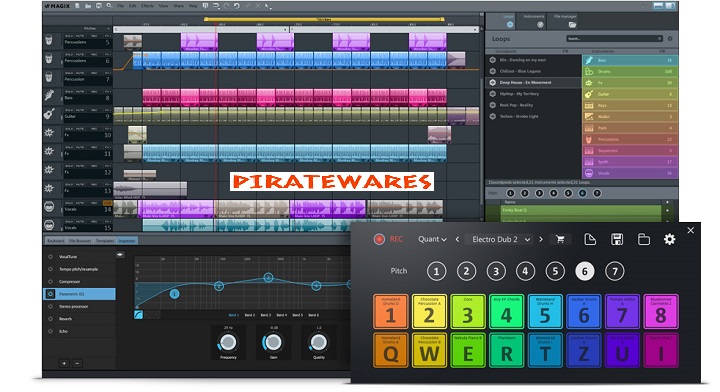
MAGIX Music Maker is music production software developed by MAGIX. It provides a workspace where users can arrange audio loops, record sounds, work with MIDI instruments, apply effects, and build complete musical projects.
Its drag-and-drop workflow makes it easier to start producing music without needing advanced audio engineering knowledge. Users can select sounds, place them on tracks, adjust their arrangement, and mix the results.
The software is designed for Windows rather than macOS, Linux, or ChromeOS.
MAGIX Music Maker 2025 Version 33.0.1.9
Version 33.0.1.9 is an update associated with MAGIX Music Maker 2025 Premium. MAGIX published its patch information on July 17, 2024.
This update included several bug fixes and stability improvements, including corrections for MIDI playback, project loading, mixer controls, plug-in handling, and backup projects.
It is important to distinguish this older build from the newer Music Maker 2026 edition. Users looking for the current product should check the official MAGIX website rather than treating version 33.0.1.9 as the latest release.

Key Features of MAGIX Music Maker
1. Drag-and-Drop Music Production
The drag-and-drop workflow lets users place audio loops and musical elements directly onto tracks. This makes it easier to experiment with arrangements and create a basic song structure.
Users can move, repeat, and organize audio objects to develop different musical ideas.
2. Loop Browser and Soundpools
The Loop Browser helps users explore available sounds and find material for their projects. Soundpools provide collections of loops and samples that can be arranged to create different musical styles.
The available sound libraries depend on the edition and content included with the user’s license.
3. Audio Recording
MAGIX Music Maker supports audio recording, allowing users to capture vocals, instruments, and other audio sources.
Recording quality depends on the connected microphone, audio interface, drivers, and recording settings.
4. MIDI Editing
MIDI editing allows users to work with musical notes and virtual instruments. It is useful for creating melodies, bass lines, chords, and drum patterns.
Users can edit musical arrangements without having to record every instrument as a live audio performance.
5. Virtual Instruments
Supported editions provide access to virtual instruments that can be used to create different sounds and musical parts.
The number and type of included instruments vary between editions. Check the official edition comparison before purchasing.
6. Audio Effects and Mixing
Audio effects help shape the sound of individual tracks and complete projects. Users can adjust effects and arrange their audio elements to create a more polished mix.
The available effects depend on the installed version and edition.
7. VST3 Plugin Support
MAGIX Music Maker supports VST3 plug-ins, allowing users to extend their music production workflow with compatible third-party instruments and effects.
Plugin compatibility can depend on the plug-in version, architecture, and installation configuration.
8. Beatbox Pro 3 and Newer Features
The Music Maker 2026 product lineup highlights Beatbox Pro 3, which provides tools for beat creation and customizable drum kits.
MAGIX also highlights an improved Loop Browser, genre filtering, and pitch control in its 2026 feature information. These features should not be assumed to exist in the older 33.0.1.9 build.
What’s New in MAGIX Music Maker 2026?
MAGIX highlights several improvements in its 2026 product information:
- Improved Loop Browser: Helps users browse and select loops more efficiently.
- Genre Filter: Makes it easier to find sounds based on musical style.
- Pitch Control: Allows users to change the pitch of loops directly from the track.
- Beatbox Pro 3: Provides beat-making controls and support for custom drum kits.
- Custom Effects: Offers tools for arranging and adjusting audio effects.
- Mastering Tools: Helps users work on the final sound of their music projects.
Feature availability varies by edition. Review the official comparison before selecting a license.
MAGIX Music Maker Editions
MAGIX offers different Music Maker editions, and their included content and tools can vary.
| Edition | General description |
|---|---|
| Free | Entry-level music creation features |
| Premium | Additional instruments, effects, and sound content |
| Unlimited | Expanded access to sound libraries and additional content |
The exact features, soundpools, instruments, and included extras can change between product releases. Check the current MAGIX pricing and comparison pages for details.
System Requirements
The official MAGIX specifications for Music Maker list the following minimum requirements:
| Component | Minimum requirement |
|---|---|
| Operating system | 64-bit Windows 10 or Windows 11 |
| Processor | 2 GHz |
| RAM | 3 GB |
| Graphics | Onboard graphics |
| Display resolution | 1280 × 768 |
| Sound card | Onboard sound card |
| Storage | At least 2 GB for program installation |
| Internet | Required for registration, validation, and selected features |
These requirements refer to the specifications published for the current product page. Older releases may have different requirements. A more powerful computer and a suitable audio interface can provide a better experience when working with larger projects.
Supported Audio Formats
MAGIX Music Maker supports several common audio formats.
Audio Import and Export
The official specifications list formats including:
- AIFF
- FLAC
- MIDI (MID)
- MP3
- OGG Vorbis
- WAV
Some additional format and codec support may depend on the software version and installed components.
How to Download and Install MAGIX Music Maker
Follow these steps to install the software from its official source:
- Visit the official MAGIX Music Maker website.
- Review the available editions and system requirements.
- Select the free version, trial, or paid edition that meets your needs.
- Download the installer from the official MAGIX website.
- Open the downloaded setup file.
- Follow the installation instructions displayed on the screen.
- Launch MAGIX Music Maker after installation.
- Complete the required registration or account sign-in.
- Allow the program to download any additional content required for your edition.
Avoid unofficial torrent packages and modified installers. They may contain unwanted software, malware, or altered program files.
How to Activate MAGIX Music Maker
Some Music Maker editions require registration and license validation.
To activate a legitimate paid copy:
- Purchase a license through MAGIX or an authorized seller.
- Install the official software.
- Open MAGIX Music Maker.
- Sign in or register as instructed.
- Enter the valid serial number or license information when requested.
- Complete the online validation process.
Do not use key generators, shared serial numbers, or unauthorized activation tools. They are not legitimate ways to obtain a software license.
Advantages of MAGIX Music Maker
- Beginner-friendly music production workflow.
- Drag-and-drop loop arrangement.
- Audio recording and MIDI editing.
- Virtual instruments and sound libraries.
- Audio effects and mixing tools.
- VST3 plugin support.
- Multiple editions for different production needs.
Limitations of MAGIX Music Maker
- Some instruments and sound libraries require paid editions.
- Certain features require an internet connection.
- Large projects can require more processing power and memory.
- Third-party plugin compatibility may vary.
- Professional users may prefer a more advanced DAW for specialized workflows.
Frequently Asked Questions
Is MAGIX Music Maker free?
MAGIX offers a Free edition alongside paid editions. The available features and content depend on the edition.
Is version 33.0.1.9 the 2026 version?
No. Version 33.0.1.9 is an update associated with Music Maker 2025 Premium, published in July 2024. MAGIX now promotes Music Maker 2026.
Can I use MAGIX Music Maker on Windows 11?
Yes. MAGIX lists 64-bit Windows 11 and Windows 10 in the current product system requirements.
Does MAGIX Music Maker support MIDI?
Yes. MIDI editing is among the supported music production features.
Can I record vocals with MAGIX Music Maker?
Yes. The software includes audio recording functionality. A compatible microphone or audio interface can be used to capture vocals and instruments.
Does MAGIX Music Maker support VST plugins?
The official product specifications list VST3 support. Individual plugin compatibility depends on the plugin and system configuration.
Can beginners use MAGIX Music Maker?
Yes. Its drag-and-drop workflow, loops, soundpools, and accessible editing tools make it suitable for people who are starting to learn music production.
Is MAGIX Music Maker available for Mac?
The current official product information lists Windows 10 and Windows 11. It does not list macOS as a supported operating system.
Final Verdict
MAGIX Music Maker is a useful option for people who want to create beats, arrange loops, record audio, and experiment with music production on Windows. Its drag-and-drop workflow makes it approachable for beginners, while MIDI editing, effects, and plugin support provide additional creative options.
Version 33.0.1.9 belongs to the older Music Maker 2025 release cycle. Users interested in newer features should review the official Music Maker 2026 editions and download the software directly from MAGIX.



Recent Comments