
MindManager 24 Review: Mind Mapping, Project Planning & Features
MindManager 24 Review: Mind Mapping, Project Planning & Features
MindManager is a visual productivity and project planning application developed by MindManager. It helps individuals and teams organize ideas, manage information, create mind maps, and turn complex projects into structured plans.
The software provides tools for brainstorming, flowcharts, concept maps, timelines, Gantt charts, and task management. It is designed for professionals, students, project managers, educators, and businesses that need a visual way to organize information.
MindManager 24 introduced improvements to project planning, task management, sharing, and collaboration. This guide explores its features, supported platforms, system requirements, and official installation process.
What Is MindManager 24 Used For?
MindManager is primarily used to organize information visually. Instead of keeping ideas in long documents or disconnected notes, users can arrange topics, tasks, resources, and relationships in a structured visual map.
Common uses include:
- Brainstorming and organizing ideas.
- Planning business projects.
- Creating mind maps and concept diagrams.
- Managing tasks and deadlines.
- Building flowcharts and process diagrams.
- Preparing presentations and reports.
- Organizing research and study materials.
- Collaborating with colleagues and teams.
Its visual workspace makes it easier to understand relationships between different topics and identify important priorities.
Key Features of MindManager 24
1. Mind Mapping
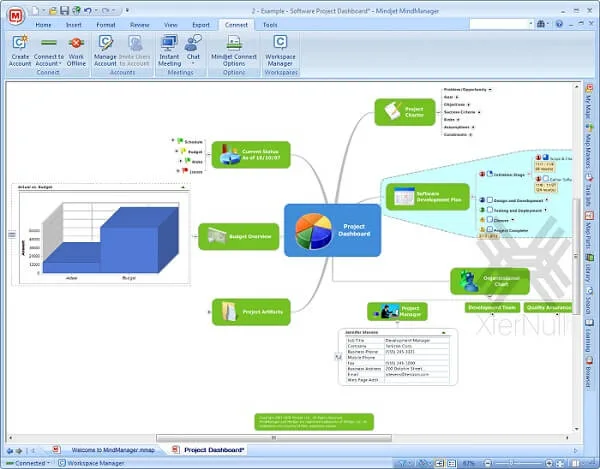
Mind mapping is the central feature of MindManager. Users can create a main topic and expand it into branches containing related ideas, notes, documents, and other information.
Topics can be rearranged and customized to create clear visual structures for planning and brainstorming.
2. Flowcharts and Concept Maps
MindManager supports different visual diagram types, including flowcharts and concept maps.
These tools help users illustrate processes, explain relationships, organize business information, and communicate complicated ideas.
3. Gantt Charts and Project Planning
The Gantt chart functionality helps project managers organize tasks and visualize project schedules.
Users can work with task dates, deadlines, resources, and dependencies to understand project progress and identify scheduling issues.
4. Task Management
MindManager allows users to organize tasks within visual maps.
Depending on the selected platform and license, task information can include:
- Start dates.
- Due dates.
- Priority levels.
- Assigned resources.
- Progress information.
- Task dependencies.
- Additional notes and supporting documents.
These options help teams keep project information organized.
5. Collaboration and Sharing
MindManager includes tools for sharing visual maps and collaborating with colleagues.
Users can publish maps, share information, and collaborate through supported platforms. Available collaboration functions depend on the subscription and application edition.
6. Microsoft Office Integration
MindManager integrates with several Microsoft applications, including Word, Excel, Outlook, SharePoint, and Microsoft Project.
These integrations help users transfer information between their visual maps and other productivity tools.
7. Customization Options
Users can customize maps using different colors, fonts, layouts, shapes, icons, and visual styles.
This makes it easier to distinguish important topics, highlight priorities, and create diagrams suitable for presentations or reports.
8. Templates and Themes
MindManager provides templates and themes that help users start projects without building every diagram from scratch.
Templates can be useful for business planning, brainstorming, meeting management, project organization, and workflow documentation.
9. Notes, Attachments, and Links
Users can attach supporting information to topics within a map.
This may include notes, hyperlinks, documents, images, and other resources, helping keep related information in one organized workspace.
10. Multiple Viewing Modes
MindManager provides different ways to view and organize information. Depending on the platform and edition, users can work with map, outline, and Gantt chart views.
These options allow users to examine the same project from different perspectives.
What’s New in MindManager 24?
MindManager 24 introduced several improvements focused on project planning and productivity.
Notable improvements included:
- Gantt chart viewing and sharing across additional platforms.
- The ability to publish maps in Gantt view.
- HTML5 Gantt chart export.
- An enhanced task information pane.
- A countdown showing the number of days until a task starts or reaches its due date.
- Improved visibility of tag groups, including Kanban-style tags.
- Better support for visual project tracking and collaboration.
These improvements were designed to make project planning and sharing more convenient for individuals and teams.
Version information: MindManager 24.0.154 is an older version identifier. The current official product lifecycle lists MindManager Windows 26 and Mac 26, released on October 6, 2026. Therefore, version 24 should be treated as a previous release rather than the latest 2026 version.
MindManager 24 System Requirements
The official MindManager 24 Windows requirements include:
| Component | Windows 24 requirement |
|---|---|
| Operating system | Windows 10 or Windows 11 |
| Processor | 1.6 GHz or faster, dual-core |
| RAM | 2 GB or greater |
| Storage | 1.5 GB available disk space |
| Display | 1280 × 720 pixels recommended minimum |
| Internet | Required for selected online features |
Additional requirements for certain integrations:
- Microsoft Office Professional 2016 or later.
- Microsoft Project 2016 or later for applicable features.
- Microsoft Edge WebView2 Runtime.
- Internet connection for online functions.
MindManager 24 for Mac had separate requirements, including macOS Ventura 13 through macOS Sequoia 15 and at least 1 GB of available storage.
Check the official requirements before installing an older version because compatibility varies by release.
How to Download and Install MindManager
For a legitimate installation, use the official MindManager download library.
- Visit the official MindManager website.
- Open the product download library.
- Select the appropriate Windows or Mac version.
- Choose the installer matching your operating system.
- Download the installation package.
- Run the installer and follow the setup instructions.
- Open MindManager after installation.
- Sign in or activate the software using a valid license.
- Start a new map or select a template.
The official download library requires an appropriate MindManager account and license for supported product downloads.
Avoid modified installers, unofficial activation keys, and license bypass tools.
MindManager License and Pricing
MindManager offers different plans for individuals, professionals, and organizations.
Available options include Essentials, Professional, Enterprise, and certain one-time purchase options, depending on the market and platform.
The features and collaboration capabilities vary between plans. Before purchasing, compare the available options on the official pricing page.
Official pricing: https://www.mindmanager.com/en/pricing/
Frequently Asked Questions
1. What is MindManager 24 used for?
MindManager 24 is used for mind mapping, brainstorming, project planning, flowcharts, task management, and visual organization of information.
2. Is MindManager free?
MindManager offers a free trial for users who want to evaluate the software. Continued use of licensed features requires an appropriate subscription or purchase.
3. Does MindManager support Gantt charts?
Yes. MindManager includes Gantt chart functionality for project planning, scheduling, task management, and tracking dependencies.
4. Is MindManager available for Windows and Mac?
Yes. MindManager provides desktop applications for Windows and macOS, with compatibility depending on the specific release.
5. Can MindManager integrate with Microsoft Office?
Yes. It supports integrations with Microsoft applications such as Word, Excel, Outlook, SharePoint, and Microsoft Project, depending on the selected version and available features.
6. What is the difference between a mind map and a flowchart?
A mind map organizes ideas around a central topic using branches and related subjects. A flowchart represents a process through connected shapes and directional relationships.
7. Is MindManager 24 the latest version in 2026?
No. The official product lifecycle lists MindManager 26 for Windows and Mac as released in October 2026. MindManager 24 is an older release.
8. Can teams collaborate using MindManager?
Yes. MindManager offers sharing and collaboration features, including cross-platform co-editing in supported plans and applications.
Final Thoughts
MindManager is a useful visual productivity application for people who need to organize ideas, create diagrams, and manage projects. Its combination of mind mapping, Gantt charts, flowcharts, templates, and Microsoft integrations makes it suitable for a wide range of professional and educational activities.
MindManager 24 introduced useful improvements to project planning and collaboration, but users considering a new installation should also review the newer MindManager 26 release.
Always download the application from the official website and choose a license that supports your intended workflow.
Official Resources:
- Official website: https://www.mindmanager.com/en/
- Product features: https://www.mindmanager.com/en/product/mindmanager/
- Download library: https://www.mindmanager.com/en/support/download-library/
- System requirements: https://kb.mindmanager.com/en/125306
- Product lifecycle: https://www.mindmanager.com/en/support/product-lifecycle-policy/
- MindManager 24 release information: https://blog.mindmanager.com/24-mindmanager-product-release/
- Pricing: https://www.mindmanager.com/en/pricing/



Recent Comments