
Nero Burning ROM Review: CD, DVD & Blu-ray Burning Guide
Nero Burning ROM Review: CD, DVD & Blu-ray Burning Guide
Nero Burning ROM is a disc burning and data management application developed by Nero AG. It allows users to burn, copy, and organise data on CDs, DVDs, and Blu-ray discs. The software also includes tools for audio CD ripping, ISO image creation, and data protection.
Nero Burning ROM is useful for people who still work with optical discs. For example, you can create music CDs, archive important files, copy supported discs, and prepare bootable or data disc projects.
Its interface provides a guided workflow for selecting a disc project, adding files, and starting the burning process. As a result, beginners can perform common tasks without learning complicated commands.
What Is Nero Burning ROM?
Nero Burning ROM is a Windows application designed for optical disc recording and copying. It supports different disc formats and provides tools for managing files before they are written to a disc.
The software can also create disc images and convert audio tracks into digital formats. These capabilities make it useful for both personal archiving and professional data management.
Nero Burning ROM is a dedicated application. It should not be confused with Nero Platinum, which is a larger multimedia software package containing additional applications.
Key Features of Nero Burning ROM
1. CD, DVD, and Blu-ray Burning
Nero Burning ROM supports burning different types of optical discs, including CDs, DVDs, and Blu-ray media.
You can add documents, photographs, videos, music, and other supported files to a compilation. The software helps organise the selected content before writing it to the disc.
This feature is useful for creating physical backups and sharing files with devices that support optical media.
2. Disc Copying
The application provides tools for copying supported CDs, DVDs, and Blu-ray discs.
You can create a copy of compatible media while preserving the supported disc structure. However, copying may be restricted by copyright protection or other technical limitations.
Only copy discs and content that you are legally authorised to reproduce.
3. Audio CD Ripping
Nero Burning ROM can extract audio tracks from CDs and save them as digital audio files.
Supported formats include:
- MP3
- MP3 PRO
- AAC
- FLAC
- APE
The software also integrates Gracenote technology for retrieving available music information, such as track titles and album details.
This makes it easier to organise music collections after transferring tracks to a computer.
4. SecurDisc 4.0
SecurDisc 4.0 is one of Nero’s data protection technologies.
It provides security features such as password protection, 256-bit encryption, and digital signatures in supported workflows. It also includes data redundancy options that can help improve readability when a disc becomes scratched or damaged.
These features are useful when storing important files on optical media.
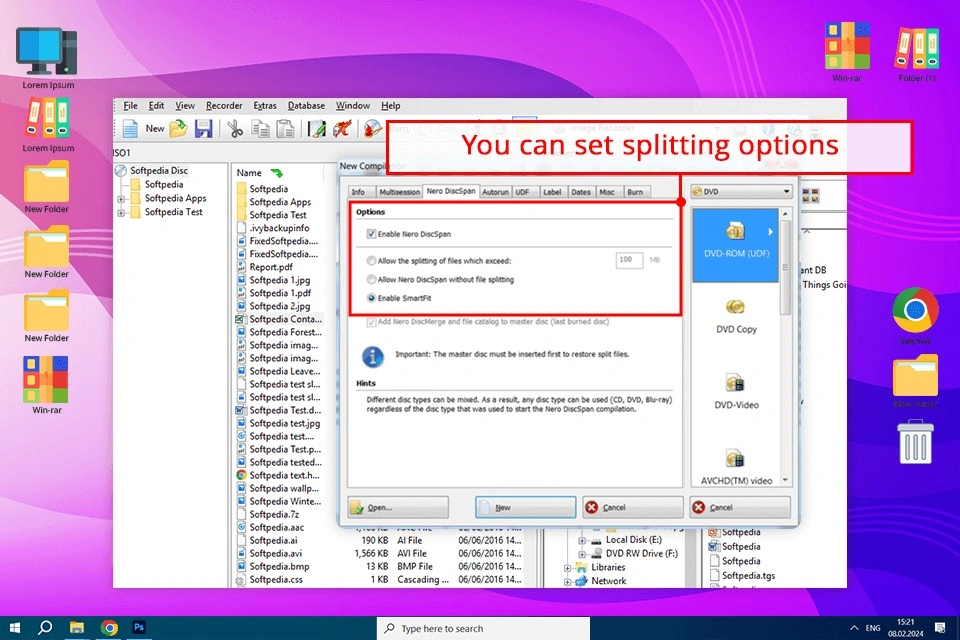
5. Nero DiscSpan and SmartFit
Nero DiscSpan helps distribute large compilations across multiple discs.
This is useful when the total amount of data exceeds the capacity of a single CD, DVD, or Blu-ray disc.
SmartFit can help distribute files more efficiently across the available discs. Depending on the selected settings, the software can also split large files.
6. ISO Image Creation
Nero Burning ROM supports creating and burning ISO images.
An ISO image stores the contents of a disc in a single image file. You can use this format to archive disc projects or prepare compatible installation media.
The application can also burn supported disc images onto physical media.
7. Audio CD Creation
The software provides tools for creating audio CDs from supported music files.
You can organise tracks, configure available audio settings, and prepare a compilation for compatible CD players.
This feature remains useful for people who use traditional car stereos or home audio systems with CD support.
8. Nero CoverDesigner
Nero’s disc creation workflow can work with CoverDesigner for preparing disc labels and cover artwork.
You can create personalised designs for disc cases and labels. This helps organise physical media collections and identify archived projects.
Availability depends on the Nero product package you install.
9. Data Verification and Protection
Nero includes tools designed to improve the reliability of disc projects.
Depending on the product edition and supported media, these tools can help verify recorded data and protect archived files.
For important backups, it is still a good idea to keep another copy on a separate storage device.
What’s New in Nero Burning ROM?
Nero continues to update its disc burning software with improvements to compatibility, security, and usability.
The current Nero Burning ROM product information highlights:
- Burning and copying CDs, DVDs, and Blu-ray discs.
- Audio CD ripping and format conversion.
- ISO image creation and disc image burning.
- SecurDisc 4.0 data protection.
- Password protection and encryption in supported workflows.
- Improved disc project management.
- Integration with Nero’s media and cover design tools.
The exact feature set depends on the edition and version. Check the official release information before upgrading.
Nero Burning ROM 25.5.2070.0 Version Information
The original article lists Nero Burning ROM version 25.5.2070.0.
However, this exact build could not be independently confirmed through Nero’s official release documentation. A third-party version archive associates this build with Nero Platinum and lists its release date as 23 February 2023.
This distinction is important because Nero Burning ROM can also be included within larger Nero software packages. Their version numbers and included applications may differ.
If you are using this older build, check the version information displayed inside the application. For newer features and Windows compatibility, consult Nero’s official download page.
Latest Nero Burning ROM Version
Nero’s official website lists Nero Burning ROM 2027 as its current product edition.
It provides disc burning, copying, audio ripping, backup, and SecurDisc functionality. The official product page lists Windows 10 and Windows 11 support.
Users who want a current installation should check the official website instead of relying on an old archive labelled as the latest 2026 version.
Nero Burning ROM System Requirements
The current official Nero Burning ROM product page lists Windows 10 and Windows 11 compatibility.
The exact hardware requirements depend on the installed edition and the disc operations you perform.
| Requirement | Information |
|---|---|
| Operating system | Windows 10 or Windows 11 |
| Processor | Compatible Windows-supported processor |
| RAM | Check the requirements for your selected edition |
| Storage | Sufficient free space for installation and temporary disc projects |
| Optical drive | Compatible CD, DVD, or Blu-ray writer for physical disc burning |
| Internet | May be required for downloads, activation, and online services |
| Media | Compatible blank CD, DVD, or Blu-ray disc |
A physical optical drive is necessary for burning physical discs. Creating or managing an ISO image does not necessarily require a disc writer.
Do not rely on the old article’s 50 MB storage and 1 GB RAM figures as current official requirements.
How to Download and Install Nero Burning ROM
Follow these steps to install Nero from its official website:
- Visit the official Nero website.
- Open the Nero Burning ROM product page.
- Review the available edition and licensing options.
- Download the installer from Nero’s official download source.
- Open the downloaded setup file.
- Follow the on-screen installation instructions.
- Complete the installation and launch Nero Burning ROM.
- Activate the application using a valid licence if required.
- Insert a compatible blank disc when you want to create a physical disc project.
- Select your project type, add files, and review the settings before burning.
Avoid modified installers, key generators, and unofficial activation files. They can expose your computer to security risks and may violate the software licence.
Advantages of Nero Burning ROM
- Supports CD, DVD, and Blu-ray burning.
- Provides tools for copying supported discs.
- Can rip audio CDs into digital formats.
- Includes ISO image creation and burning.
- Offers SecurDisc 4.0 security features.
- Supports multi-disc projects through Nero DiscSpan.
- Provides audio CD creation tools.
- Integrates with Nero’s cover design workflow.
- Offers a guided interface for common disc projects.
Limitations of Nero Burning ROM
- Designed for Windows rather than macOS or Linux.
- Physical disc burning requires compatible optical hardware.
- Some features depend on the purchased edition.
- Modern computers may not include built-in optical drives.
- Copying protected or restricted media may not be supported.
- Older versions may not support current Windows releases.
Frequently Asked Questions
What is Nero Burning ROM used for?
Nero Burning ROM is used to burn and copy CDs, DVDs, and Blu-ray discs. It also provides audio ripping, ISO image creation, and data protection features.
Is Nero Burning ROM free?
Nero Burning ROM is commercial software. Availability of trial versions and paid editions depends on Nero’s current offers. Check its official website for the latest options.
Does Nero Burning ROM support Windows 11?
Yes. Nero’s current product page lists Windows 11 and Windows 10 support.
Can Nero Burning ROM burn Blu-ray discs?
Yes. It supports Blu-ray disc burning when you have compatible hardware and blank media.
What is SecurDisc 4.0?
SecurDisc 4.0 is a Nero data protection technology. It includes features such as encryption, password protection, digital signatures, and data redundancy in supported workflows.
Can Nero Burning ROM convert audio CDs to MP3?
Yes. It can rip audio CD tracks and convert them into supported digital formats, including MP3 and FLAC.
What is Nero DiscSpan?
Nero DiscSpan helps distribute large data compilations across multiple optical discs. SmartFit can help arrange files to use available disc capacity more efficiently.
Is Nero Burning ROM the same as Nero Platinum?
No. Nero Burning ROM is a dedicated disc burning application. Nero Platinum is a larger multimedia package that includes additional applications and features.
Final Verdict
Nero Burning ROM remains a useful application for people who need reliable optical disc burning, copying, and audio ripping tools. Its support for CDs, DVDs, and Blu-ray media makes it suitable for physical data archiving and music collections.
SecurDisc 4.0, ISO image creation, and DiscSpan add further value for users who work with important files. However, you need compatible optical hardware for physical disc recording.
For the best experience, choose a supported version, download it from Nero’s official website, and keep an additional backup of important data.


Recent Comments