
Ant Download Manager Review: Features, Video Downloads & Guide
Ant Download Manager Review: Features, Video Downloads & Guide
Ant Download Manager (AntDM) is a Windows application designed to manage internet downloads. It helps users download files, organise multiple transfers, pause and resume supported downloads, and capture audio or video from compatible websites.
The software combines a traditional download manager with media downloading tools. It supports common internet protocols and integrates with popular web browsers. As a result, users can manage downloads without repeatedly copying links into a separate application.
Ant Download Manager is useful for downloading documents, archives, software installers, images, and other permitted files. It also provides tools for handling supported streaming formats and converting compatible media into MP3 audio.
What Is Ant Download Manager?
Ant Download Manager is a download management application developed by AntGROUP Inc. It is designed to make downloading files easier and more organised.
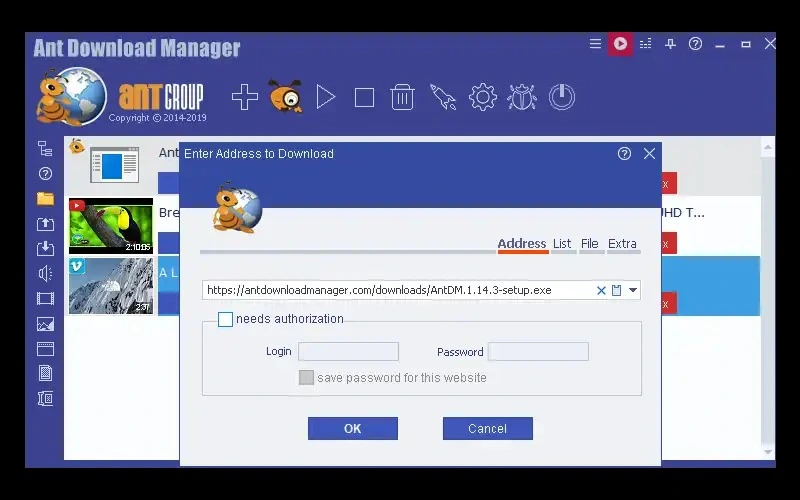
Instead of handling every download separately in a browser, users can manage their transfers from one interface. They can view download progress, organise files into categories, and configure download settings.
The application also includes browser integration and a built-in media downloader. However, media capture depends on the website, streaming format, and available access permissions.
Key Features of Ant Download Manager
1. Multi-Threaded Downloading
Ant Download Manager uses multi-threaded downloading technology to manage supported file transfers.
This feature divides eligible downloads into multiple parts. It can improve download performance when the server and network support multiple connections.
Actual speeds depend on your internet connection, server limits, and the file being downloaded.
2. Pause and Resume Downloads
The application allows users to pause and resume supported downloads.
This is helpful when an internet connection becomes unstable or you need to temporarily stop a large transfer. However, resuming depends on whether the source server supports the required functionality.
3. Browser Integration
Ant Download Manager can integrate with popular browsers, including:
- Google Chrome
- Mozilla Firefox
- Microsoft Edge
- Opera
- Other supported Chromium-based browsers
After installing the relevant browser integration, the application can detect supported downloadable content and offer to manage it through AntDM.
Browser compatibility can change as browsers receive updates. Check the official documentation if an extension stops working.
4. Video and Audio Downloading
One of AntDM’s main features is its ability to capture supported online audio and video.
The application includes a media downloader that works with supported websites and streaming formats. It can also provide different download options when the source makes them available.
Not every website or video can be downloaded. Some services use restrictions, encryption, or access controls that prevent downloading.
Always respect copyright rules and the terms of the website when saving online media.
5. HLS and MPEG-DASH Support
Ant Download Manager supports several streaming technologies, including:
- HLS (M3U8)
- MPEG-DASH (MPD)
- VIMEO-STREAM
These technologies are used by many online video platforms. Support depends on the stream configuration and whether the content is accessible to the application.
6. MP3 Conversion
The software includes an audio conversion feature that can convert compatible media files into MP3 format.
This can be useful when you need an audio version of a video for personal use. Conversion options depend on the source file and available media components.
7. Download Queue and Scheduler
AntDM provides download management tools that help users organise multiple transfers.
You can arrange downloads, manage their order, and use the built-in scheduler to control when supported tasks begin.
This is especially useful when downloading several large files or managing transfers over a limited internet connection.
8. Batch Downloading
The application supports downloading multiple files and lists of download links.
Instead of adding every file individually, users can organise several supported links in one workflow. This can save time when handling multiple documents or other permitted downloads.
9. Download Categories and Preview
Ant Download Manager organises downloads through categories and lists. It also provides thumbnail and preview options for supported media.
These features make it easier to find completed files and review download activity.
10. Torrent and Magnet Link Support
AntDM also supports the BitTorrent protocol through its torrent component.
Users can open supported torrent files and magnet links through the application. Only download or share content that you are legally permitted to access.
Ant Download Manager 2.14.1 Version Details
The original article lists version 2.14.1.88710. However, the official AntDM changelog identifies version 2.14.1 Build 88711, released on 5 October 2024.
The official release notes mention these changes:
- Added two ways to add subtitles to completed video files.
- Updated the Video Button for video capture and newer Chrome versions.
- Fixed issues with downloading video subtitles.
- Included general fixes and improvements.
The build number in the original article does not exactly match the official changelog. Therefore, check the installer details before identifying a downloaded package as this specific release.
Latest Ant Download Manager Version
Ant Download Manager has received several updates since version 2.14.1.
The official download page lists version 2.18.1, released on 15 November 2026. Its changelog mentions an updated video downloader, a video merger fix, corrected cURL timeouts, HLS downloader fixes, and general improvements.
Users who want the latest compatibility updates should check the official download page rather than relying on an older installer.
Ant Download Manager Free vs Pro
AntDM offers different access options, including free and paid Pro editions.
The free version provides access to selected download management and browser integration features. Pro adds further capabilities, depending on the current licence and product plan.
Before purchasing, compare the current official plan details. A lifetime licence, where offered, must be purchased through the developer’s authorised sales channel.
| Option | Description |
|---|---|
| Free | Access to selected download management features |
| Trial | Time-limited access to evaluate Pro features |
| Pro | Paid access to additional features |
| Lifetime Pro | Long-term licence option offered by the developer |
Feature availability can change, so check the official comparison before choosing a plan.
System Requirements
Ant Download Manager is a Windows application. Its official website currently lists Windows 7 and later for its x32 and x64 versions.
| Requirement | Information |
|---|---|
| Operating system | Windows 7 and later, according to the official website |
| Architecture | 32-bit and 64-bit builds |
| Browser | Compatible Chrome, Firefox, Edge, or supported browser |
| Internet | Required for downloading files and online media |
| Storage | Free space for the application and downloaded files |
| Memory | Depends on Windows, browser use, and download activity |
The developer does not provide a confirmed minimum RAM or storage figure on the current product overview. Therefore, the older claims of 2 GB RAM and 306 MB storage should not be treated as verified requirements.
How to Download and Install Ant Download Manager
Follow these steps to install AntDM safely:
- Visit the official Ant Download Manager website.
- Open its download page.
- Select the appropriate 32-bit or 64-bit installer for your Windows system.
- Download the installer from the official source.
- Open the setup file.
- Choose your preferred installation language.
- Accept the licence agreement and select an installation folder.
- Choose the components you want to install.
- Complete the setup and launch Ant Download Manager.
- Install or enable the supported browser integration if needed.
For Pro features, use a valid licence obtained from the developer. Avoid modified installers and unauthorised activation tools.
Advantages of Ant Download Manager
- Simple interface for managing downloads.
- Supports multi-threaded downloading.
- Can pause and resume supported transfers.
- Integrates with several popular browsers.
- Includes audio and video capture tools.
- Supports HLS and MPEG-DASH streaming formats.
- Provides MP3 conversion for compatible media.
- Includes download queues and scheduling.
- Supports batch downloads and categories.
- Offers both free and paid access options.
Limitations of Ant Download Manager
- Designed for Windows rather than macOS or Linux.
- Browser integration can be affected by browser updates.
- Video downloading depends on website and stream compatibility.
- Some advanced capabilities require a Pro licence.
- Download speeds depend on the source server and internet connection.
- Not every protected or restricted stream can be downloaded.
Frequently Asked Questions
What is Ant Download Manager used for?
Ant Download Manager is used to manage internet downloads. It supports files, archives, documents, and compatible audio and video content.
Is Ant Download Manager free?
AntDM offers a free option, along with trial and paid Pro editions. Some advanced features require a valid Pro licence.
Does Ant Download Manager work with Chrome?
Yes. AntDM supports Google Chrome and several other popular browsers. Browser integration may require installing or enabling its companion extension.
Can Ant Download Manager download videos?
Yes. It can capture supported online video and audio streams. However, compatibility depends on the website and streaming technology.
Does Ant Download Manager support Windows 11?
The developer’s website lists Windows 7 and later. Check the current installer and support information for your Windows 11 system.
Can Ant Download Manager resume interrupted downloads?
Yes, it can resume supported downloads. This depends on whether the source server allows a transfer to continue from its previous position.
What is the difference between Ant Download Manager Free and Pro?
The editions provide different levels of functionality. Pro offers additional features, so users should review the official comparison before purchasing.
Is Ant Download Manager 2.14.1 the latest version?
No. The official download page lists version 2.18.1, released on 15 November 2026. Version 2.14.1 is an older release from October 2024.
Final Verdict
Ant Download Manager is a useful Windows download manager for users who want to organise files, manage multiple transfers, and capture compatible online media.
Its browser integration, multi-threaded downloading, queue management, and streaming support make it more than a basic download utility. However, users should understand that media compatibility depends on the source website and that some features require a paid licence.
For a secure experience, download the installer from the official website, keep the application updated, and use it only for content you are authorised to download.


Recent Comments