
SimaPro 9.5 Review: LCA Features, Databases & Version Guide
SimaPro 9.5 Review: LCA Features, Databases & Version Guide
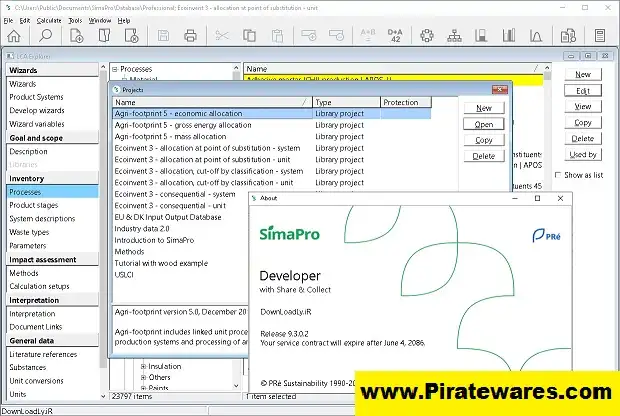
SimaPro 9.5 is a professional Life Cycle Assessment (LCA) software developed by PRé Sustainability. It helps companies, researchers, consultants, and sustainability teams study the environmental impact of products and processes. Users can build life cycle models, work with inventory databases, calculate environmental impacts, and review results.
Life Cycle Assessment looks at the environmental impact of a product or service throughout its life. This process can include raw material extraction, manufacturing, transportation, product use, and disposal. By studying each stage, organizations can find areas that cause high environmental impacts and look for ways to improve them.
SimaPro 9.5 arrived in February 2023. It added updated databases, new impact assessment methods, and better tools for managing project data. Although newer versions are now available, SimaPro 9.5 remains useful for people who maintain older projects or study previous releases.
What Is SimaPro Used For?
SimaPro helps users study the environmental performance of products, services, and industrial processes.
For example, researchers can collect life cycle data, build product models, calculate environmental impacts, and compare different designs or production methods.
Common uses include:
- Measuring the environmental impact of products.
- Comparing materials and manufacturing methods.
- Finding major sources of environmental impact in supply chains.
- Studying energy and resource use.
- Supporting product design and eco-design decisions.
- Preparing data for sustainability reports.
- Supporting Environmental Product Declaration (EPD) work.
- Carrying out academic and industrial LCA studies.
Many industries use SimaPro, including manufacturing, agriculture, construction, transport, energy, and packaging.

How Does Life Cycle Assessment Work in SimaPro?
A typical Life Cycle Assessment study has four main stages.
1. Goal and Scope Definition
First, users decide what they want to study and why. They also define the product or process, system boundaries, target audience, and functional unit.
A clear scope helps the study focus on the right questions. It also makes the results easier to understand and compare.
2. Life Cycle Inventory (LCI)
Next, users collect information about the inputs and outputs of the product system.
This information may include:
- Raw materials.
- Energy use.
- Water consumption.
- Transportation.
- Manufacturing activities.
- Emissions and waste.
SimaPro helps users organize this information into processes. They can then connect those processes to suitable database records.
3. Life Cycle Impact Assessment (LCIA)
After collecting the inventory data, users calculate the possible environmental impacts.
Depending on the selected method, the study may examine climate change, resource use, water-related impacts, and other environmental indicators.
Each method uses its own scientific data and assumptions. Therefore, users should choose a method that matches the purpose of their study and its reporting requirements.
4. Interpretation
Finally, users review the results and identify the processes that contribute most to the environmental impacts.
They should also check the model’s assumptions, data quality, and limitations. These checks help organizations compare alternatives and make better decisions.
Key Features of SimaPro 9.5
1. Life Cycle Assessment Modeling
SimaPro provides tools for building and studying product life cycle models.
Users can connect materials, energy inputs, transport activities, production processes, and other inventory elements. As a result, they can study environmental impacts across the full product life cycle instead of looking at only one activity.
2. Life Cycle Inventory Databases
Reliable inventory data plays an important role in any LCA study.
SimaPro 9.5 introduced updates to several data libraries, including:
- ecoinvent 3.9.1, allocation, cut-off by classification.
- Agri-footprint 6.3, economic allocation.
- Industry data 2.0, with updated steel datasets and other industry information.
These libraries give users data for building life cycle models. However, the available databases depend on the SimaPro edition, license, and installed libraries.
Some ecoinvent system models may also require separate access.
3. Environmental Impact Assessment Methods
SimaPro 9.5 added new impact assessment methods and updates to existing ones.
Notable additions included:
- Environmental Footprint 3.1 (adapted).
- EN 15804 + A2 (adapted).
- Mineral Resources Dissipation, based on Poncelet et al. (2022).
- Minor updates and corrections to existing methods.
These methods help users calculate environmental indicators through different scientific approaches.
However, the best method depends on the study’s purpose, location, standards, and reporting needs.
4. Product and Process Analysis
SimaPro lets users organize processes and connect them with products and other inventory data.
This approach helps users build a model of materials, energy use, production activities, and environmental outputs.
They can also examine individual processes to find which activities contribute most to the calculated impacts.
5. Database Management
SimaPro 9.5 improved several database management tools.
For example, users can deselect database libraries that they do not need. This can reduce the time the software takes to open projects and load processes.
The release also improved database packing and other related tasks.
6. Project and Parameter Management
SimaPro supports projects and parameters to help users organize LCA studies.
Users can apply parameters to values in their calculations and structure their models more clearly. These tools can be useful when they work with large assessments or several product systems.
7. Data Export and Reporting
SimaPro offers options for exporting information and calculation data. Users can then review the results in other applications or use them in reports.
Version 9.5 kept XLSX export support but removed the older Excel 97 XLS export option.
Before exporting data, users should check the available formats and documentation for their installed version.
8. Scenario Comparison and Decision Support
Many LCA studies compare different materials, processes, or product designs.
SimaPro helps users create models for these alternatives and study how each change affects the results.
For a fair comparison, users should keep system boundaries consistent, choose suitable datasets, and document their assumptions.
What’s New in SimaPro 9.5?
SimaPro 9.5 was officially released on February 28, 2023. Its deployment began on April 12, 2023.
The update brought changes to databases, impact assessment methods, and software tools.
Database Updates
- Added ecoinvent 3.9.1, allocation, cut-off by classification.
- Added Agri-footprint 6.3, economic allocation.
- Updated Industry data 2.0 with new and revised datasets.
New Impact Assessment Methods
- Environmental Footprint 3.1 (adapted).
- EN 15804 + A2 (adapted).
- Mineral Resources Dissipation method.
Software Improvements
- Added an option to deselect unused database libraries.
- Improved the copy tree and CSV export tools.
- Made database packing more efficient.
- Improved silent installation.
- Added clearer warnings when license deactivation fails.
- Removed the older XLS export option but kept XLSX support.
- Improved several database and project management tasks.
These changes belong to the SimaPro 9.5 release. They are not new features from 2026.
SimaPro 9.5 vs Newer Versions
SimaPro has received several updates since version 9.5.
The desktop release history includes:
| Version | Release Date |
|---|---|
| SimaPro 9.5 | February 28, 2023 |
| SimaPro 9.6 | March 31, 2024 |
| SimaPro Craft 10.3 | October 31, 2025 |
| SimaPro 10.4 | March 31, 2026 |
| SimaPro 10.5 | June 30, 2026 |
| SimaPro 11.0 | November 1, 2026 |
As of November 2026, SimaPro 11.0 is the newer desktop release listed in the official release history. The developer began its deployment on November 13, 2026.
Version 11.0 brings a 64-bit architecture, better support for large models, advanced filtering, and updated license management. It also includes changes to data libraries and impact assessment methods.
Before upgrading, users should read the official release notes. New versions may change database formats, licensing, or installation steps.
SimaPro Desktop and SimaPro Cloud
SimaPro offers different ways to work with LCA models. The two main environments are desktop and cloud.
SimaPro Desktop
SimaPro desktop is a Windows application for detailed LCA modeling and database management.
It supports single-user and multi-user setups, depending on the license and installation.
SimaPro Cloud
SimaPro cloud runs in a web browser. It gives users an online environment for building and analyzing LCA models.
Its features and version numbers differ from the desktop application. For example, SimaPro cloud version 1.30 arrived on October 22, 2026. It introduced an optional AI Model Builder that can create a starter model from plain-language instructions.
Keep in mind that SimaPro cloud 1.30 and desktop 11.0 are separate product environments. Their version numbers do not represent the same release.
SimaPro 9.5 System Requirements
SimaPro 9.5 runs on Windows. Its official installation manual lists these system requirements.
| Component | Requirement |
|---|---|
| Operating System | Windows 10 or Windows 11 |
| Application Architecture | 32-bit application; also runs on 64-bit Windows |
| RAM | 4 GB for 32-bit Windows |
| Recommended RAM | 8 GB for 64-bit Windows |
| Processor | Multi-core processor recommended |
| Display Resolution | Minimum 1280 × 1024 |
| Database Storage | Approximately 20 GB for single-user databases |
| Temporary Storage | Up to 10 GB of free local disk space |
The official requirements do not support older Windows versions, even if the software may run in some older environments.
Multi-user installations have separate database server requirements. Therefore, check the official installation manual before setting up a server.
Does SimaPro Support macOS?
SimaPro desktop is designed for Windows.
Mac users may try to run it through Windows virtualization or an emulator. However, the developer does not guarantee full functionality or provide technical support for these setups.
Check compatibility before planning to use SimaPro desktop on a Mac.
How to Download and Install SimaPro
SimaPro is commercial software. Users need a valid license, subscription, or service agreement to access the software and its licensed features.
Follow these steps for a legitimate installation:
- Visit the official SimaPro website.
- Open the desktop installation and update information.
- Check the available version and its system requirements.
- Confirm that your account or organization has a valid license.
- Get the installer through the authorized SimaPro download process.
- Follow the installation manual for your single-user or multi-user setup.
- Enter your valid registration details when the software asks for them.
- Complete the official license activation or sign-in process.
- Install the required database libraries and updates according to the documentation.
Avoid unauthorized serial keys, modified installers, and unofficial activation files. A legitimate installation does not require you to turn off Windows Defender or other security tools.
Who Should Use SimaPro?
SimaPro is designed for people and organizations that need tools for environmental assessment and LCA modeling.
It may suit:
- Sustainability consultants.
- Environmental researchers.
- University students and academic teams.
- Product designers.
- Manufacturing companies.
- Environmental assessment professionals.
- Organizations preparing life cycle studies and EPD-related work.
Beginners should first learn the basics of LCA. These include functional units, system boundaries, inventory data, and impact assessment methods. This knowledge helps them understand the results and avoid common modeling mistakes.
Frequently Asked Questions
What is SimaPro 9.5?
SimaPro 9.5 is Life Cycle Assessment software released in February 2023. It provides tools for environmental modeling, inventory database management, impact assessment, and sustainability analysis.
Is SimaPro 9.5 the latest version?
No. SimaPro 9.5 is an older release. The official desktop release history lists SimaPro 11.0, released in November 2026.
What is SimaPro used for?
SimaPro helps users study the environmental impact of products, services, and processes throughout their life cycles. Researchers, manufacturers, and sustainability consultants use it for LCA studies.
Does SimaPro 9.5 include ecoinvent?
Yes. SimaPro 9.5 included ecoinvent 3.9.1, allocation, cut-off by classification, in its documented database updates. However, some other ecoinvent system models may require separate library access.
What is the difference between LCA and EPD?
Life Cycle Assessment is a method for studying the potential environmental impacts of a product throughout its life. An Environmental Product Declaration is a standardized document that reports environmental information under specific rules. An LCA study can provide data for an EPD.
Does SimaPro 9.5 work on Windows 11?
Yes. The official requirements list Windows 10 and Windows 11 for SimaPro 9.2 and newer.
Is SimaPro available for Mac?
SimaPro desktop is designed for Windows. Users may try to run it through Windows virtualization, but the developer does not guarantee full functionality or support for non-Windows setups.
What is the difference between SimaPro desktop and cloud?
SimaPro desktop is a Windows application, while SimaPro cloud runs in a web browser. They have different features and separate release histories.
Is SimaPro free?
SimaPro is commercial software. Access depends on the license, subscription, and service options offered by the developer. Visit the official website for current academic and business options.
Final Thoughts
SimaPro 9.5 remains an important release in the history of this professional Life Cycle Assessment platform. It brought database updates, Environmental Footprint 3.1, EN 15804 + A2, and better database management tools.
However, it is no longer the latest desktop version. Anyone planning a new installation should review newer releases, current license options, and updated system requirements.
Good LCA results depend on more than the software. Users must also choose suitable databases and impact assessment methods, set clear system boundaries, and record their assumptions. These steps help make environmental studies more useful and reliable.



Recent Comments