
FonePaw iOS Unlocker Review: Features, Compatibility & Guide
FonePaw iOS Unlocker Review: Features, Compatibility & Guide
FonePaw iOS Unlocker is a desktop utility designed to help users regain access to compatible iPhone, iPad, and iPod touch devices. It focuses on common access problems, such as forgotten screen passcodes, Apple ID restrictions, and Screen Time passcodes.
The software provides guided steps through a Windows or Mac computer. However, its features have important limits. For example, removing a forgotten screen passcode usually requires erasing the device. Therefore, users should understand the possible data loss before starting.
This guide explains the main features, supported tasks, important limitations, and installation considerations for FonePaw iOS Unlocker.
What Is FonePaw iOS Unlocker?
FonePaw iOS Unlocker is a computer-based utility for certain iOS device access problems. It is different from iPhone data recovery software, which focuses on finding or restoring lost files.
Instead, an iOS unlocking utility focuses on device access and passcode-related restrictions. Depending on the software version and device conditions, its available functions may include:
- Removing a forgotten screen passcode.
- Helping users manage certain Apple ID restrictions.
- Removing a Screen Time passcode.
- Guiding users through device connection and firmware-related steps.
The available functions depend on the installed version, device model, iOS version, and security settings.

Key Features of FonePaw iOS Unlocker
1. Screen Passcode Removal
A forgotten screen passcode can prevent users from accessing an iPhone or iPad.
FonePaw iOS Unlocker provides a guided process for supported devices. However, users should understand that removing a forgotten screen passcode generally requires restoring or erasing the device.
As a result, locally stored photos, messages, and other files may disappear. A backup can help restore data after the reset.
2. Apple ID Management
Apple ID connects an iPhone or iPad to services such as iCloud, the App Store, FaceTime, and Apple Music.
Some unlocking tools offer Apple ID removal under specific conditions. However, this does not mean that every Apple account restriction can be removed.
Users should also distinguish between an Apple ID password problem and Activation Lock. These are different security issues and require different solutions.
3. Screen Time Passcode Removal
Screen Time helps users manage device usage, app limits, and content restrictions.
For users who forget their Screen Time passcode, compatible unlocking software may provide a reset option. Availability depends on the installed version and device configuration.
Before using this feature, check the software documentation and understand whether the process may erase device settings or data.
4. Guided Unlocking Process
The software provides on-screen instructions to guide users through supported operations.
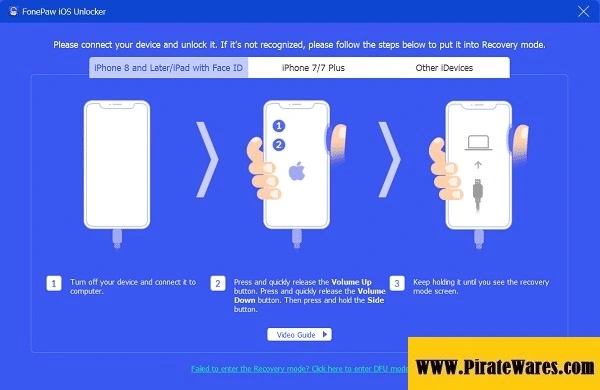
Users can connect their iPhone or iPad to a computer and follow the instructions displayed by the application.
A guided interface can make the process easier to understand. Nevertheless, users should read each warning carefully before confirming an operation.
5. Firmware Download Support
Some device recovery and unlocking operations require firmware files.
Depending on the selected function, the application may download the required firmware before continuing. A stable internet connection and sufficient storage space can help prevent interruptions.
Important Limitations You Should Know
Before using an iOS unlocking utility, understand the difference between the various types of device locks.
Screen Passcode and Activation Lock Are Different
A screen passcode protects access to the device itself. Activation Lock is an Apple security feature linked to Find My and the Apple Account associated with the device.
Removing a screen passcode does not automatically remove Activation Lock. After restoring an iPhone, the device may still ask for the original Apple Account details.
If you purchased a second-hand iPhone, ask the previous owner to remove it from their account. You can also contact Apple Support if you have valid proof of purchase.
Unlocking May Erase Personal Data
Do not assume that passcode removal preserves your files.
When users forget an iPhone passcode, Apple’s supported reset process erases the device. You can restore information afterward if you have a suitable iCloud or computer backup.
Therefore, check your backup options before proceeding.
Use Only Devices You Own or Have Permission to Manage
Use unlocking software only on your own device or one you have clear permission to manage.
It should not be used to access another person’s phone, account, or private information without authorization.
FonePaw iOS Unlocker vs iPhone Data Recovery
These two software categories serve different purposes.
| Function | iOS Unlocker | iPhone Data Recovery |
|---|---|---|
| Main Purpose | Address supported device access problems | Find or recover available data |
| Screen Passcode | May offer removal for supported devices | Not its main purpose |
| Apple ID | May offer limited account-related functions | Not its main purpose |
| Deleted Files | Not its main purpose | Main focus |
| Backup Analysis | Depends on the available features | May support backup scanning |
| Data Loss Risk | Some unlocking operations erase the device | Recovery results depend on available data and backups |
Choose the software according to the problem you need to solve. A device access issue and lost-file recovery are not the same task.
FonePaw iOS Unlocker Compatibility
Compatibility can vary between software releases.
Before installation, check these details:
- Your exact iPhone or iPad model.
- The iOS or iPadOS version installed on the device.
- Whether the selected feature supports your device.
- Your computer’s operating system.
- The required Apple drivers and device connection software.
- Any additional firmware or storage requirements.
Do not rely on old system requirement lists as proof of current compatibility. Check the official product documentation for the version you plan to install.
How to Download and Install FonePaw iOS Unlocker
For a safer installation, use the developer’s official website and follow its current instructions.
- Visit the official FonePaw website.
- Find the iOS Unlocker product page, if the product remains available.
- Review the current version information and compatibility details.
- Select the installer that matches your computer.
- Download the installation file from the authorized source.
- Open the installer and follow the on-screen instructions.
- Launch the application after installation.
- Connect your iPhone or iPad using a suitable USB cable.
- Follow the instructions for the feature you need.
- Read all data-loss and compatibility warnings before confirming any operation.
Do not use modified installers, unauthorized registration codes, or key generators. Also, avoid disabling your antivirus software to run an unofficial installer.
Official Ways to Recover Access to an iPhone
You may not need third-party unlocking software for every problem.
If You Forgot Your iPhone Passcode
Apple provides an official reset process for supported devices. Depending on your iOS version and settings, you may be able to erase the device from the lock screen or restore it through a computer.
Keep in mind that this process removes the data stored on the device. You can restore your information from a backup if one is available.
Read Apple’s guide: If you forgot your iPhone or iPad passcode.
If Your Device Shows Activation Lock
Activation Lock requires the Apple Account associated with the device or another supported removal option.
If you bought the device second-hand, contact the previous owner and ask them to remove it from their account. If you own the device and have proof of purchase, Apple provides a support request process.
Read Apple’s guide: How to remove Activation Lock.
Who Should Consider FonePaw iOS Unlocker?
FonePaw iOS Unlocker may interest users who:
- Have forgotten their device screen passcode.
- Need help with a supported Screen Time passcode issue.
- Want to understand available Apple ID management options.
- Prefer a guided desktop interface for supported device operations.
- Need to review third-party unlocking software before choosing a solution.
However, users should check compatibility and data-loss risks first. Anyone dealing with Activation Lock should use Apple’s official support process rather than expecting a screen-passcode tool to remove that protection.
Frequently Asked Questions
What is FonePaw iOS Unlocker?
FonePaw iOS Unlocker is a desktop utility designed to address certain iPhone and iPad access problems. Its available functions depend on the software version and device compatibility.
Is FonePaw iOS Unlocker a data recovery tool?
No. An iOS unlocking utility and an iPhone data recovery application have different purposes. Unlocking software focuses on supported access problems, while recovery software focuses on finding or restoring available files.
Does removing an iPhone passcode delete data?
The standard reset process for a forgotten iPhone passcode erases the device. You may restore your files afterward if you have an iCloud or computer backup.
Can FonePaw iOS Unlocker remove Activation Lock?
Do not assume that it can. Activation Lock is a separate Apple security feature. Follow Apple’s official removal process and provide the required account information or proof of purchase.
Does FonePaw iOS Unlocker support iOS 26?
Compatibility depends on the exact software release and device model. Check the developer’s current compatibility information before using the application. Do not assume that an older release supports every newer iOS version.
Is FonePaw iOS Unlocker free?
Availability and pricing depend on the developer’s current licensing options. Some software versions may offer limited trial features, while full functionality may require a paid license.
Is FonePaw iOS Unlocker available for Mac?
The availability of a Mac version depends on the developer’s current product offering. Check the official download page for supported macOS versions and hardware requirements.
Is FonePaw iOS Unlocker safe?
Download software only from the developer’s official website or another authorized source. Review the installation file, licensing information, and data-loss warnings before using it.
Final Thoughts
FonePaw iOS Unlocker is designed to help with certain iPhone and iPad access problems. Its potential uses include screen passcode removal and other supported passcode-related operations.
However, users should not confuse screen passcode removal with Activation Lock removal or data recovery. These tasks involve different processes and security requirements.
Before choosing the software, check its current version, device compatibility, and licensing details. Most importantly, create a backup whenever possible and understand the consequences of erasing your device.



Recent Comments