
Xilisoft Movie Maker 6.6.0 Review: Features & System Requirements
Xilisoft Movie Maker 6.6.0 Review: Features & System Requirements
Xilisoft Movie Maker is a Windows video editing application designed to turn multiple video clips into a single movie. It allows users to import different video formats, trim unwanted sections, crop footage, add transitions, and include background music.
The software is intended for people who want to create simple movies without using a complicated professional video editor. It supports several standard and high-definition video formats, making it useful for working with older camcorder recordings and other media files.
This guide explores Xilisoft Movie Maker 6.6.0, its main features, supported formats, system requirements, and installation considerations.
Version note: Version 6.6.0 Build 20170210 is documented by third-party software listings. Xilisoft’s official website currently maintains a product page, but its download listings show older releases such as 6.5 and 6.0. Therefore, version 6.6.0 should not be described as a newly released 2026 version.
What Is Xilisoft Movie Maker?
Xilisoft Movie Maker is a movie creation and basic video editing program for Windows. It helps users combine video clips, adjust footage, and create a finished movie in a supported output format.
Its drag-and-drop workflow makes importing and arranging clips straightforward. Users can also preview their projects before exporting the final video.
The application supports various standard, HD, and camcorder video formats. Consequently, it can be useful when preparing older recordings for playback on compatible computers and portable devices.
Main Features of Xilisoft Movie Maker
1. Create Movies from Multiple Videos
Users can import several video clips and combine them into one movie. This feature is useful for joining recordings from family events, holidays, presentations, and other personal projects.
2. Trim and Clip Videos
The trimming tools allow users to select the sections they want to keep. They can remove unwanted footage and organize the remaining clips into a more coherent movie.
3. Crop Video Frames
Xilisoft Movie Maker provides cropping controls for adjusting the visible area of a video. Users can remove unwanted borders or change the framing of their footage.
4. Add Scene Transitions
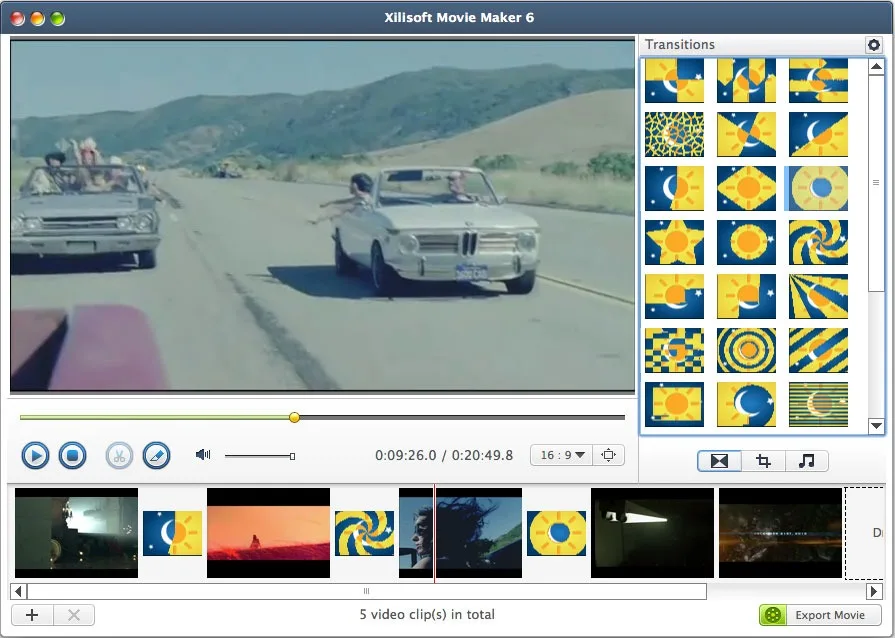
Transitions help create smoother visual changes between clips. The software includes several transition styles, such as ripple, mosaic, diamond, and other visual effects.
5. Add Background Music
Users can attach music and audio tracks to their movies. This helps create a more engaging result for personal videos and simple presentations.
6. Add Watermarks and Subtitles
The application supports adding text-based elements, watermarks, and subtitles to supported projects. These options can help users identify their videos or provide additional information.
7. Preview Movies
A built-in preview player lets users review their edits before exporting. Full-screen preview is also available, making it easier to inspect the result.
8. Multi-Core Processor Support
Xilisoft Movie Maker can detect available CPU cores and allows users to configure core usage. This feature is intended to improve processing efficiency on compatible systems.
Supported Video and Audio Formats
Xilisoft Movie Maker supports a range of common and high-definition media formats.
Video input formats include:
- AVI
- MPEG
- MP4
- WMV
- MOV
- FLV
- MKV
- 3GP
- M4V
- RM and RMVB
- VOB
- MTS and M2TS
- ASF
- DAT
- HD AVI and HD WMV
Audio formats include:
- MP3
- WMA
- AAC
- WAV
- OGG
- FLAC
- AC3
- AIFF
Subtitle formats include:
- SRT
- SSA
- ASS
Supported output formats include AVI, MPEG, WMV, MP4, MOV, FLV, 3GP, VOB, and other formats. Availability may depend on the selected profile and installed components.
Editing and Export Options
In addition to combining clips, Xilisoft Movie Maker provides several basic editing and export controls.
Users can adjust video and audio parameters, including resolution, bitrate, frame rate, and audio quality. They can also create separate copies of clips when applying different effects.
The software includes post-processing actions that can close the application, shut down the computer, or place the system into standby after a movie-making task finishes.
These features are useful when exporting longer videos and leaving the computer unattended.
Xilisoft Movie Maker 6.6.0: Version Information
The 6.6.0 release belongs to an older generation of Xilisoft software. The product is designed primarily for straightforward movie creation rather than modern professional editing workflows.
Xilisoft’s official product page continues to describe its movie-making, trimming, cropping, transition, and soundtrack features. However, the official download catalogue lists older Movie Maker releases rather than confirming 6.6.0 as the latest release.
It is therefore important to check the installer version and its source before installing an older copy.
Xilisoft Movie Maker System Requirements
According to Xilisoft’s official product page, the application has relatively modest hardware requirements.
- Operating System: Windows 11, 10, 8, 7, Vista, or XP SP2 and later.
- Processor: 1 GHz Intel or AMD processor or above.
- RAM: 256 MB minimum; 512 MB or above recommended.
- Storage: 50 MB of free disk space for installation.
- Graphics: Super VGA resolution of 800 × 600 with a 16-bit graphics card or higher.
These are the requirements listed by the developer. Actual performance can vary depending on video resolution, file size, codecs, and the computer’s hardware.
Trial Version and Licensing
Xilisoft provides a product page with a free download option and a paid purchase option. Its official page lists a purchase price of $39.95, although pricing and availability can change.
Third-party software documentation reports that the unregistered Windows edition may add a watermark to exported videos and display a reminder screen.
For unrestricted use, check the current licensing terms and purchase information on the official Xilisoft website. Avoid unofficial registration codes, key generators, and modified installers.
How to Install Xilisoft Movie Maker
If you have obtained a legitimate installer, follow these general installation steps:
- Visit the official Xilisoft Movie Maker product page.
- Check the available download and licensing information.
- Download the installer from the official source.
- Locate the downloaded setup file on your computer.
- Run the installer and follow the on-screen instructions.
- Review and accept the applicable license terms.
- Choose an installation location if the setup provides that option.
- Complete the installation and open the application.
- Follow the official licensing instructions if you purchased a license.
Always check downloaded files before running them. Do not disable antivirus protection to install an unofficial copy.
Advantages and Limitations
Advantages
- Simple interface for basic movie creation.
- Combines multiple video clips into one project.
- Supports trimming and cropping.
- Provides transitions and background music options.
- Supports several common and HD video formats.
- Has relatively modest published hardware requirements.
Limitations
- It is an older video editing application.
- Its interface and workflow may feel dated.
- Trial exports may contain watermarks.
- It lacks many advanced features found in modern editing suites.
- Compatibility with newer hardware and codecs may vary.
- Official release information for version 6.6.0 is limited.
Frequently Asked Questions
What is Xilisoft Movie Maker used for?
Xilisoft Movie Maker is used to combine video clips, trim footage, crop frames, add transitions, attach music, and export finished movies.
Is Xilisoft Movie Maker 6.6.0 the latest version?
The 6.6.0 Build 20170210 release is documented by third-party listings. However, Xilisoft’s official download catalogue lists other older versions, so 6.6.0 cannot be confirmed as the latest official release.
Does Xilisoft Movie Maker support HD videos?
Yes. The developer lists support for several HD and camcorder video formats, including HD AVI, HD MPEG, HD VOB, HD WMV, MTS, and M2TS.
Can I add music to a movie?
Yes. The application allows users to attach background music and audio tracks to their movie projects.
Does Xilisoft Movie Maker support Windows 10?
Windows 10 is included in the operating systems listed on the official product page. However, compatibility can depend on the installed build and hardware.
Is Xilisoft Movie Maker free?
Xilisoft provides a free download option, but unrestricted use may require purchasing a license. The unregistered edition may have export limitations, including a watermark.
Is Xilisoft Movie Maker suitable for professional editing?
It is mainly intended for basic movie creation and editing. Users who need advanced color grading, complex effects, professional audio workflows, or modern collaboration features may prefer a more advanced editor.
Final Verdict
Xilisoft Movie Maker is a straightforward application for combining video clips and creating simple movies. Its trimming, cropping, transition, soundtrack, and format support make it suitable for basic editing tasks.
However, version 6.6.0 is an older release, and users should not assume that it supports every modern video format or device. Check the official product information and licensing terms before installing it.
For simple projects involving older video files, it may still be worth examining. For more demanding editing work, a modern video editor is likely to provide a better long-term experience.


Recent Comments