
CapCut Pro Crack + Full Version Free Download 2026
CapCut Pro Crack + Full Version Free Download 2026
CapCut Pro Crack is a popular search term among users looking for premium video editing features, professional effects, and advanced tools for creating engaging videos on PC. CapCut is a video editing application developed by ByteDance. It is widely used by content creators, YouTubers, social media marketers, and video editors.
CapCut provides a collection of editing tools that make it easier to create professional-looking videos. Users can trim clips, add transitions, apply filters, create subtitles, edit audio, and export videos for different social media platforms. Its user-friendly interface makes it suitable for beginners, while its advanced timeline and AI-assisted features also support more detailed editing projects.
Whether you create TikTok videos, Instagram Reels, YouTube Shorts, tutorials, or promotional content, CapCut offers useful tools for managing your video projects. This article covers CapCut Pro features, editing tools, supported platforms, system requirements, and installation information.
CapCut Pro Crack + Latest Version Free Download 2026
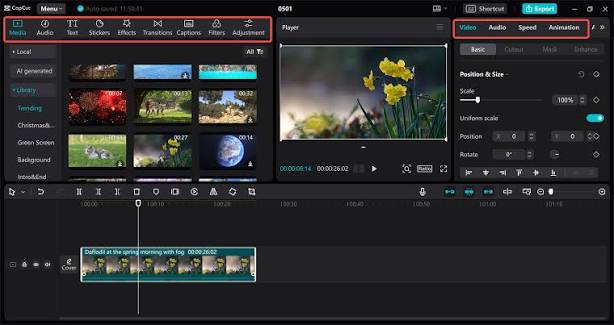
CapCut is designed to simplify video editing without requiring users to learn complicated professional editing software. Its desktop application includes a timeline-based workspace where users can arrange video clips, audio tracks, text, effects, and other elements.
The application supports different editing workflows, from short social media videos to longer creative projects. You can import media files, organize clips, adjust their timing, add background music, and apply visual effects before exporting the finished video.
CapCut also provides AI-assisted features that can help with captions, background removal, visual enhancement, and other editing tasks. Availability of certain premium tools depends on the account, region, subscription, and application version.
For a complete content creation workflow, you can also use OBS Studio to record your screen or capture gameplay before editing the footage in CapCut. If your project needs professional voice recording, noise reduction, or audio cleanup, Adobe Audition is another useful application to explore.
What Is New in CapCut 2026?
CapCut continues to develop its desktop and mobile editing tools. Recent versions focus on AI-assisted video creation, improved editing workflows, and tools for social media content.
1. AI Video Generation
CapCut includes AI-assisted video creation tools that can help users turn a topic, script, or creative idea into a video draft. Users can then refine the generated result through the editor.
2. Automatic Captions
Automatic captions can identify spoken words and convert them into subtitles. This feature is useful for interviews, tutorials, educational videos, and short-form social media content.
Users can review the generated text, correct mistakes, and customize subtitle appearance.
3. Background Removal
CapCut offers background-removal tools that can help isolate people or objects from video footage. This makes it easier to create promotional videos, presentations, and creative compositions.
4. AI Audio and Voice Tools
Audio tools help users improve the sound of their projects. Depending on the available version and plan, features can include voice enhancement, noise reduction, text-to-speech, and other AI-assisted audio options.
5. Advanced Video Effects
Users can apply filters, transitions, animations, and visual effects to improve the appearance of their videos. These tools help create different styles for vlogs, advertisements, gaming clips, and social media content.
6. Multi-Track Timeline Editing
The desktop timeline allows users to arrange multiple video and audio tracks. You can place clips, adjust their duration, synchronize sound, and organize different elements within a single project.
7. Export and Sharing Options
CapCut provides export options for preparing videos for different platforms. Available resolutions, frame rates, and other export settings depend on the device and application version.
Key Features of CapCut Pro Full Version
CapCut offers a range of tools for everyday editing and professional-style content creation.
- Video Trimming: Cut unwanted sections and adjust clip duration.
- Split and Merge: Divide footage into smaller sections or combine multiple clips.
- Transitions: Add smooth visual changes between scenes.
- Video Filters: Apply different color styles and visual appearances.
- Effects Library: Enhance videos with creative effects and animations.
- Auto Captions: Generate subtitles from spoken audio.
- Text and Titles: Add headings, captions, labels, and animated text.
- Audio Editing: Add music, voiceovers, sound effects, and other audio elements.
- Background Removal: Separate subjects from backgrounds using supported tools.
- Speed Control: Create slow-motion and fast-motion video effects.
- Keyframe Animation: Control the movement and properties of selected elements over time.
- Chroma Key: Remove selected background colors from compatible footage.
- Multi-Track Editing: Organize video, audio, text, and effects on separate timeline tracks.
- Social Media Formats: Prepare content for vertical, square, and widescreen platforms.
- AI-Assisted Tools: Use supported AI features to simplify selected editing tasks.
CapCut Pro for TikTok, YouTube Shorts and Instagram Reels
CapCut is particularly useful for creators who publish short-form videos. Its editing tools help prepare content in different aspect ratios and styles.
TikTok Video Editing
Creators can combine short clips, add trending-style transitions, insert subtitles, and synchronize video with music. The vertical editing format is useful for TikTok content.
YouTube Shorts
CapCut can help create vertical videos with captions, animations, background music, and visual effects. These tools are useful for educational clips, gaming highlights, and entertainment content.
Instagram Reels
Users can edit product videos, travel clips, tutorials, and promotional content. Text overlays and transitions can make short videos easier to follow.
YouTube Long Videos
The desktop timeline is also useful for longer projects. Users can organize footage, add voiceovers, remove unnecessary sections, and prepare videos for YouTube.
CapCut Pro System Requirements for PC
CapCut’s performance depends on the computer’s processor, memory, graphics hardware, and the complexity of the editing project.
The following specifications provide a practical starting point for Windows desktop users. Check the official CapCut requirements for the exact release before installation.
| Component | Minimum / Recommended |
|---|---|
| Operating System | Windows 10 or later |
| Processor | Intel Core i3 or equivalent AMD processor |
| RAM | 4 GB minimum; 8 GB or more recommended |
| Graphics | Compatible integrated or dedicated GPU |
| Storage | At least 2 GB for basic installation; additional project space required |
| Internet | Required for downloads, account access, and online features |
| Display | Compatible desktop display |
For smoother editing, especially with high-resolution footage, an Intel Core i5 or equivalent processor, 16 GB RAM, and an SSD are preferable.
How to Download and Install CapCut on PC
For a genuine installation, use the official CapCut website and follow these steps:
- Open the official CapCut website.
- Select the desktop version for Windows.
- Download the installer.
- Open the downloaded setup file.
- Follow the on-screen installation instructions.
- Launch CapCut after installation.
- Sign in if you want to use account-based features.
- Create a new project and import your video clips.
- Edit your footage and export the finished video.
Avoid unofficial modified installers and unknown torrent packages. They may contain malware, unwanted software, or altered application files. Premium access should be obtained through the provider’s official subscription options.
CapCut Free vs CapCut Pro
CapCut provides free editing tools as well as paid Pro features. The exact features available can change by region and application version.
| Feature | Free Version | Pro Version |
|---|---|---|
| Basic video editing | Available | Available |
| Timeline editing | Available | Available |
| Basic transitions | Available | Available |
| Basic text and titles | Available | Available |
| Premium effects | Limited selection | Additional options |
| Premium templates | Limited selection | Additional options |
| Advanced AI features | Feature-dependent | More eligible features |
| Cloud-related features | Limited or plan-dependent | Plan-dependent |
| Premium assets | Limited selection | Additional access |
Not every feature is available in every country or on every device. Check the CapCut application to see which tools are included in your account.
Advantages of CapCut Pro
- User-friendly video editing interface.
- Useful tools for TikTok, Reels, and YouTube Shorts.
- Automatic caption generation.
- Multiple transitions, effects, and filters.
- Multi-track timeline editing on desktop.
- AI-assisted editing features.
- Audio and text editing tools.
- Suitable for beginners and regular content creators.
Disadvantages of CapCut
- Some advanced features require a Pro subscription.
- AI features may require an internet connection.
- Performance depends on the computer’s hardware.
- Large projects can consume significant storage.
- Certain templates and features may vary by region.
- Export options and premium assets can differ between versions.
Frequently Asked Questions
What is CapCut Pro used for?
CapCut Pro provides video editing tools and eligible premium features for creating social media videos, YouTube content, advertisements, tutorials, and other creative projects.
Is CapCut available for Windows 11?
Yes. CapCut offers a Windows desktop application that supports compatible Windows 11 computers.
Can I use CapCut for YouTube Shorts?
Yes. CapCut provides vertical video editing, captions, transitions, text, and audio tools that are useful for creating YouTube Shorts.
Does CapCut support automatic subtitles?
Yes. CapCut provides automatic caption tools that can convert spoken audio into subtitles. Users can edit the generated text before exporting.
Can CapCut remove video backgrounds?
Yes. Supported background-removal tools can isolate subjects from their backgrounds. Availability may depend on the application version and account plan.
Is CapCut Pro free?
CapCut provides free editing features, while selected premium tools and assets require a Pro subscription. Available features may vary by region.
Is CapCut available for Android and iPhone?
Yes. CapCut provides mobile applications for Android and iOS, in addition to its desktop and web editing options.
Is CapCut Pro Crack an official version?
No. The term crack refers to unofficial modified software or attempts to bypass paid features. These are not official CapCut releases and can expose devices or personal information to security risks.
Final Words
CapCut Pro is a useful video editing solution for content creators, social media users, and people who want to produce engaging videos without learning a complicated editing workflow. Its timeline tools, automatic captions, transitions, audio editing, and AI-assisted features make it suitable for many creative projects.
Whether you are preparing TikTok videos, YouTube Shorts, Instagram Reels, tutorials, or promotional content, CapCut offers a flexible editing environment. Check the latest official version and system requirements before installing the application.


Recent Comments