
Adobe Photoshop 2026 Crack + Full Version Free Download
Adobe Photoshop 2026 Crack + Full Version Free Download
Adobe Photoshop 2026 Crack is a popular search term among users looking for Adobe Photoshop’s full-version features, professional photo editing tools, and advanced graphic design capabilities. Adobe Photoshop is a powerful image-editing application used by photographers, graphic designers, digital artists, and content creators.
The software provides a complete collection of tools for photo retouching, background removal, image manipulation, digital painting, and creative design. Users can work with layers, masks, filters, adjustment controls, and AI-powered features to produce professional-quality images.
Photoshop is also useful for people who create online content. For example, users can prepare YouTube thumbnails and promotional graphics in Photoshop, record their screens with OBS Studio, and edit voice recordings or background audio using Adobe Audition.
Adobe Photoshop 2026 Crack + Full Version Download
Adobe Photoshop is designed for both basic and advanced image-editing tasks. Beginners can use its cropping, resizing, selection, and adjustment tools, while experienced designers can create complex compositions using layers, masks, blending modes, and advanced retouching features.
The application supports different image formats and provides a flexible workspace for professional projects. It can be used to edit photographs, create social media posts, design banners, prepare product images, and produce digital illustrations.
Photoshop also integrates with other Adobe creative applications, making it easier to manage different parts of a creative project. Its combination of traditional editing tools and AI-assisted features makes it suitable for a wide range of design requirements.
What’s New in Adobe Photoshop 2026?
Adobe continues to improve Photoshop with new editing tools, performance updates, and AI-assisted creative features. The 2026 releases include improvements designed to make common editing tasks easier.
1. AI-Powered Image Editing
Photoshop includes AI-assisted tools that help users modify images, generate visual elements, and improve creative compositions. These features can reduce the time needed for certain editing tasks.
2. Generative Fill
Generative Fill allows users to add, replace, or remove visual elements using text prompts. It can help extend an image, add objects, or change selected areas while maintaining the surrounding composition.
3. Generative Expand
Generative Expand helps extend an image beyond its original boundaries. This is useful when adapting photographs to different dimensions or creating additional space around a subject.
4. Advanced Remove Tool
The Remove Tool helps eliminate unwanted objects and distractions from photographs. It can improve images by removing selected elements while blending the edited area with its surroundings.
5. Advanced Selection and Masking
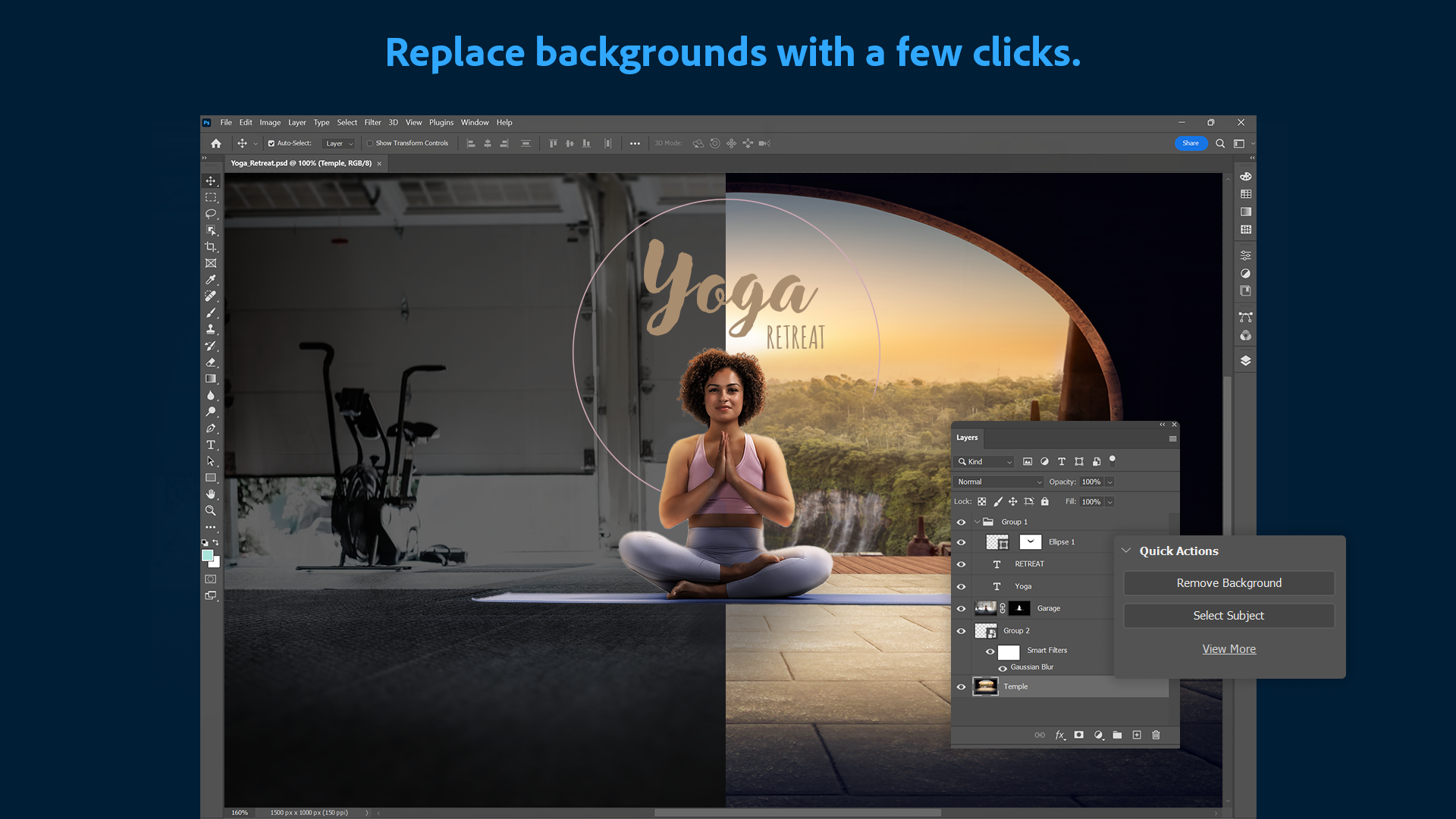
Photoshop offers selection and masking tools that allow users to isolate specific objects, people, and backgrounds. These tools are useful for replacing backgrounds, applying selective adjustments, and creating detailed compositions.
6. Neural Filters
Neural Filters provide AI-assisted options for editing portraits and photographs. Depending on the available filter, users can make creative adjustments to faces, colors, and image appearance.
7. Professional Layer Editing
Layers allow users to organize separate design elements without permanently changing the original image. Adjustment layers, layer masks, and blending modes provide additional control over complex editing projects.
Key Features of Adobe Photoshop 2026 Full Version
Adobe Photoshop includes many tools for creative professionals and everyday users.
- Photo Retouching: Improve portraits, remove imperfections, and adjust image details.
- Background Removal: Select subjects and replace unwanted backgrounds.
- Layer Management: Organize images, text, effects, and other design elements.
- Color Correction: Adjust brightness, contrast, exposure, saturation, and color balance.
- Typography Tools: Create professional graphics with customizable text and fonts.
- Filters and Effects: Apply blur, sharpening, artistic effects, and image enhancements.
- Smart Objects: Preserve source content while applying editable transformations.
- Masking Tools: Hide or reveal image areas without permanently deleting original content.
- Digital Painting: Use brushes and drawing tools to create illustrations.
- AI Editing: Use supported generative tools to modify and create image content.
- PSD Support: Save editable projects with layers and other editing information.
- Multiple Export Formats: Prepare graphics for websites, social media, and printing.

What Can You Do With Adobe Photoshop?
Professional Photo Editing
Photographers can improve exposure, adjust colors, remove unwanted objects, retouch portraits, and enhance image details.
Graphic Design
Designers can create posters, banners, advertisements, business graphics, thumbnails, and promotional materials.
Social Media Content
Photoshop can help create profile graphics, YouTube thumbnails, Instagram posts, Facebook banners, and other digital content.
Digital Painting
Artists can use brushes, layers, blending modes, and drawing tools to create digital illustrations and artwork.
Product Photography
Businesses can improve product images, remove distracting backgrounds, adjust lighting, and prepare photographs for online stores.
Website Graphics
Designers can prepare website images, interface elements, icons, and other visual assets for digital projects.
Adobe Photoshop 2026 System Requirements
Photoshop requires a compatible computer, sufficient memory, and supported graphics hardware. Requirements can vary between releases, so check Adobe’s official requirements for your exact version.
| Component | Requirement |
|---|---|
| Operating System | Supported 64-bit Windows 10 or Windows 11 |
| Processor | Supported Intel, AMD, or compatible processor |
| RAM | 8 GB minimum; 16 GB or more recommended |
| Graphics | Compatible DirectX 12 graphics processor |
| Video Memory | Depends on the version and graphics features |
| Storage | SSD with sufficient free space for installation and projects |
| Display | Supported display resolution |
| Internet | Required for activation, updates, and some online features |
For large images and demanding projects, additional RAM and a capable graphics card can improve performance. Mac users should check Adobe’s separate macOS compatibility requirements.
How to Download and Install Adobe Photoshop 2026
For a genuine installation, use Adobe’s official download and installation process.
- Visit the official Adobe Photoshop website.
- Download Adobe Creative Cloud.
- Open the Creative Cloud application.
- Sign in using your Adobe account.
- Find Photoshop in the available applications.
- Select Install and wait for the setup to finish.
- Launch Photoshop after installation.
- Follow the available trial or subscription options.
Avoid unknown torrent packages and modified installers. They may contain unwanted programs, malware, or altered application files. Third-party crack files are not official Adobe activation methods.
Adobe Photoshop 2026 Advantages
- Professional photo-editing and graphic-design tools.
- Advanced layers, masks, and selection features.
- AI-powered image editing and enhancement.
- Support for PSD project files.
- Tools for photography, digital art, and marketing designs.
- Integration with other Adobe creative applications.
- Regular feature and compatibility updates.
Adobe Photoshop 2026 Limitations
- Requires a relatively capable computer for demanding projects.
- Some AI features require an internet connection.
- Certain generative features may have usage limits.
- Beginners may need time to understand the interface.
- Large PSD projects can require substantial RAM and storage.
- Full access requires an eligible Adobe plan.
Frequently Asked Questions
Is Adobe Photoshop 2026 available for Windows 11?
Yes. Photoshop supports compatible Windows 11 systems. Check Adobe’s official requirements for the exact release and hardware specifications.
Can Photoshop remove backgrounds?
Yes. Photoshop provides selection, masking, and background-removal tools that help isolate subjects and replace backgrounds.
Does Adobe Photoshop support PSD files?
Yes. PSD is Photoshop’s native project format and can preserve layers, masks, text, and other editable elements.
How much RAM is required for Photoshop?
Adobe lists 8 GB as a minimum for many recent desktop releases, while 16 GB or more is recommended for demanding editing projects. Always check the requirements for your specific version.
Is Adobe Photoshop suitable for beginners?
Yes. Beginners can start with cropping, resizing, selection, and adjustment tools. Advanced features such as masks, smart objects, and compositing may require additional practice.
Is Adobe Photoshop available for Mac?
Yes. Adobe provides a macOS version of Photoshop. Compatibility depends on the Mac hardware and supported macOS release.
Is Adobe Photoshop Crack an official Adobe product?
No. The term crack refers to unofficial modified software or activation methods. Adobe distributes Photoshop through its official channels and requires an eligible licence or subscription for full access.
Final Words
Adobe Photoshop 2026 is a powerful image-editing application for photographers, designers, digital artists, and content creators. Its combination of professional editing tools, advanced layer controls, and AI-powered features makes it suitable for a wide range of creative projects.
Whether you are editing photographs, creating promotional graphics, designing thumbnails, or producing digital artwork, Photoshop offers a flexible collection of tools for your creative work. Before installing, check the system requirements and use a genuine download source to protect your computer and creative projects.



Recent Comments