
Audacity 3.7.7 Review: Features, Audio Editing & Recording Guide
Audacity 3.7.7 Review: Features, Audio Editing & Recording Guide
Audacity is a free, open-source audio recording and editing application for Windows, macOS, and Linux. It provides a practical set of tools for recording voice, editing music, cleaning up audio, and preparing sound files for podcasts, videos, and other creative projects.
The application supports multitrack editing, audio effects, waveform visualization, and several import and export formats. Its straightforward interface also makes it useful for beginners who want to perform basic audio edits without purchasing an expensive professional audio workstation.
This guide focuses on Audacity 3.7.7, including its features, release information, supported formats, system compatibility, and installation process.
What Is Audacity?
Audacity is a desktop audio editor and recorder developed as an open-source project. It allows users to capture sound through a microphone or supported recording device and edit existing audio files.
Users can arrange multiple tracks, remove unwanted sections, adjust volume, apply effects, and export completed projects into supported audio formats.
Because Audacity is open source, users can download and use it without purchasing a commercial license key. Its features and available plugins make it suitable for personal projects, educational work, podcast production, and general audio editing.
Audacity 3.7.7 for Windows, Mac and Linux
Audacity 3.7.7 was released on 11 December 2025 as a hotfix update.
According to the official release notes, this version addressed a problem with waveform scrolling and selection that affected some users after installing version 3.7.6. It also added a checksum to WavPack export.
Version 3.7.7 belongs to the Audacity 3.7 series. It is not the latest release in 2026, because the developer has since published additional 3.7 updates and Audacity 4.0.
If you specifically need version 3.7.7 for an existing project or compatibility reasons, use the official older-version archive. Otherwise, consider the latest stable release.
Key Features of Audacity
Audacity includes a wide range of tools for recording, editing, analyzing, and exporting sound.
1. Audio Recording
Audacity allows users to record live audio through supported microphones, audio interfaces, and other recording devices.
You can record voiceovers, interviews, musical instruments, and other sound sources. Recording settings also let you select available input devices and configure channels.
2. Multitrack Audio Editing
The application supports working with multiple audio tracks in one project. Users can arrange recordings, combine different sound sources, and edit individual tracks.
This feature is useful for podcasts, voiceovers, music projects, and audio arrangements.
3. Cut, Copy, Paste and Undo
Audacity provides familiar editing commands for modifying recordings. You can remove unwanted sections, copy selected audio, move clips, and undo previous actions.
These tools make everyday editing tasks easier without requiring advanced technical knowledge.
4. Audio Effects and Filters
The software includes audio effects for adjusting and improving recordings.
Depending on the version and installed plugins, users can work with tools such as:
- Noise reduction
- Equalization
- Compressor
- Reverb
- Fade In and Fade Out
- High-pass and low-pass filters
- Volume and amplitude adjustments
These effects help users improve clarity, control volume levels, and create smoother transitions.
5. Spectrogram and Frequency Analysis
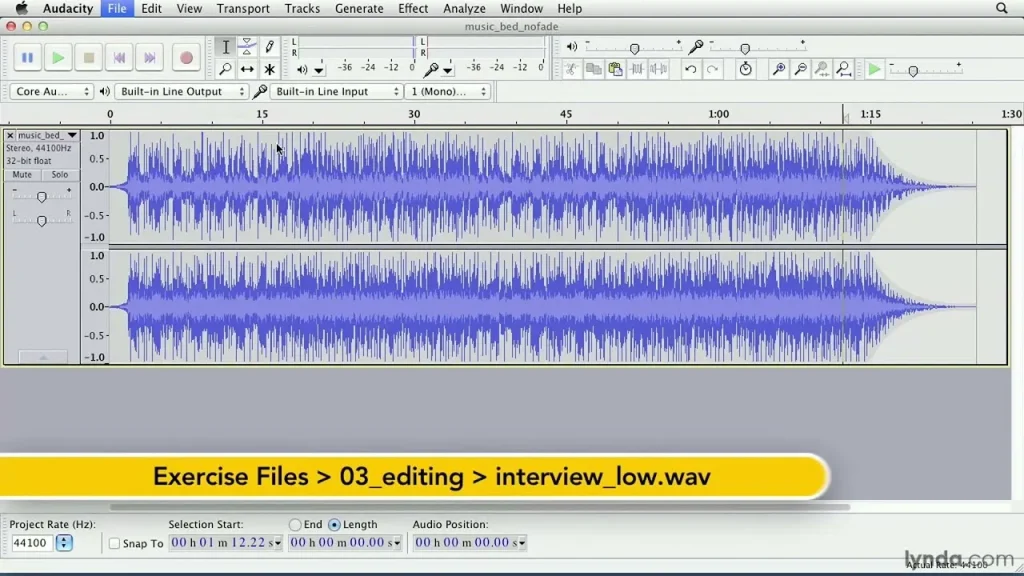
Audacity provides visual tools for examining audio frequencies. The spectrogram displays frequency information over time, while analysis tools help users inspect the characteristics of a recording.
These options are useful when identifying unwanted noise, studying audio signals, or examining particular frequency ranges.
6. Audio Format Support
Audacity supports several common audio formats. Depending on the installed version and optional libraries, users can import or export formats such as:
- WAV
- AIFF
- MP3
- Ogg Vorbis
- FLAC
- WavPack
Additional formats, including some compressed audio types, may require the optional FFmpeg library.
Always check the export dialog to confirm the format and available quality settings.
7. Plugin Support
Audacity supports different plugin formats that extend its audio editing capabilities. Users can install compatible effects and analysis plugins to add new processing options.
Supported plugin types include VST effects, LV2, LADSPA, Nyquist, and other formats, with platform-specific compatibility limitations.
8. Audio Project Management
Users can save their work as Audacity projects and continue editing later. This is useful for longer recordings and projects that contain multiple tracks.
Keep backup copies of important project files, especially before upgrading to a major software version.
What’s New in Audacity 3.7.7?
The official 3.7.7 release notes describe the following changes:
- Fixed broken waveform scrolling for affected users.
- Fixed audio selection behavior associated with the 3.7.6 issue.
- Added a checksum to WavPack export.
This was primarily a maintenance update rather than a major feature release.
Is Audacity 3.7.7 the Latest Version?
No. Audacity 3.7.7 was released in December 2025. Later updates included versions 3.7.8 and 3.7.9.
The developer subsequently released Audacity 4.0. On 2 November 2026, Audacity 4.0.2 became the current release listed in the official changelog.
Users who need newer fixes should check the official download page before installing an older build.
Audacity System Requirements
Audacity is available for Windows, macOS, and Linux. Its exact compatibility depends on the operating system and application version.
Windows
The official download information lists Windows 10 and Windows 11 as tested operating systems. Older Windows versions may work with certain older Audacity releases, but compatibility is not guaranteed for current versions.
Both x86_64 and ARM64 Windows builds are available. Some plugin features have limitations on ARM64.
macOS
Audacity provides builds for Intel-based Macs and Apple Silicon Macs. Check the official macOS download page for the supported operating system versions and the appropriate installer.
Linux
Audacity provides Linux builds, including AppImage downloads. Compatibility can vary depending on the Linux distribution and installed dependencies.
Storage and Performance
Audacity does not publish a universal minimum CPU or RAM requirement for every release. However, audio projects can use significant storage space, especially when recording long stereo sessions or editing multiple tracks.
For reliable recording, use a fast local SSD or hard drive with sufficient free space. Avoid relying on slow removable or network storage for active recording projects.
How to Download and Install Audacity
Follow these steps to install the official application:
- Visit the official Audacity download website.
- Choose the installer for Windows, macOS, or Linux.
- Download the appropriate package for your computer.
- On Windows, open the installer and follow the setup instructions.
- On macOS, open the downloaded DMG file and move Audacity into the Applications folder.
- On Linux, follow the instructions for the downloaded package.
- Launch Audacity and select your preferred recording device.
- Import an existing audio file or start a new recording.
Audacity does not require a serial number or paid activation key. Downloading the installer from the official website also helps you avoid modified installation packages.
Tips for Better Audio Editing
A few simple practices can improve your editing workflow:
- Record in a quiet environment to reduce unwanted background noise.
- Check your microphone input level before starting a long recording.
- Save your project regularly.
- Use headphones when checking audio quality.
- Apply noise reduction carefully to avoid damaging the original sound.
- Keep an original copy of important recordings.
- Export a test file before producing a long final recording.
For additional audio routing functionality, you can also explore our guide to Virtual Audio Cable. It covers a separate utility for routing audio between applications on Windows.
You can also read about DFX Audio Enhancer, which focuses on audio playback enhancement rather than multitrack editing.
Frequently Asked Questions
Is Audacity free to download?
Yes. Audacity is free and open-source software. You can download it from the official website without purchasing a serial key.
Is Audacity 3.7.7 the latest version?
No. Audacity 3.7.7 was released on 11 December 2025. The developer has since released later versions, including Audacity 4.0.2 in November 2026.
Can Audacity record my voice?
Yes. You can record voice through a supported microphone or audio input device. You can then edit, process, and export the recording.
Does Audacity support MP3 files?
Yes. Audacity supports MP3 import and export, along with other common audio formats. Some additional formats may require optional libraries.
Can I use Audacity for podcast editing?
Yes. Its recording, multitrack editing, noise reduction, and export features make it suitable for podcast production and voice editing.
Does Audacity support plugins?
Yes. Audacity supports several plugin formats, including VST effects, LV2, LADSPA, and Nyquist. Plugin compatibility depends on your operating system and application build.
Is Audacity available for Mac and Linux?
Yes. Audacity provides desktop versions for Windows, macOS, and Linux. Select the correct installer for your operating system.
Do I need a license key to activate Audacity?
No. Audacity is free and does not require a commercial license key or serial number.
Final Verdict
Audacity is a useful audio recording and editing application for beginners, students, podcasters, and content creators. Its multitrack editing tools, audio effects, format support, and plugin compatibility make it a flexible choice for everyday audio work.
Version 3.7.7 introduced important maintenance fixes in December 2025, but it is now an older release. Users who want the latest improvements should check the official Audacity download page and changelog before installing.
Official Website: https://www.audacityteam.org/
Official Download Page: https://www.audacityteam.org/download/
Official Version History: https://www.audacityteam.org/changelog/


Recent Comments