
MediBang Paint Pro Review: Features, Cloud Tools & System Requirements
MediBang Paint Pro Review: Features, Cloud Tools & System Requirements
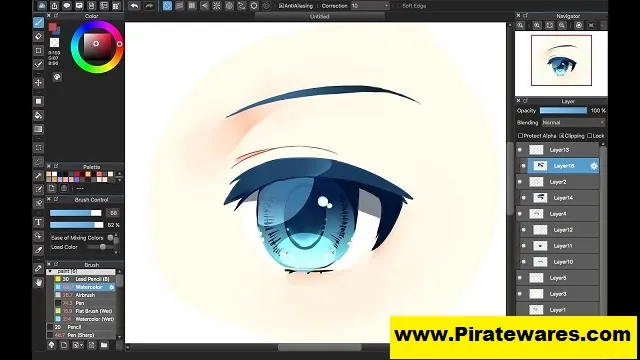
MediBang Paint Pro is a free digital painting and comic creation program for Windows and Mac. It gives artists a simple workspace for drawing, coloring, and creating manga. The software also includes brushes, fonts, backgrounds, and other tools that help users create digital artwork.
One of its main benefits is its focus on comic and manga creation. Artists can use comic guides, page layouts, tones, and text tools to prepare their projects. In addition, a MediBang account gives users access to cloud features, online materials, and collaboration tools.
MediBang Paint is also available on mobile devices and tablets. As a result, artists can move between supported devices and continue working on their projects. This guide explains its main features, cloud tools, system requirements, and official installation process.
What Is MediBang Paint Pro?
MediBang Paint Pro is the desktop version of MediBang Paint. It is designed for digital artists, illustrators, and comic creators who need drawing and painting tools without paying for a basic desktop license.
The program supports common art tasks such as sketching, line art, coloring, and adding text. It also provides tools for creating comic pages and organizing artwork.
Users can work with a mouse, keyboard, or compatible pen tablet. A pen tablet can make drawing more natural, although it is not required to use the software.

Key Features of MediBang Paint Pro
1. Digital Brushes and Drawing Tools
MediBang Paint includes a range of brushes for different drawing styles. Artists can use pencil, pen, paint, and other brush types to create sketches, outlines, and finished illustrations.
Furthermore, users can adjust brush settings to suit their artwork. The program also includes basic tools such as an eraser, fill tool, and color selection options.
2. Comic and Manga Creation
MediBang Paint includes tools designed for manga and comic artists.
Users can create comic canvases, set page guides, and arrange panels. These features make it easier to plan page layouts and keep artwork within the correct print areas.
The comic workflow also supports text and dialogue elements. Therefore, artists can prepare manga pages without relying on a separate layout program for every task.
3. Backgrounds, Tones, and Materials
Artists can use additional materials to improve their illustrations. MediBang offers downloadable brushes, backgrounds, tones, and other resources through its online services.
A MediBang account provides access to cloud materials. However, some content and additional resources may require a Premium subscription.
4. Fonts and Text Tools
MediBang Paint supports text for comic dialogue, titles, labels, and other artwork elements.
Users can access cloud text fonts after signing in to a MediBang account. Some fonts are free, while certain premium fonts require a paid plan.
These tools are useful when preparing manga pages with dialogue or adding text to illustrations.
5. Layers and Image Editing
Layers help artists organize different parts of an illustration. For example, users can keep sketches, line art, colors, and backgrounds on separate layers.
This makes editing easier because artists can adjust one part without changing the entire image.
MediBang Paint also includes image editing tools and effects for common tasks. These can help users adjust their artwork during the drawing process.
6. Cloud Storage and Synchronization
MediBang’s cloud service lets users save artwork online and access it from supported devices.
After signing in, users can work with cloud-saved files and sync certain settings and materials. This is useful when moving between a desktop computer, tablet, or smartphone.
An internet connection and MediBang account are required for cloud services. Users should also check their account’s storage limits and available features.
7. Group Projects and Collaboration
MediBang provides group project features for artists who want to work together.
Users can share supported projects with other MediBang members. This can help teams collaborate on manga and illustration work, even when members use different devices.
8. Multiple Device Support
MediBang Paint is available for desktop computers, iPad, iPhone, and Android devices.
This gives artists more flexibility when choosing where to draw. However, available tools and features can vary between platforms.
What Can You Create With MediBang Paint?
MediBang Paint supports several types of digital artwork.
Common uses include:
- Manga and comic pages.
- Character illustrations.
- Digital sketches.
- Concept art.
- Background artwork.
- Colored drawings.
- Social media illustrations.
- Comic panels and dialogue layouts.
Its comic-focused tools make it especially useful for artists who create manga or illustrated stories.
MediBang Paint Free vs Premium
MediBang Paint offers free access to its core drawing tools. Users can install the desktop application and create artwork without purchasing a basic license.
MediBang also offers a Premium subscription with additional benefits. Depending on the plan, these may include expanded access to brushes, materials, fonts, cloud storage, and other features.
| Feature | Free Access | Premium |
|---|---|---|
| Basic drawing tools | Yes | Yes |
| Core painting features | Yes | Yes |
| Cloud services | Account required | Expanded benefits |
| Additional materials | Limited selection | More available |
| Premium brushes and fonts | Limited | Included according to plan |
| Extra cloud storage | Limited | Expanded |
Check the official MediBang website for current subscription details because plan features can change.
MediBang Paint System Requirements
MediBang lists different requirements for its desktop and mobile versions. The following table covers the desktop application.
| Component | Windows | Mac |
|---|---|---|
| Operating System | Windows 10 or later | macOS 11 or later |
| Free Storage | 100 MB minimum | 100 MB minimum |
| Recommended Storage | 2 GB | 2 GB |
| RAM | 4 GB for 32-bit; 8 GB for 64-bit recommended | 8 GB recommended |
| Internet | Required for cloud features | Required for cloud features |
MediBang Paint also supports Windows on ARM devices running compatible versions of Windows 11.
A compatible pen tablet can improve the drawing experience. However, users can still work with a mouse or trackpad.
For the latest platform requirements, check MediBang’s official system requirements page.
Supported Image Formats
MediBang Paint supports common image formats and its own project format.
The native MDP format helps users save editable MediBang projects. Users can also export artwork in formats such as PNG, JPG, and PSD, depending on the platform and available functions.
Before exporting a project, choose a format that suits its intended use. For example, PNG can work well for images that need transparency, while JPG is useful for smaller image files.
How to Download and Install MediBang Paint
MediBang Paint is available through its official download page. Follow these steps to install the correct version.
- Visit the official MediBang Paint download page.
- Choose the desktop version for Windows or Mac.
- Select the correct installer for your operating system.
- Download the installation file.
- On Windows, open the EXE installer and follow the setup instructions.
- On Mac, open the DMG file and move the application into the Applications folder.
- Launch MediBang Paint after installation.
- Create a MediBang account or sign in if you want to use cloud services and online materials.
- Start a new canvas and explore the drawing tools.
Always download the application from an official source. Avoid modified installers, unauthorized license files, and unofficial activation tools.
Tips for New MediBang Paint Users
New users can learn the program more easily by starting with a simple drawing project.
- Begin with the pencil and brush tools.
- Learn how layers work before starting a large illustration.
- Try different brushes to find a suitable drawing style.
- Use comic guides when creating manga pages.
- Save editable projects in MDP format.
- Sign in to access supported cloud features.
- Keep backup copies of important artwork.
- Read the official tutorials when learning advanced tools.
These steps can help beginners become familiar with the interface and build a consistent drawing workflow.
Frequently Asked Questions
Is MediBang Paint Pro free?
Yes. MediBang Paint offers a free desktop application with core drawing and painting tools. Some additional materials and services require a MediBang account or Premium subscription.
Is MediBang Paint available for Windows and Mac?
Yes. MediBang Paint for Desktop supports Windows 10 or later and macOS 11 or later, according to its published system requirements.
Can I use MediBang Paint for manga?
Yes. The software includes comic-focused tools such as comic guides, page layouts, tones, and text features. These tools help artists create manga and comic pages.
Does MediBang Paint support cloud storage?
Yes. Users with a MediBang account can use cloud features to save and access supported artwork across devices. Cloud operations require an internet connection.
Does MediBang Paint work on Android and iPhone?
Yes. MediBang offers separate applications for Android and iPhone, as well as versions for iPad and desktop computers. Features can vary between platforms.
What is the MDP file format?
MDP is MediBang Paint’s native project format. It allows users to save their artwork in an editable project file.
Does MediBang Paint support PSD files?
MediBang Paint supports PSD for compatible import and export workflows. Check the current documentation if you need to preserve specific layer effects or advanced Photoshop features.
Do I need a drawing tablet to use MediBang Paint?
No. You can use a mouse or trackpad. However, a compatible pen tablet can make sketching and painting more comfortable.
What is the difference between MediBang Paint Free and Premium?
The free version provides core drawing tools. Premium adds benefits such as expanded access to brushes, materials, fonts, and cloud-related features, depending on the current plan.
Final Thoughts
MediBang Paint Pro is a useful option for artists who want free digital drawing and comic creation software. Its brushes, layers, comic tools, and cloud services support a wide range of creative projects.
It is particularly suitable for beginners, manga creators, and illustrators who need a simple drawing workspace. Before installing it, check the official system requirements and choose the correct version for your device.
For the safest installation, use MediBang’s official download page and review its current free and Premium features.


Recent Comments