
Leawo Prof. Media 13 Review: Features & Media Conversion Guide
Leawo Prof. Media 13 Review: Features & Media Conversion Guide
Leawo Prof. Media is a multimedia software suite designed to help users convert, copy, rip, and create digital media. It combines several tools for working with video files, audio, DVDs, Blu-ray discs, and ISO images.
The software is useful for people who want to manage different media formats through one application. For example, you can convert a video into another format, extract audio from supported media, or create a DVD or Blu-ray disc from personal video files.
Leawo currently promotes Prof. Media 13 as its all-in-one multimedia solution. However, the exact build number 13.0.0.6 could not be independently confirmed through the official version information. Therefore, check the installer details before treating that build as a verified release.
What Is Leawo Prof. Media?
Leawo Prof. Media is a collection of multimedia tools developed by Leawo Software. It brings several media-related functions together in one desktop application.
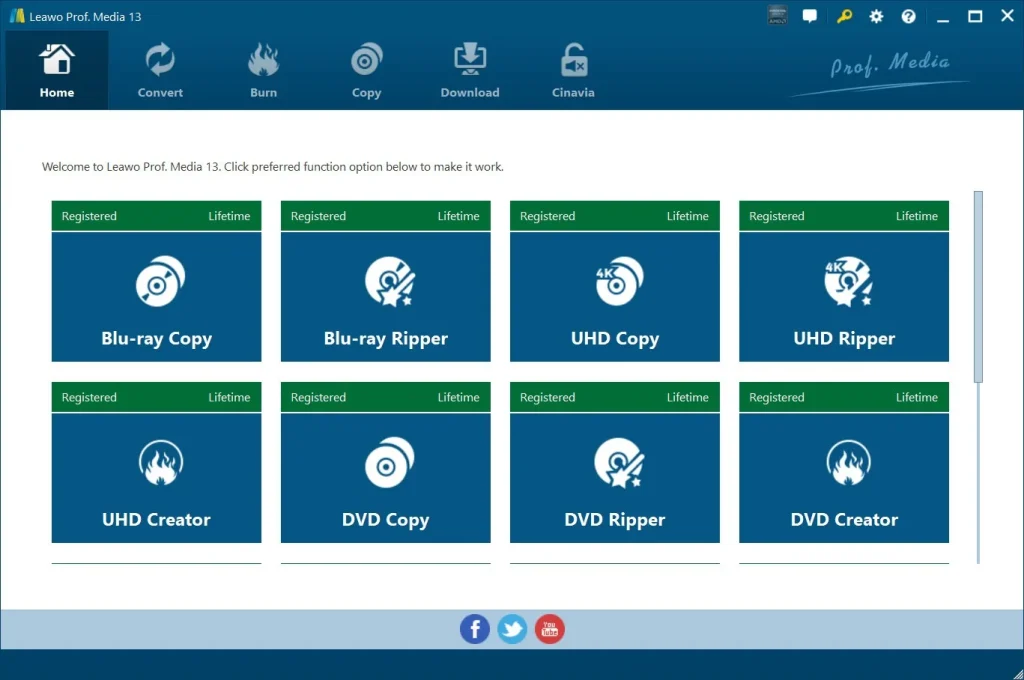
Depending on the installed edition and available modules, users can work with video conversion, audio extraction, DVD and Blu-ray ripping, disc copying, and disc creation.
The software also provides options for editing media settings before conversion. These include output format, video codec, audio codec, bitrate, frame rate, and other parameters.
Main Features of Leawo Prof. Media
1. Video and Audio Conversion
The video converter supports many common media formats. These include MP4, AVI, MOV, MKV, WMV, FLV, and other supported formats.
You can also extract audio from compatible video files. In addition, the software supports common audio formats such as MP3, AAC, WAV, FLAC, and OGG.
Available output options depend on the source file, selected profile, and installed software version.
2. DVD and Blu-ray Ripping
Leawo Prof. Media includes tools for converting supported DVD and Blu-ray content into digital media files.
This can be useful when you want to access your own discs on compatible computers or portable devices. You can select an output format and adjust available video and audio settings before conversion.
Always make sure you have the legal right to copy or convert the disc. Copyright rules and disc protection restrictions vary by country and content.
3. DVD and Blu-ray Copying
The disc-copying tools can create backups of supported DVD and Blu-ray discs.
Depending on the source and destination, users can work with disc folders, ISO image files, and compatible recordable media. The available copy modes may vary according to the disc type and software edition.
4. DVD and Blu-ray Creation
The creator tools allow users to make DVD or Blu-ray projects from compatible video and image files.
You can also use available menu templates to organize a disc project. This is helpful when preparing personal videos, family recordings, or other content that you have permission to distribute.
5. Support for Different Media Formats
Format compatibility is one of the main advantages of this suite. Leawo lists support for a wide selection of video, audio, DVD, Blu-ray, and image formats.
Some commonly supported video formats include:
- MP4
- AVI
- MOV
- MKV
- WMV
- FLV
- MPEG
- WebM
Common audio formats include:
- MP3
- AAC
- WAV
- FLAC
- OGG
- WMA
Not every format or codec works with every module. Check the official technical specifications for the format you plan to use.
6. Video Editing and Output Settings
The software provides basic media editing and conversion settings. Users can adjust supported video and audio parameters before starting a task.
Depending on the selected module, these settings may include:
- Video codec and quality
- Bitrate and frame rate
- Aspect ratio
- Audio codec and bitrate
- Sample rate and audio channels
- Subtitle options
These controls help users prepare files for different devices and playback requirements.
7. Photo Slideshow and Disc Projects
Leawo Prof. Media also includes photo slideshow-related features. Users can arrange images into a slideshow project and prepare compatible output for supported disc formats.
This can be useful for personal collections, presentations, and family projects.
8. Online Video Features
Earlier versions of Leawo Prof. Media included an integrated video downloader. However, Leawo’s current user guide explains that its internal Download module has been replaced by CleverGet Video Downloader.
Therefore, don’t assume that every Prof. Media installer includes the same online video downloading features. Check the current official documentation and follow the terms of the websites you use.
What’s New in Leawo Prof. Media 13?
Leawo presents Prof. Media 13 as an expanded multimedia suite with tools for UHD Blu-ray, Blu-ray, DVD, video, audio, and photo-related tasks.
The official product information highlights:
- A combined collection of multimedia tools.
- Support for a wide range of video and audio formats.
- DVD and Blu-ray conversion and copying options.
- UHD Blu-ray-related tools.
- Video and photo disc creation features.
- Adjustable conversion and performance settings.
These are product capabilities, not a confirmed change list for build 13.0.0.6. Check Leawo’s official release information for build-specific updates.
System Requirements
The following requirements are listed on Leawo’s official technical specifications page for Prof. Media 13.
| Component | Officially listed requirement |
|---|---|
| Operating system | Windows 7, 8, 8.1, 10, or 11 |
| Processor | Intel or AMD processor, 1 GHz or above |
| RAM | 512 MB minimum; 1 GB or above recommended |
| Free storage | 5 GB or more for DVD tasks; 25 GB or more for Blu-ray tasks |
| Graphics | NVIDIA GeForce GTX 260 or above listed |
| Other requirements | Internet connection and a recordable Blu-ray drive for relevant disc tasks |
These are the specifications published by Leawo. Actual storage needs can be higher when working with large video files, Blu-ray content, or temporary conversion files.
How to Download and Install Leawo Prof. Media
For a safer installation, obtain the software from Leawo’s official website.
- Visit the official Leawo download centre.
- Find Prof. Media 13.
- Select the installer for your operating system.
- Download the setup file from the official source.
- Open the installer and follow the on-screen instructions.
- Complete the installation process.
- Launch Leawo Prof. Media.
- Select the module you want to use and review its available settings.
Use a genuine licence if you need paid features. Avoid unofficial registration codes, modified installers, and activation bypasses.
How to Convert a Video with Leawo Prof. Media
The general conversion workflow is straightforward:
- Open Leawo Prof. Media.
- Select the Convert module.
- Add a compatible video file.
- Choose an output format.
- Review the available video and audio settings.
- Select an output folder.
- Start the conversion.
- Open the output folder and test the converted file.
Conversion time depends on the source file, output settings, computer hardware, and selected codec.
Advantages and Limitations
Advantages
- Combines several multimedia tools in one application.
- Supports many common video and audio formats.
- Provides DVD and Blu-ray conversion options.
- Includes disc creation and copying features.
- Offers adjustable video and audio settings.
- Provides tools for different media projects.
Limitations
- Some modules require a paid licence.
- Advanced disc tasks may need compatible hardware.
- Large Blu-ray projects require considerable storage.
- Features can differ between editions and versions.
- The online video downloader module has been replaced by CleverGet in the current documentation.
Frequently Asked Questions
What is Leawo Prof. Media used for?
Leawo Prof. Media is used for video and audio conversion, DVD and Blu-ray ripping, disc copying, and creating DVD or Blu-ray projects.
Is Leawo Prof. Media available for Windows 11?
Yes. Leawo’s download centre lists Windows 11 among the supported operating systems for its Windows Prof. Media 13 installer.
Does Leawo Prof. Media support MP4 and MKV?
Yes. Leawo lists MP4 and MKV among its supported video formats. Actual compatibility depends on the selected module and codec.
Can Leawo Prof. Media convert DVD to video?
Yes. Its DVD Ripper module is designed to convert supported DVD content into digital video or audio formats.
Does Leawo Prof. Media include a video downloader?
Earlier versions included an internal Download module. However, Leawo’s current guide says this module has been replaced by CleverGet Video Downloader.
Is Leawo Prof. Media free?
Leawo provides a trial download. Some functions or usage limits may require a paid licence. Check the official product page for current trial restrictions and pricing.
Is version 13.0.0.6 the latest version?
The exact build number 13.0.0.6 could not be confirmed from the official sources checked for this article. Leawo’s official website currently identifies the product as Prof. Media 13. Check its download centre for the installer currently offered.
Final Verdict
Leawo Prof. Media is a comprehensive multimedia suite for users who regularly work with video, audio, DVDs, and Blu-ray discs. Its main advantage is the combination of several media tools in one application.
It can be useful for converting supported media formats, preparing disc backups, and creating DVD or Blu-ray projects. However, users should review the system requirements, module availability, and licence terms before installing it.
For the most reliable experience, download the installer and updates directly from Leawo’s official website.


Recent Comments