
Reimage PC Repair Review: Discontinued Status, Safety & Alternatives
Reimage PC Repair Review: Discontinued Status, Safety & Alternatives
Reimage PC Repair was a Windows maintenance and repair application designed to scan computers for system errors, damaged files, performance problems, and other issues. It was marketed as a tool that could help users diagnose Windows problems and restore system stability.
However, Reimage PC Repair is no longer an actively distributed product. Its sales and subscription renewals reportedly ended in 2023, and there is no verified official download available today. Anyone searching for Reimage PC Repair in 2026 should understand its discontinued status before downloading an installer or purchasing a license.
This guide explains what Reimage PC Repair was designed to do, what happened to the product, the important security concerns, and which Windows tools users can consider instead.
What Was Reimage PC Repair?
Reimage PC Repair was a Windows repair utility that offered system scanning and repair services. Its advertised purpose was to identify potential operating system problems and help users resolve issues affecting computer performance and stability.
The software was promoted for diagnosing problems involving Windows system files, application errors, damaged components, and other system-related issues.
It was not a replacement for Windows itself, and its advertised repair capabilities should not be confused with a guaranteed solution for every hardware, software, or malware problem.
Key Features Historically Advertised by Reimage PC Repair
The following features describe the capabilities historically promoted for the application. They should not be interpreted as confirmation that the discontinued product remains available or supported.
1. System Scanning
Reimage offered a scanning process intended to examine Windows components and identify possible operating system problems.
2. Windows File Repair
The software was marketed as a utility that could identify damaged Windows files and replace certain components with working versions.
3. System Error Detection
It advertised the ability to detect selected system errors, application issues, and other problems that could affect Windows stability.
4. Performance Diagnostics
Reimage promoted system analysis features intended to help users understand possible causes of slow performance and instability.
5. Repair Reports
The application provided scan results and reports describing the issues it claimed to identify. Users were encouraged to review these results before purchasing repair services.
6. Windows Maintenance
Its advertised maintenance functions included identifying unnecessary files and selected system-related issues.
Is Reimage PC Repair Still Available in 2026?
No verified official download or active licensing service for the original Reimage PC Repair product is available.
Public product-status reporting indicates that new sales and renewals ended in 2023. The original product should therefore be treated as discontinued rather than advertised as a new 2026 release.
Be careful with websites offering:
- Reimage PC Repair 2026 Crack
- Reimage PC Repair Serial Keys
- Reimage License Key Generators
- Modified Reimage Installers
- Unofficial Activation Tools
These offers are not verified official distributions. They may expose your computer to unwanted software, malicious files, or misleading download pages.
Reimage PC Repair and the FTC Case
An important part of Reimage’s history concerns action taken by the US Federal Trade Commission (FTC).
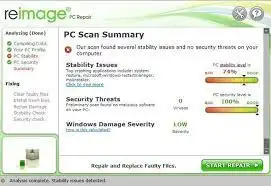
In March 2024, the FTC announced a $26 million settlement involving Reimage Cyprus Limited and Restoro Cyprus Limited. The FTC alleged that the companies used misleading marketing, including fake Windows pop-ups and scans that reported serious problems on computers regardless of their actual condition.
The FTC said consumers were encouraged to purchase repair software and, in some cases, additional technical support services.
In March 2025, the FTC announced that it was sending more than $25.5 million to affected consumers through its refund process.
This history is important for anyone researching Reimage. A scan result or alarming pop-up should never be treated as proof that a computer is infected or damaged.
You can read the official information here:
- FTC case information: https://www.ftc.gov/legal-library/browse/cases-proceedings/x240021-restoro-reimage
- FTC announcement: https://www.ftc.gov/news-events/news/press-releases/2024/03/tech-support-firms-will-pay-26-million-settle-ftc-charges-they-deceived-consumers-buying-repair
- FTC consumer advice: https://consumer.ftc.gov/consumer-alerts/2024/03/what-know-you-click-free-computer-security-scan
Safer Alternatives to Reimage PC Repair
If you need to diagnose or repair a Windows computer, several built-in tools can help without requiring an obsolete third-party application.
1. Windows Security
Windows Security provides built-in antivirus and threat protection. Use Microsoft Defender Antivirus to scan your computer and review detected threats.
2. System File Checker (SFC)
System File Checker checks protected Windows system files and can repair corrupted files when possible.
Open Command Prompt as Administrator and run:
sfc /scannowWait for the scan to finish before closing the window.
3. DISM
Deployment Image Servicing and Management (DISM) can check and repair the Windows component store.
Open Command Prompt as Administrator and run:
DISM /Online /Cleanup-Image /RestoreHealthAfter it completes, run the SFC command again if necessary.
4. Windows Storage Settings
Windows Storage settings can identify temporary files and help users free up disk space. Review the available categories before deleting anything important.
5. Outbyte PC Repair
Outbyte PC Repair is a separate Windows maintenance product. It advertises system diagnostics, disk cleanup, optimization, privacy tools, and other maintenance features.
It should not be described as the same product as the discontinued Reimage PC Repair. Outbyte also states that its PC Repair software is designed to complement antivirus protection rather than replace it.
Official product page: https://outbyte.com/software/pc-repair/
How to Maintain a Windows PC Safely
You do not need an obsolete repair application to perform basic computer maintenance. Follow these practices:
- Keep Windows updated through Windows Update.
- Use Windows Security to check for malware.
- Remove applications you no longer use.
- Keep sufficient free storage space.
- Install software from official developer websites.
- Back up important documents and personal files.
- Avoid unknown registry cleaners and modified installers.
- Do not purchase technical support because of an unexpected pop-up warning.
These steps can help maintain a Windows computer without relying on unverified repair utilities.
Frequently Asked Questions
1. What was Reimage PC Repair used for?
Reimage PC Repair was a Windows maintenance application designed to scan for system problems, identify damaged files, and offer repair-related services.
2. Is Reimage PC Repair still available?
The original product is reported to be discontinued. New sales and subscription renewals reportedly ended in 2023, and a verified official download is not currently available.
3. Is Reimage PC Repair 2026 a new version?
There is no verified official Reimage PC Repair 2026 release. Websites advertising a new crack, serial key, or activation tool should be treated cautiously.
4. What happened to Reimage PC Repair?
Reimage became the subject of an FTC case involving allegations of misleading marketing and computer repair sales practices. In March 2024, the companies involved agreed to a $26 million settlement.
5. Can Reimage PC Repair remove viruses?
Reimage historically advertised system repair and security-related scanning capabilities. However, it should not be relied upon as a current antivirus solution. Use an actively supported security product such as Microsoft Defender Antivirus.
6. What is a good alternative to Reimage PC Repair?
Windows Security, System File Checker, DISM, and Windows Storage settings provide useful built-in maintenance and troubleshooting options. Outbyte PC Repair is another separately developed commercial product.
7. Can I use a Reimage PC Repair license key?
Because the original product is discontinued and its official sales and renewals have ended, avoid buying or downloading unofficial license keys. There is no verified current activation service to recommend.
8. Is Outbyte PC Repair the same as Reimage?
No. Outbyte PC Repair is a separate product with its own developer, website, features, and licensing arrangements. Do not assume that an Outbyte installer or license activates the original Reimage application.
Final Thoughts
Reimage PC Repair was originally marketed as a Windows system repair utility, but it is no longer a suitable choice for new installations in 2026. Its discontinued status and the FTC case involving Reimage and Restoro make it especially important to avoid unofficial installers and misleading repair offers.
For modern Windows troubleshooting, start with Windows Security, SFC, DISM, and built-in storage tools. If you need additional maintenance software, research its current support status, licensing terms, and developer reputation before installing it.



Recent Comments