
Enigma Recovery Review: iPhone Data Recovery Features & Limitations
Enigma Recovery Review: iPhone Data Recovery Features & Limitations
Enigma Recovery was a desktop application designed to help users recover or extract information from iPhones, iPads, and iPod touch devices. It provided tools for scanning connected iOS devices and examining existing iTunes backup files to locate information such as messages, contacts, notes, call history, and other personal data.
The application was developed for Windows and Mac computers rather than Android smartphones. Its main purpose was to help users access information that might otherwise be difficult to retrieve after accidental deletion, device damage, or data loss.
However, Enigma Recovery is an older product, and its current official availability and licensing status cannot be reliably confirmed. This guide explains its historical features, limitations, version information, and safer ways to recover iPhone data.
What Is Enigma Recovery?
Enigma Recovery was an iOS data recovery utility that worked through a desktop computer. Users could connect an iPhone, iPad, or iPod touch and scan available information.
It also provided an option to examine compatible iTunes backup files stored on a computer. After scanning, users could browse available information and export selected items to their computer.
The software was designed primarily for Apple devices. It should not be confused with Android recovery applications or products from other companies with similar names.

Key Features of Enigma Recovery
1. iPhone Data Scanning
Enigma Recovery provided a scanning function for connected iOS devices. Users could examine available information and review the results displayed by the application.
2. iTunes Backup Extraction
The application could examine supported iTunes backup files stored on a computer. This was useful when the original iPhone was unavailable but a compatible backup still existed.
3. Messages and iMessages
The software advertised recovery and extraction of text messages and iMessages from supported device data and backups.
4. Contact Recovery
Users could examine contact information found during a scan and export supported records for further use.
5. Call History
Enigma Recovery also advertised access to call-history information stored in supported device data or backups.
6. Notes and Calendar Information
The application supported examining notes and calendar-related information where the necessary data was available.
7. Photos and Videos
Photo and video recovery depended on the available backup data and the limitations of the recovery method. It should not be assumed that the software can restore every permanently deleted image directly from an iPhone.
8. Data Preview and Export
After scanning, users could browse available results and export supported information to a computer. Historical product descriptions also mention export formats such as CSV, XLS, and PDF.
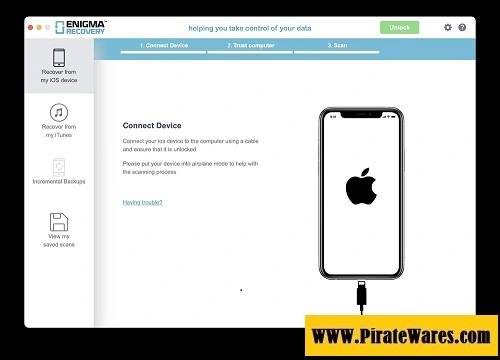
How Did Enigma Recovery Work?
The historical workflow generally involved connecting an iOS device or selecting a compatible backup.
- Install the application on a compatible computer.
- Connect the iPhone or select an existing iTunes backup.
- Allow the software to examine the available data.
- Review the categories and scan results.
- Preview supported information.
- Export the available information to the computer if the software license permits it.
The actual results depended on the device, iOS version, backup availability, and type of information being recovered.
Enigma Recovery Version Information
The title of this post originally mentioned Enigma Recovery 4.2.1. However, I could not verify an official release announcement or reliable developer documentation confirming that version.
Public software archives list older releases, including version 1.3.0 and version 1.7.0. These listings are historical records and do not establish the current official release.
The original product’s official website is also not publicly accessible through the sources available for this review. Therefore, a current official installer, activation service, and license price cannot be confirmed.
Avoid websites claiming to provide a guaranteed Enigma Recovery 2026 release, free activation keys, or modified installers without reliable developer verification.
Enigma Recovery System Requirements
Historical third-party listings describe older Windows versions and dependencies, but they do not establish compatibility with modern operating systems.
| Component | Historical information |
|---|---|
| Platform | Windows and Mac versions were advertised |
| Device support | iPhone, iPad, and iPod touch |
| Windows compatibility | Older listings mention Windows XP through Windows 10 |
| Backup support | Compatible iTunes backup files |
| Additional software | iTunes was required for certain Windows workflows |
| Current compatibility | Not officially verified |
| Current license availability | Not officially verified |
Do not rely on the old Windows XP, 1 GB RAM, and 50 MB storage figures as modern system requirements.
Important Limitations of iPhone Data Recovery
Data recovery applications cannot guarantee that every deleted file will be restored.
Several factors affect recovery results:
- Whether an iCloud or computer backup exists.
- How long ago the information was deleted.
- Whether the deleted data has been overwritten or permanently removed.
- The iOS version and device model.
- Whether the required information is included in the available backup.
Modern iPhone storage encryption and backup restrictions also affect what third-party applications can access.
For this reason, be cautious of any application promising 100% recovery of all deleted information.
Safer Ways to Recover Deleted iPhone Data
Before installing an older third-party recovery application, try Apple’s built-in recovery options.
1. Check the Recently Deleted Album
If you accidentally deleted photos or videos, open the Photos application and check the Recently Deleted album.
Apple keeps deleted photos and videos there for up to 30 days, during which they can be recovered if they have not been permanently removed.
Official guide: https://support.apple.com/guide/iphone/delete-or-hide-photos-and-videos-iphb4defbde9/27/ios/27
2. Recover Information from iCloud
Visit iCloud.com and sign in using your Apple Account. Depending on the type of information, you may be able to restore recently deleted files, contacts, calendars, notes, and other supported information.
Official guide: https://support.apple.com/guide/icloud/recover-files-and-information-mme6182cfc37/icloud
3. Restore from an iPhone Backup
If you previously created an iCloud or computer backup, you may be able to restore your device using that backup.
Check its date and contents before restoring because restoring a backup can replace information currently stored on the device.
Official Apple guide: https://support.apple.com/en-us/118967
4. Create Regular Backups
Regular backups are one of the best ways to protect important information. Apple supports iCloud backups and backups through a Windows PC or Mac.
Windows backup guide: https://support.apple.com/en-us/108967
Is Enigma Recovery Safe to Download?
The original Enigma Recovery application was a known iOS data recovery product, but that does not mean every website offering its installer is trustworthy.
Because its current official distribution and activation status cannot be verified, avoid downloading modified packages or unofficial activation tools.
Keep these precautions in mind:
- Download applications only from verified developer websites.
- Never disable Windows Defender to install an unknown package.
- Avoid unknown license-key generators.
- Do not share your Apple Account password with untrusted applications.
- Keep a separate backup of important information before attempting recovery.
- Review the application’s privacy policy before allowing access to personal data.
Frequently Asked Questions
1. What is Enigma Recovery used for?
Enigma Recovery was designed to scan iOS devices and compatible iTunes backups to help users access information such as messages, contacts, notes, call history, photos, and other supported data.
2. Does Enigma Recovery support Android?
No. Enigma Recovery was designed for Apple mobile devices, including iPhones, iPads, and iPod touch models. It should not be advertised as an Android recovery application.
3. Is Enigma Recovery 4.2.1 an official version?
I could not verify an official developer release confirming version 4.2.1. Historical third-party archives list older versions, including 1.3.0 and 1.7.0.
4. Can Enigma Recovery extract data from iTunes backups?
Yes. Historical product documentation and software listings describe the ability to examine compatible iTunes backup files and export supported information.
5. Can Enigma Recovery restore permanently deleted photos?
There is no guarantee. Photo and video recovery depends on the available data and backups. Items permanently removed without an available backup may not be recoverable.
6. Is Enigma Recovery still available?
Its current official availability, licensing, and activation service could not be verified. Users should check the developer’s official support channels before relying on an old installer.
7. Does Enigma Recovery work on Windows and Mac?
Historical descriptions advertise Windows and Mac editions. However, current compatibility with recent operating systems has not been officially verified.
8. What are the alternatives to Enigma Recovery?
Apple’s Recently Deleted album, iCloud recovery, and computer backups are useful first options. Users can also research currently supported iPhone recovery products, checking their compatibility and privacy policies before purchasing.
Final Thoughts
Enigma Recovery was designed to help iPhone and iPad users examine device data and compatible iTunes backups. Its scanning, preview, and export features made it a specialized utility for retrieving supported information.
However, its current official availability and licensing status remain uncertain. Users should avoid unofficial activation packages and misleading 2026 download claims.
For modern iPhone data recovery, Apple’s built-in Recently Deleted feature, iCloud recovery, and regular computer backups are sensible starting points. Always create a backup before attempting major recovery operations.



Recent Comments