
TypingMaster 11 Review: Features, Typing Lessons & Guide
TypingMaster 11 Review: Features, Typing Lessons & Guide
TypingMaster 11 is a touch-typing training application designed to help users improve their typing speed, accuracy, and keyboard skills. It provides structured lessons, personalized exercises, typing tests, and interactive games for beginners as well as experienced typists.
The application analyzes typing performance and identifies keys or fingers that need additional practice. Based on this information, it creates targeted exercises to help users develop better keyboard habits.
TypingMaster 11 was released in 2022 and is an earlier version of the TypingMaster software series. This guide explores its features, training tools, system compatibility, and installation process.
What Is TypingMaster 11?
TypingMaster 11 is a Windows typing tutor developed to teach proper touch-typing techniques. Touch typing means typing without constantly looking at the keyboard.
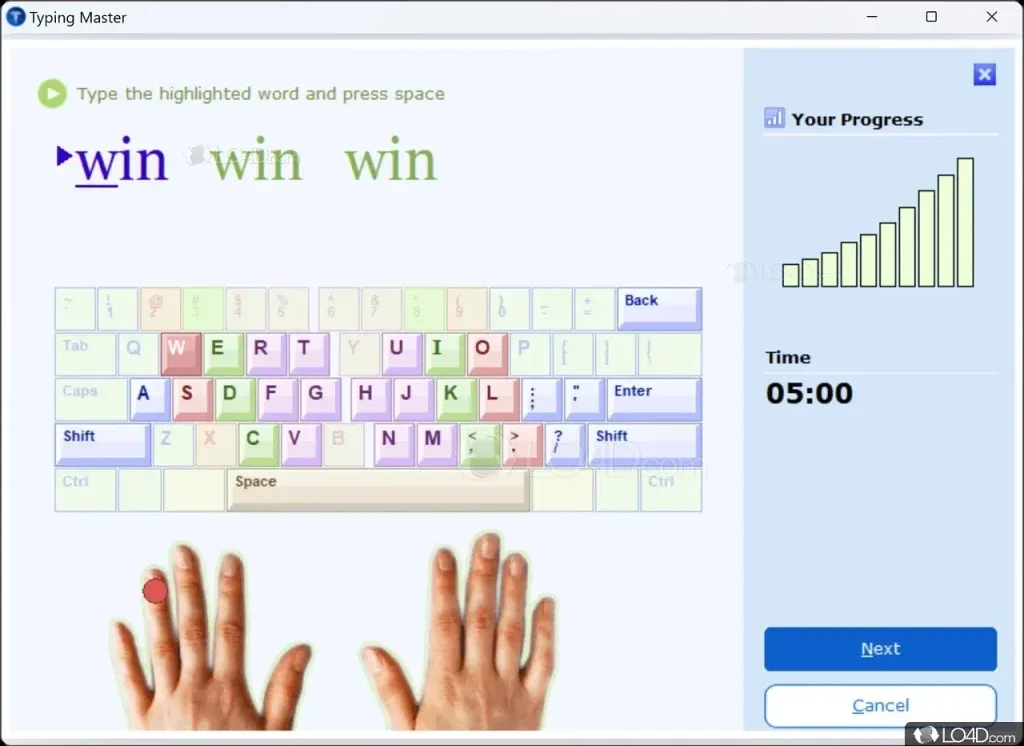
The software begins with basic keyboard lessons and gradually introduces more advanced exercises. Users learn the correct finger positions, practice individual keys, and complete exercises designed to improve their typing performance.
It also includes typing tests and progress reports, allowing learners to measure their words-per-minute (WPM) speed and accuracy over time.
Main Features of TypingMaster 11
1. Personalized Typing Lessons
TypingMaster 11 provides a structured training course with lessons designed for different skill levels.
Beginners can start with the home-row keys and gradually learn additional keyboard sections. As users improve, the software introduces more challenging exercises.
This step-by-step approach helps learners develop consistent typing habits instead of relying on random practice.
2. Adaptive Typing Exercises
One of the application’s useful features is its ability to analyze typing performance.
TypingMaster identifies frequently mistyped keys and areas where users need improvement. It then provides additional exercises that focus on those weaknesses.
This personalized approach makes practice more relevant and helps learners concentrate on the skills they need most.
3. Typing Speed and Accuracy Tests
The application includes typing tests that measure performance using speed and accuracy statistics.
Users can review their results after completing a test. These reports help them understand whether their typing speed is improving and which mistakes occur most frequently.
Regular testing also provides a practical way to track progress throughout the training course.
4. TypingMeter Widget
TypingMaster 11 Premium includes the TypingMeter widget, which helps users monitor their typing activity while working on the computer.
It can analyze typing habits and identify keys that may require additional practice. This allows users to continue improving their skills beyond the application’s regular lessons.
5. Interactive Typing Games
TypingMaster includes typing games that make learning more engaging.
Instead of completing only traditional exercises, users can practice keyboard skills through interactive challenges. These activities help reinforce key positions, improve reaction time, and make regular practice more enjoyable.
6. Speed-Building Exercises
After learning the basic keyboard positions, users can move on to exercises designed to increase typing speed.
These activities focus on developing smoother finger movements and reducing unnecessary pauses. Consistent practice can help users type more comfortably and accurately.
7. Detailed Performance Reports
TypingMaster provides statistics that help users understand their typing development.
Depending on the training activity, reports can show:
- Typing speed in words per minute
- Typing accuracy
- Frequently mistyped keys
- Individual key performance
- Training progress
- Areas requiring additional practice
These statistics make it easier to identify improvements and plan future exercises.
8. Custom Typing Tests
The Premium edition of TypingMaster 11 supports custom typing tests using plain-text files.
This can be useful for students, office workers, and professionals who want to practice with specific material rather than relying only on the standard exercises.
What Is New in TypingMaster 11?
TypingMaster 11 introduced improvements to the established TypingMaster training experience.
Its main features include:
- A touch-typing course with personalized exercises.
- The TypingMeter widget for monitoring typing performance.
- Typing tests with performance reports.
- Interactive typing games.
- Additional training exercises.
- Improved tools for identifying weak keys.
- A printable typing certificate after completing the required tests.
TypingMaster 11 was released in 2022. It has since been replaced by TypingMaster 12, which includes newer features and continues to receive updates.
TypingMaster 11 vs TypingMaster 12
TypingMaster 11 and 12 are separate major releases. Version 12 adds several improvements while retaining the core touch-typing training approach.
| Feature | TypingMaster 11 | TypingMaster 12 |
|---|---|---|
| Touch-typing course | Yes | Yes |
| Typing games | 4 | 6 |
| Typing tests | Yes | Yes |
| TypingMeter | Premium | Premium |
| Dark mode | No | Yes |
| Custom keyboard layouts | Limited | Yes |
| Hindi typing support | No | Yes |
| Newer updates | No longer current | Actively maintained |
Users who already own a TypingMaster 11 license can continue using that version. However, a version 11 license does not automatically activate version 12.
TypingMaster 11 System Requirements
TypingMaster 11 is designed for Windows computers. The developer’s official download information lists the following supported operating systems:
- Windows 11
- Windows 10
- Windows 8
- Windows 7
The official download page lists an installer size of approximately 12 MB.
The developer does not publish a complete detailed minimum hardware specification for every supported Windows version. Therefore, older requirements such as a Pentium 3 processor or 256 MB of storage should not be treated as verified current specifications.
For the best experience, use a supported Windows computer with sufficient free storage and memory.
Does TypingMaster 11 Work on Mac or Linux?
TypingMaster 11 is the Windows edition. The developer does not list an official macOS version.
TypingMaster 12 is available for Windows and also has a separate Linux edition. However, Linux support should not be confused with native Mac compatibility.
How to Download and Install TypingMaster 11
Follow these steps to install the official version:
- Visit the official TypingMaster website.
- Open the previous versions section.
- Select the TypingMaster 11 download option.
- Download the official Windows installer.
- Open the downloaded setup file.
- Follow the installation wizard.
- Complete the installation and launch TypingMaster 11.
- Start the introductory typing lessons.
- If you previously purchased a license, enter the registration details from your purchase receipt.
TypingMaster 11 is an older release, and its installer is primarily intended for users who already own a version 11 license. New users should consider the current version before purchasing.
Avoid unofficial key generators, modified installers, and unknown activation files.
Is TypingMaster 11 Free?
TypingMaster offers a free trial that provides access to its training features for a limited period.
The official version 11 download page describes a one-week trial with access to the full feature set. After the trial, some features become limited.
Users who purchase a license can unlock the features included in their edition. The developer also provides information about available free learning options and special charity licenses.
Frequently Asked Questions
Is TypingMaster 11 good for beginners?
Yes. Its structured lessons begin with basic keyboard positions and gradually introduce more advanced typing exercises. This makes it suitable for beginners who want to learn touch typing.
Can TypingMaster 11 improve typing speed?
It can help users improve their speed through regular practice, personalized exercises, and typing tests. Actual progress depends on practice time, starting ability, and consistency.
Does TypingMaster 11 work on Windows 11?
Yes. The official download information lists Windows 11, Windows 10, Windows 8, and Windows 7 as supported systems.
Is TypingMaster 11 free?
It offers a one-week trial with full features. Some features become limited after the trial period, while a valid license unlocks the paid edition.
Does TypingMaster 11 support Mac?
No official native macOS version is listed for TypingMaster 11. It is designed for Windows computers.
What is TypingMeter?
TypingMeter is a performance-monitoring widget that analyzes typing activity and helps users identify areas that need additional practice. It is included with the Premium edition.
Can I use my TypingMaster 11 license in TypingMaster 12?
No, a version 11 license does not automatically unlock version 12. The developer treats these as separate major versions and provides upgrade options for eligible customers.
What is the latest TypingMaster version?
TypingMaster 12 is the current major release. The official support page lists version 12.01.983 as its latest build at the time of checking.
Final Verdict
TypingMaster 11 is a useful typing tutor for people who want to develop better keyboard habits and improve their typing accuracy. Its personalized exercises, typing tests, interactive games, and performance reports provide a structured learning experience.
Although it is no longer the current major release, it remains relevant to users who already own a version 11 license or need to reinstall an older edition.
New users should consider TypingMaster 12 because it includes newer training options and continues to receive official updates.



Recent Comments