
Autodesk AutoCAD 2026 Review: Features, Tools & System Requirements
Autodesk AutoCAD 2026 Review: Features, Tools & System Requirements
AutoCAD 2026 is professional computer-aided design (CAD) software developed by Autodesk. It helps architects, engineers, designers, and construction professionals create accurate 2D drawings and 3D models.
The software provides tools for drafting, dimensioning, annotation, modelling, and design documentation. It also supports automation and collaboration features that can improve everyday design workflows.
AutoCAD is used in many industries, including architecture, mechanical engineering, construction, manufacturing, and product design. Its drawing tools help professionals prepare technical plans and communicate design ideas with greater accuracy.
What Is Autodesk AutoCAD?
Autodesk is the company that develops AutoCAD. AutoCAD is one of its main design applications.
The software allows users to create and edit technical drawings using lines, arcs, circles, dimensions, blocks, layers, and other drawing objects. It also supports 3D modelling with solid, surface, and mesh tools.
AutoCAD supports the DWG drawing format, which is widely used for exchanging CAD designs. Users can also work with other supported file formats when importing or exporting project data.
Is AutoCAD Free?
AutoCAD is commercial software, so a full professional licence generally requires a paid subscription.
However, Autodesk provides several ways to access its products:
- Free trial: Eligible users can try AutoCAD through Autodesk’s official trial programme.
- Educational access: Eligible students and educators can receive one-year access to Autodesk software. Access can be renewed annually while eligibility continues.
- Paid subscription: Professionals and businesses can purchase a subscription for commercial work.
Educational licences are intended for learning, training, and research. They must not be used for commercial or for-profit projects.
There is no legitimate universal lifetime product key for AutoCAD 2026. Avoid unofficial activation tools and modified installers.
Key Features of AutoCAD 2026
1. 2D Drafting and Drawing
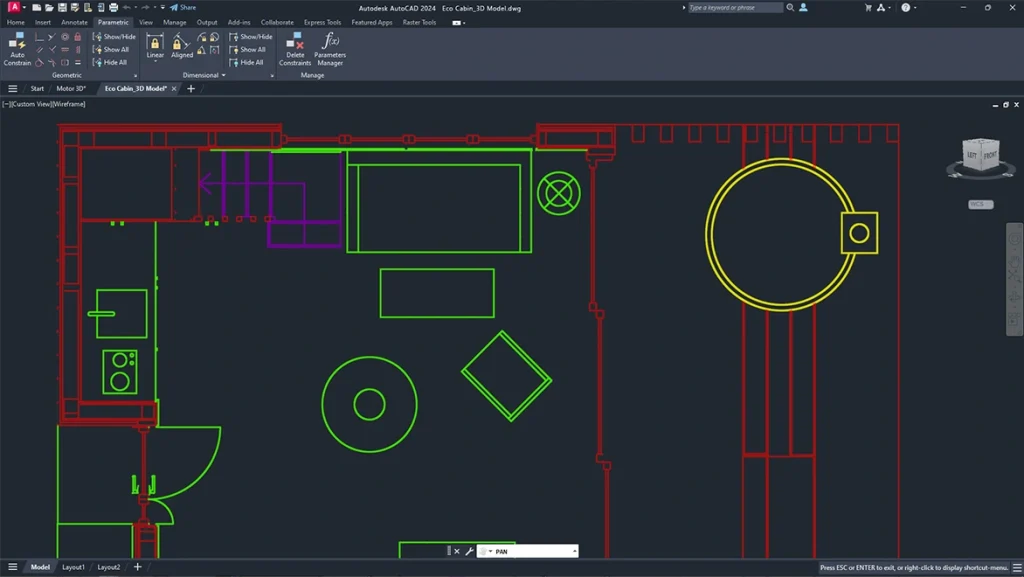
AutoCAD provides a wide range of tools for creating accurate 2D drawings. Users can draw lines, circles, arcs, polylines, and other geometric objects.
These tools are useful for preparing floor plans, engineering layouts, construction drawings, and technical documentation.
2. 3D Modelling
AutoCAD also supports 3D design. Users can create and modify solid, surface, and mesh objects to develop three-dimensional models.
This capability helps designers examine shapes, understand dimensions, and communicate design concepts before production or construction.
3. Smart Blocks
Smart Blocks helps users work with repeated objects more efficiently.
It can suggest block placement based on previous placements and provide tools to find and replace existing blocks. This can reduce repetitive work in drawings that contain many similar components.
4. Markup Import and Markup Assist
Markup tools help users work with feedback from PDF files and other review sources.
Markup Import can bring supported markups into a drawing, while Markup Assist helps users interpret and incorporate revisions. These features can make drawing reviews easier.
5. Activity Insights
Activity Insights provides information about drawing activity and saved changes.
This helps users understand what has changed during a project and review relevant editing history. It can be particularly useful when several people work on the same design.
6. AutoLISP Automation
AutoLISP allows users to automate repetitive tasks and customise workflows.
Experienced users can create routines to perform repeated commands, modify drawing objects, and improve productivity.
7. Annotation and Dimensioning
AutoCAD includes tools for adding text, dimensions, leaders, tables, and other annotations.
These elements help make technical drawings easier to read and understand. Users can also organise objects with layers and drawing standards.
8. Web and Mobile Access
Autodesk provides web and mobile workflows that allow users to view, edit, and annotate supported drawings outside their main workstation.
These tools are useful when reviewing designs on-site or sharing information with project collaborators. Available functions depend on the platform and account access.
What’s New in AutoCAD 2026?
AutoCAD 2026 includes several workflow improvements and design features. Important highlights include:
- Smart Blocks: Improved tools for finding, converting, and managing repeated blocks.
- Markup Import: Better integration of drawing feedback and revisions.
- Markup Assist: Helps users incorporate markups into their drawings.
- Activity Insights: Provides information about saved drawing activity.
- Connected Support Files: Helps project collaborators work with shared support files in supported Autodesk project workflows.
- Improved workflows: Updates to drawing tools and existing commands help make everyday drafting more efficient.
AutoCAD 2026.1 also introduced additional improvements to Smart Blocks and multi-user markup workflows. Features can vary depending on the installed update and Autodesk services.
AutoCAD vs Autodesk: What Is the Difference?
Autodesk and AutoCAD are not two competing CAD applications.
Autodesk is the software company, while AutoCAD is one of its products. Autodesk also develops other applications for architecture, engineering, construction, and manufacturing.
| Name | Description |
|---|---|
| Autodesk | Software company that develops design and engineering applications |
| AutoCAD | General-purpose 2D drafting and 3D CAD software |
| Revit | Building Information Modelling (BIM) software |
| Civil 3D | Civil engineering design and documentation software |
| Fusion | Product design, engineering, and manufacturing platform |
AutoCAD vs Revit
AutoCAD is commonly used for general-purpose drafting and modelling. Revit is designed around Building Information Modelling (BIM), where building elements and project information are connected.
Both applications can be useful in architectural and engineering workflows, but they serve different purposes.
AutoCAD vs Civil 3D
AutoCAD supports general CAD drafting and modelling. Civil 3D provides specialised tools for civil engineering projects, including roads, surfaces, grading, and infrastructure design.
The right choice depends on the type of project you are working on.
AutoCAD 2026 System Requirements
AutoCAD 2026 has specific hardware and operating system requirements. The following table summarises Autodesk’s published Windows requirements.
| Component | Basic requirement | Recommended |
|---|---|---|
| Operating system | 64-bit Windows 10 or Windows 11 | Supported updated Windows installation |
| Processor | 2.5–2.9 GHz, 8 logical cores | 3+ GHz base, 4+ GHz turbo |
| RAM | 8 GB | 32 GB |
| Graphics | 2 GB GPU, DirectX 11 compatible | 8 GB GPU, DirectX 12 compatible |
| Display | 1920 × 1080 with True Color | Up to 3840 × 2160 with recommended graphics card |
| Storage | 10 GB available space | SSD recommended |
| Pointing device | MS-Mouse compatible | Compatible precision mouse |
Large datasets, point clouds, and advanced 3D modelling can require more powerful hardware. Autodesk recommends 32 GB RAM or more for demanding workflows.
AutoCAD 2026 also has a macOS version with separate hardware and operating system requirements. Check Autodesk’s Mac requirements before installing it on an Apple computer.
How to Download and Install AutoCAD 2026
Use Autodesk’s official website to download the correct installer.
- Visit the official Autodesk AutoCAD product page.
- Sign in with your Autodesk account or create a new account.
- Choose the appropriate access option, such as a trial, educational access, or paid subscription.
- Select AutoCAD 2026 if it is available for your account.
- Choose the correct operating system and download the installer.
- Open the downloaded installer and follow the on-screen instructions.
- Sign in to activate the software through your authorised Autodesk account.
- Open AutoCAD and start a new drawing or load an existing DWG file.
Do not use unofficial product keys, key generators, or modified installation files. They can expose your computer to security risks and may violate Autodesk’s licence terms.
Advantages of AutoCAD 2026
- Provides accurate 2D drafting and drawing tools.
- Supports 3D solid, surface, and mesh modelling.
- Includes Smart Blocks for repeated design elements.
- Offers markup and collaboration tools.
- Supports automation through AutoLISP.
- Provides tools for dimensions, annotations, and drawing organisation.
- Supports widely used CAD drawing formats.
- Offers web and mobile workflows for supported tasks.
Limitations of AutoCAD 2026
- A paid subscription is generally required for professional use.
- Advanced features require suitable hardware.
- Beginners may need time to learn its commands and workflows.
- Large drawings can require substantial memory and graphics resources.
- Some online collaboration features require an internet connection and an Autodesk account.
Frequently Asked Questions
What is AutoCAD 2026 used for?
AutoCAD 2026 is used to create and edit 2D technical drawings and 3D models. It is widely used in architecture, engineering, construction, manufacturing, and design.
Is AutoCAD developed by Autodesk?
Yes. Autodesk is the company that develops AutoCAD and several other design and engineering applications.
Can I use AutoCAD 2026 for free?
Eligible students and educators can receive one-year educational access through Autodesk. Other users can check the official free trial or paid subscription options.
Does AutoCAD 2026 support Windows 11?
Yes. Autodesk lists 64-bit Windows 11 and Windows 10 as supported operating systems for AutoCAD 2026.
Does AutoCAD 2026 support 3D modelling?
Yes. It includes tools for creating and editing 3D solid, surface, and mesh objects.
What is the difference between AutoCAD and Revit?
AutoCAD is general-purpose CAD software for drafting and modelling. Revit is BIM software designed for building design and project information management.
Can AutoCAD open DWG files?
Yes. DWG is a native drawing format used by AutoCAD. The software can open, edit, and save compatible DWG drawings.
Is there a lifetime product key for AutoCAD 2026?
There is no legitimate universal lifetime product key. Use an authorised Autodesk subscription or an eligible educational licence.
Final Verdict
AutoCAD 2026 is a powerful CAD application for professionals who need accurate drafting, 3D modelling, annotation, and design documentation tools. Its Smart Blocks, markup features, and Activity Insights can also improve everyday project workflows.
However, users should choose the right Autodesk product and licence for their needs. Students and educators can explore educational access, while commercial users should select an appropriate paid subscription.
For a secure installation, always download AutoCAD from Autodesk and keep the application updated.


Recent Comments