
Speedify 15.4.1.12864 Crack + Torrent Free Download 2026
Speedify 15.4.1.12864 Crack + Torrent Free Download 2026
Speedify 15.4.1.12864 Crack is a search term used by people looking for Speedify VPN features, premium access, and a way to improve their internet connection. Speedify is a VPN application known for its channel bonding technology, which combines multiple internet connections to improve connection stability and performance.
Unlike traditional VPN applications that mainly focus on encrypted browsing, Speedify also focuses on keeping internet connections stable. It can combine Wi-Fi, Ethernet, and mobile data connections, helping users maintain a more reliable connection during downloads, video calls, and live streaming.
If you are comparing VPN applications, you can also explore IPVanish VPN and NordVPN to learn about other VPN services and their privacy features.
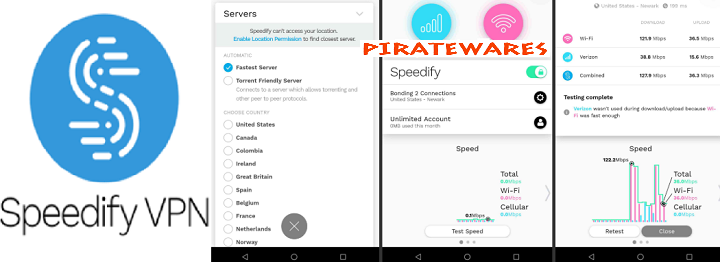
[Speedify VPN software interface for PC]
Speedify 15.4.1.12864 Crack + Latest Version Download
Speedify is designed for users who need a stable internet connection across different network types. Its channel bonding technology allows the application to use multiple active internet connections simultaneously instead of relying on only one connection.
For example, a computer connected to Wi-Fi can also use a compatible mobile hotspot or Ethernet connection. Speedify manages these connections and distributes network traffic to improve overall performance.
The application is useful for remote workers, online gamers, video creators, travellers, and people who frequently participate in online meetings. Its interface makes it possible to connect to a VPN server and manage available network connections from one place.
The exact consumer-app build number 15.4.1.12864 could not be independently confirmed from the official release information. Check the installed application’s About section to verify its actual version.

Speedify VPN Features
Speedify includes several tools designed to improve internet performance, connection reliability, and online privacy.
1. Channel Bonding Technology
Channel bonding is Speedify’s main feature. It combines available internet connections, such as Wi-Fi, Ethernet, and cellular data, into one connection.
This can help improve throughput when multiple usable connections are available. Actual performance depends on network quality, signal strength, server distance, and data limitations.
2. Automatic Connection Failover
If one internet connection becomes unavailable, Speedify can move traffic to another active connection. This helps reduce interruptions during online activities.
For example, if Wi-Fi disconnects while a compatible mobile data connection remains active, Speedify can continue using the available connection.
3. Streaming Optimization
Speedify includes streaming optimization features that prioritize real-time traffic. These features are useful for video calls, live broadcasts, voice communication, and other activities where delays can affect the experience.
It can help reduce interruptions caused by unstable network conditions, although it cannot guarantee completely buffer-free streaming.
4. VPN Encryption and Privacy
Speedify encrypts internet traffic between the device and its VPN server. This helps protect data while using public Wi-Fi and other shared networks.
Users should still review the provider’s privacy policy and understand that a VPN does not make them completely anonymous or protect against every online threat.
5. Multiple Device Support
Speedify provides applications for several platforms, including Windows, macOS, Linux, Android, and iOS. Supported devices and operating-system versions depend on the current release.
6. Connection Management
Users can manage their available internet connections and adjust how Speedify uses them. This is particularly useful when working with a combination of Wi-Fi, Ethernet, and mobile data.
Speedify Streaming and Bonding Modes
Speedify offers different ways to manage network traffic depending on the user’s requirements.
- Speed Mode: Distributes traffic across available connections to improve overall throughput.
- Redundant Mode: Sends duplicate traffic over multiple connections to improve reliability. This can use additional bandwidth.
- Enhance Streaming: Prioritizes real-time traffic such as video calls and live streams.
These modes serve different purposes. Speed Mode focuses on throughput, while Redundant Mode emphasizes reliability. The best option depends on the available networks and the activity being performed.
Speedify 15.4.1.12864 What’s New?
The exact consumer-app changelog for build 15.4.1.12864 could not be verified. The available Speedify SDK release notes describe version 15.4.1 as a performance and stability release rather than a major feature update.
General Speedify improvements and capabilities include:
- Performance and stability improvements.
- Better handling of multiple internet connections.
- Connection management and automatic failover.
- Streaming traffic optimization.
- VPN connection and encryption improvements.
- Compatibility updates for supported operating systems.
Do not treat these general features as a confirmed changelog for the exact build listed in this article.
Speedify System Requirements
Speedify’s current platform requirements are newer than the outdated Windows 98 and 512 MB RAM specifications sometimes found in older articles.
| Platform | Current minimum operating system |
|---|---|
| Windows | Windows 10 or later |
| macOS | macOS 11.5 or later on the download page |
| Linux | Supported Ubuntu, Debian and Raspberry Pi OS distributions |
| Android | Android 9 or later |
| iOS / iPadOS | iOS 17 or later |
Actual compatibility can depend on the device architecture and the application release. Check the official requirements before installing.
How to Download and Install Speedify
For a genuine and up-to-date installer, use the official Speedify download page.
- Open the official Speedify website.
- Select the version for your operating system.
- Download the installer from the official source.
- Open the downloaded setup file.
- Follow the on-screen installation instructions.
- Launch Speedify after installation.
- Sign in or create an account if required.
- Select an available VPN server and connect.
Avoid unknown torrent packages, modified installers, and files that request suspicious permissions. Unofficial modified software can expose your device and personal information to security risks.
Speedify Free and Premium Access
Speedify offers a free usage allowance and paid plans. The official download page currently advertises the first 5 GB of data usage each month at no charge. Paid plans provide unlimited data and additional plan features.
Premium access should be obtained through the provider’s official subscription process. A third-party crack or activation file should not be considered a verified or secure licence.
Advantages of Speedify
- Combines multiple internet connections.
- Supports connection failover when a network drops.
- Includes streaming traffic optimization.
- Provides encrypted VPN connections.
- Offers applications for multiple operating systems.
- Includes a free monthly data allowance.
Limitations of Speedify
- Channel bonding requires more than one usable internet connection to provide its main benefit.
- Performance depends on network conditions and server location.
- Redundant mode can consume additional data.
- VPN speed may be lower when using distant or busy servers.
- Free usage has a monthly data limit.
Frequently Asked Questions
What is Speedify used for?
Speedify is a VPN application that combines multiple internet connections and provides encrypted network traffic. It is designed to improve connection stability and support activities such as streaming, video calls, and downloads.
Does Speedify support Windows 11?
Yes. Speedify’s current Windows requirements specify Windows 10 or later, which includes supported Windows 11 systems.
Can Speedify combine Wi-Fi and mobile data?
Yes. Speedify can combine compatible Wi-Fi and cellular connections through its channel bonding technology. The actual improvement depends on the quality and availability of both networks.
Is Speedify available for Android and iOS?
Yes. Speedify offers mobile applications for Android and iOS devices. Current minimum operating-system requirements should be checked before installation.
Does Speedify support Linux?
Yes. Speedify currently supports selected Linux distributions, including Ubuntu and Debian-based systems.
Is Speedify 15.4.1.12864 the latest version?
The exact build number could not be confirmed as the latest consumer-app release. Visit the official Speedify download page to check the newest version for your device.
Is Speedify completely anonymous?
No VPN can guarantee complete anonymity. Speedify encrypts traffic between your device and its VPN server, but users should still follow good security practices and review the provider’s privacy policy.
Final Words
Speedify 15.4.1.12864 is the version keyword covered in this article for users searching for Speedify Crack and Torrent Free Download information. Its main features include channel bonding, automatic connection failover, streaming optimization, and encrypted VPN connections.
Speedify can be useful when you need to combine multiple internet connections or maintain a more stable connection during important online activities. For security and compatibility, download the genuine application from its official website and verify the installed version before use.



Recent Comments